16 April 2026 · Entertainment · AI-assisted · published by Jaco Olwagen · How we rank
Best Streaming Device Australia 2026: Apple TV vs Fire TV vs Google TV
The best streaming devices in Australia for 2026 - Apple TV, Fire TV Stick, and Google TV compared with AUD prices and Australian streaming app support.
Best Streaming Device Australia 2026: Which One Actually Suits Your Setup?
The streaming stick market in Australia is more interesting than it looks. On paper, they all do the same thing - plug into your TV's HDMI port and give you access to Netflix, Stan, Kayo, Disney+ and the rest. But spend an afternoon switching between them and you'll notice the differences pretty quickly: some feel snappy and polished, others stutter on the menus, and a few handle Australian streaming services better than others. For more home entertainment picks, check out our full top 7 picks for Aussie buyers.
This guide covers the best streaming devices available in Australia right now, with AUD pricing, Amazon AU links, and a breakdown of which Australian streaming services work on each platform. Because the whole point of buying one of these things is actually watching what you pay for.
Quick Picks - Best Streaming Devices Australia 2026
| Device | Best For | Price (AUD) |
|---|---|---|
| Apple TV 4K | Apple households, best overall | ~A$249–279 |
| Fire TV Stick 4K Max | Best value 4K streamer | ~A$79–99 |
| Google TV Streamer | Best for Android users | ~A$99–129 |
| Chromecast with Google TV HD | Budget 1080p pick | ~A$49–59 |
| NVIDIA Shield TV Pro | Power users, Plex, 4K upscaling | ~A$259–299 |
Apple TV 4K - Best Streaming Device Overall
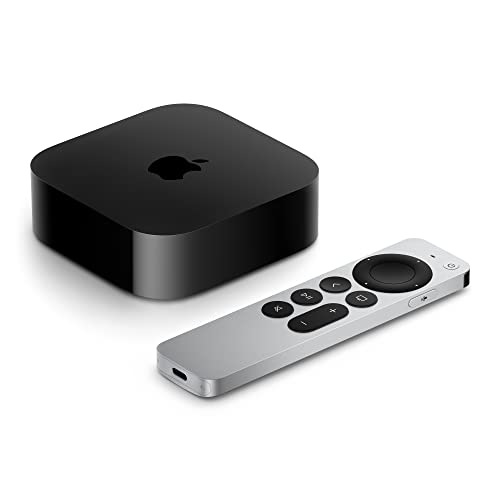 Apple TV 4KCheck Price
 If you've got an iPhone, a pair of AirPods, and a MacBook on your desk, the Apple TV 4K is the obvious call. The integration is tight in all the ways that actually matter day-to-day: AirPlay streams your phone screen to the telly without fussing around, you can hand off audio from your iPhone to the Apple TV mid-song, and if you've got a HomeKit smart home setup, the Apple TV doubles as the hub that keeps everything ticking when you're not home.
Under the hood, Apple's A15 Bionic chip (the same silicon that powered the iPhone 13 Pro) makes the interface feel genuinely quick. No sluggish menu transitions, no buffering spinners on the home screen. The Siri remote is excellent - slim, gesture-based, with a clickpad ring that feels premium in the hand. Lose it down the back of the couch and your iPhone works as a replacement.
The tvOS App Store covers every major Australian streaming service: Netflix, Disney+, Stan, Kayo Sports, Binge, Paramount+, Apple TV+, ABC iview, SBS On Demand, and Amazon Prime Video. No gaps. Apple also supports Dolby Vision, Dolby Atmos, and HDR10+ for the sharpest and loudest picture your TV can push. Pair it with a decent set of cans and the difference is night and day - see our best headphones for Australians if you're after something with proper spatial audio support.
At A$249 (Wi-Fi) or A$279 (Wi-Fi + Ethernet), it's the most expensive streamer on this list by a fair margin. But if you're already in the Apple ecosystem, it earns its keep. Available at Apple Australia, JB Hi-Fi, Harvey Norman, and Amazon AU.
The good: Snappiest interface on the market, flawless AU streaming app support, Siri remote, AirPlay, HomeKit hub built-in, Dolby Vision + Atmos.
The trade-off: Premium price. Android users won't get the same ecosystem benefits. The Apple TV+ subscription to unlock the full value is an extra A$9.99/month.
Fire TV Stick 4K Max - Best Value Streaming Device
 Fire TV Stick 4K MaxCheck Price
 Amazon sells the Fire TV Stick 4K Max on their own platform, which tells you something about how confident they are in it. It's the best-value 4K streaming stick you can buy in Australia right now - and Amazon regularly discounts it, sometimes down to A$69 during Prime Day or Black Friday. At full price of around A$79-99, it's still exceptional value.
The 4K Max is the step up from the regular Fire TV Stick 4K - the main differences are Wi-Fi 6E support (faster connections if your router handles it) and a more capable processor that keeps the Alexa-powered interface moving without much lag. The voice remote works well for searching across services without opening each app individually - say 'find crime dramas on Stan' and Alexa will actually pull results.
Australian streaming support is solid: Netflix, Disney+, Stan, Binge, Kayo Sports, Paramount+, ABC iview, SBS On Demand, and Amazon Prime Video all have native apps on Fire TV. The one gap worth knowing about: Apple TV+ is available through the Apple TV app on Fire TV, though the integration isn't quite as clean as it is on an actual Apple TV.
It supports 4K, HDR10, HDR10+, Dolby Vision, and Dolby Atmos - so your TV's picture and your soundbar's audio will both get pushed to their limits. The stick runs warm under sustained use but hasn't raised any reliability concerns in widespread use.
AUD Street Price: ~A$79–99 (full price on Amazon AU), regularly discounted to A$59–69.
Available at: Amazon AU, JB Hi-Fi, Officeworks.
The good: Outstanding value for 4K, Wi-Fi 6E, Alexa voice search, all major AU streaming services, frequent sales.
The trade-off: Amazon's Fire TV interface is ad-heavy - it pushes Prime Video content front and centre. If you're not a Prime subscriber, it can feel like you're constantly being upsold.
Google TV Streamer - Best for Android and Google Users
 Google TV StreamerCheck Price
 Google quietly replaced the Chromecast in 2024 with the Google TV Streamer, and it's a meaningful upgrade. The most practically useful change: it has an Ethernet port. If your router is near your TV, plugging in directly means zero wireless interference - streaming-quality drops become someone else's problem.
The Google TV Streamer is also beefier than the old Chromecast with Google TV - more RAM, a faster processor, and proper storage that keeps the interface feeling quick as your app library grows. Google Assistant handles voice search across services, and the personalised home screen does a decent job of surfacing what you actually watch rather than just promoting Google's own content.
Google TV's Australian streaming support covers all the bases: Netflix, Disney+, Stan, Kayo Sports, Binge, Paramount+, ABC iview, SBS On Demand, and Amazon Prime Video. Apple TV+ works through a browser workaround rather than a native app, which is a bit clunky - the Fire TV Stick handles Apple TV+ better.
At around A$99–129 AUD, it sits between the Fire TV Stick and Apple TV in terms of price. For Android phone users who want Google Assistant integration and don't want to fund Amazon's ecosystem, it's the right pick.
The good: Ethernet port, Google Assistant, fast performance, good AU streaming support, Google Photos screensaver.
The trade-off: No Apple TV+ native app. Slightly pricier than the Fire TV Stick 4K Max for comparable day-to-day performance.
Chromecast with Google TV HD - Best Budget Streaming Device
 Chromecast with Google TV HDCheck Price
 If your TV tops out at 1080p, or you need a streamer for a bedroom or holiday house without wanting to spend real money on it, the Chromecast with Google TV HD is the pick. It's the same Google TV interface as the Streamer above, just capped at 1080p and without the Ethernet port. At around A$49–59 AUD, it's the cheapest decent streaming device on this list.
Setup takes about ten minutes, the Google TV home screen is clean and logical, and all the major Australian streaming apps are available. The casting feature is also handy - if you're using an Android phone or Chrome browser, you can throw video from any website straight to the TV, even if the site doesn't have a dedicated streaming app.
The honest trade-off: if your TV has a 4K panel, skip this and spend the extra $30–$40 on the Google TV Streamer or Fire TV Stick 4K Max. Paying for a 4K TV and then feeding it 1080p content is a waste of what you've already bought.
The good: Cheapest option with a decent interface, Google TV, casting from Chrome/Android, covers all major AU streaming apps.
The trade-off: 1080p only. Wi-Fi only (no Ethernet). Not worth it if your TV supports 4K.
NVIDIA Shield TV Pro - Best for Power Users
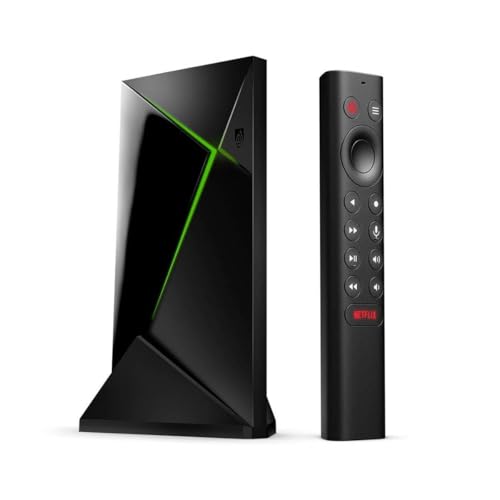 NVIDIA Shield TV ProCheck Price
 The NVIDIA Shield TV Pro is overkill for most people and absolutely the right call for a specific kind of Aussie tech enthusiast. It runs Android TV (not Google TV's cleaner interface, but the more flexible underlying platform), packs a Tegra X1+ processor that Android TV apps have been optimised around for years, and does things no other stick on this list can do.
The headline feature is AI upscaling: the Shield TV uses NVIDIA's DLSS technology to upscale 1080p and even 720p content to near-4K quality in real time. If you've got a large 4K TV and a lot of older content or lower-resolution streams, the upscaling is noticeably good - not magic, but genuine improvement. The Shield TV Pro also runs Plex Media Server natively, meaning it can serve your personal media collection to every device in your house without a separate NAS or always-on PC. If you're into gaming as well as streaming, the Shield doubles as an Android gaming box - check out our best video games picks for titles worth playing on the big screen.
At around A$259–299 AUD, it's expensive for a streaming device. But if you're running Plex, or you want the best possible upscaling on a large TV, or you just want the most powerful streaming box available, the Shield TV Pro delivers in ways the sticks can't match.
All major Australian streaming services are supported: Netflix, Disney+, Stan, Kayo, Binge, Paramount+, Prime Video, ABC iview, SBS On Demand. Available from Amazon AU, Harvey Norman, and specialist retailers like Scorptec.
The good: Best AI upscaling available, runs Plex Media Server, Android TV flexibility, most powerful streaming device on this list.
The trade-off: Expensive. Android TV's interface is clunkier than Apple TV or Google TV. Overkill for casual streamers who just want Netflix and Stan.
Australian Streaming App Support - Which Device Covers Everything?
This is the question that actually matters for Aussie buyers. Here's how Australian streaming service support breaks down across each device:
| Service | Apple TV 4K | Fire TV Stick | Google TV Streamer | Shield TV Pro |
|---|---|---|---|---|
| Netflix | Yes | Yes | Yes | Yes |
| Disney+ | Yes | Yes | Yes | Yes |
| Stan | Yes | Yes | Yes | Yes |
| Kayo Sports | Yes | Yes | Yes | Yes |
| Binge | Yes | Yes | Yes | Yes |
| Paramount+ | Yes | Yes | Yes | Yes |
| Apple TV+ | Native app | Via Apple TV app | Browser only | Browser only |
| Prime Video | Yes | Yes (front and centre) | Yes | Yes |
| ABC iview | Yes | Yes | Yes | Yes |
| SBS On Demand | Yes | Yes | Yes | Yes |
The honest takeaway: all four devices cover 95% of what Australians actually watch. The main gap is Apple TV+ on non-Apple devices, but that's a minor inconvenience rather than a dealbreaker for most people. If Apple TV+ is important to you, get the Apple TV 4K.
Built-in Smart TV vs Streaming Device - Do You Even Need One?
Fair question. Most TVs sold in Australia in the last few years have some form of smart TV platform built in - Samsung Tizen, LG webOS, Sony Google TV, Hisense VIDAA. So why buy an external device?
The honest answer: built-in smart TV platforms age badly. The processors inside budget and mid-range TVs are designed to a cost, and after two or three years, the interface gets sluggish, apps stop receiving updates, and streaming services start dropping support. A A$99 streaming stick plugged into the HDMI port revives any TV immediately - and you can take it with you if you upgrade the TV.
Premium TVs from Sony and Samsung hold up better, but even those eventually fall behind the update cycle of a dedicated streaming device. If your TV feels sluggish or a key streaming app has disappeared from its app store, an external streaming stick is the fix.
Can You Claim a Streaming Device on Tax in Australia?
Possibly, yes. If you use streaming services for work-related purposes - professional development content, training videos, industry webinars, or conference recordings - you may be able to claim the cost of the device as a work-from-home deduction. Items under A$300 can be claimed as an immediate deduction in the year of purchase under the ATO's general deduction rules, provided the work use is genuine and you keep your receipt.
As with any tax claim, the work-use portion is what matters. If you use the device 80% for Stan and 20% for work training content, you can claim 20% of the purchase price. Talk to your accountant or check the ATO community forums for guidance on your specific situation - but it's worth knowing the option exists if you're buying before June 30.
Which Streaming Device Should You Buy in Australia?
For most Australians in 2026, the Fire TV Stick 4K Max at A$79–99 is the easy recommendation. It covers every major Australian streaming service, supports 4K with Dolby Vision, and Amazon discounts it regularly enough that you'd be unlucky to pay full price. Watch it drop during Prime Day in July.
If you're in the Apple ecosystem - iPhone, AirPods, the lot - spend the extra and get the Apple TV 4K. The interface is the best in the business and the ecosystem integration pays off every day.
Android users who want a cleaner experience than Fire TV's ad-heavy home screen should look at the Google TV Streamer - particularly if you can plug it into Ethernet. And if your TV tops out at 1080p, the Chromecast with Google TV HD at under A$60 does everything you need without spending money on 4K you can't display.
If this helped you sort your living room setup, check out our other home tech coverage: the best Bluetooth speakers in Australia are a solid complement to any streaming setup, and our best NBN routers guide will make sure your streaming doesn't buffer at the worst possible moment. For the full picture on home tech, browse our top 7 picks across all categories.