11 April 2026 · Accessories · AI-assisted · published by Jaco Olwagen · How we rank
Best Wireless Gaming Mouse in Australia 2026: Top Picks for Every Budget
The best wireless gaming mice available in Australia right now - four picks across every budget with AU prices and Amazon AU links. No cables required.
Best Wireless Gaming Mouse Australia 2026: Our Top Picks
A wired mouse is still technically faster if you're competing at the absolute highest level - marginally less latency, no battery to manage, no wireless signal to worry about. But for the vast majority of Aussie gamers, a good wireless gaming mouse is more than quick enough, and the freedom to run a clean desk without cable drag is well worth the trade.
The market's in a good spot right now. At the budget end, you can get a reliable wireless mouse with a solid sensor for under A$80. At the top end, mice weigh less than a bag of chips and respond so fast the latency gap versus wired is practically unmeasurable. For all our peripherals and desk-setup picks, check out our keyboards and accessories category - or read on for the four wireless gaming mice worth buying in Australia right now.
Buying this as a gift? Father's Day falls on Sunday 6 September - our Father's Day tech gift guide rounds up 14 more ideas from A$40 up.
Quick Picks - Best Wireless Gaming Mouse Australia 2026
| Mouse | Best For | Price (AUD) |
|---|---|---|
| Logitech G305 LIGHTSPEED | Best budget wireless | ~A$69 |
| Corsair Sabre v2 PRO | Best overall - lightest and best value | ~A$119 |
| Razer Viper V3 HyperSpeed | Best Razer for claw and fingertip grip | ~A$83 |
| Logitech G502 X Plus LIGHTSPEED | Best premium pick | ~A$168 |
Why Go Wireless in 2026?
A few years back, "wireless gaming mouse" meant accepting a tax on responsiveness. Not anymore. The 2.4GHz technology in today's better mice - Logitech's LIGHTSPEED, Razer's HyperSpeed, Corsair's SLIPSTREAM - has effectively closed the gap. Polling rates of 1,000Hz are standard even at the budget end, which means your inputs register every millisecond, same as a wired connection in practical use.
The real-world advantages are obvious: no cable drag interrupting a flick shot, a cleaner desk, and you can lean back or move around without being tethered to your PC. The trade-off is managing the battery - though with 200–280 hour ratings on some of these, you're talking about plugging in roughly once a week at most. Plenty of Aussies reckon that's a reasonable ask.
1. Logitech G305 LIGHTSPEED - Best Budget Wireless Gaming Mouse
 Logitech G305 LIGHTSPEEDCheck Price
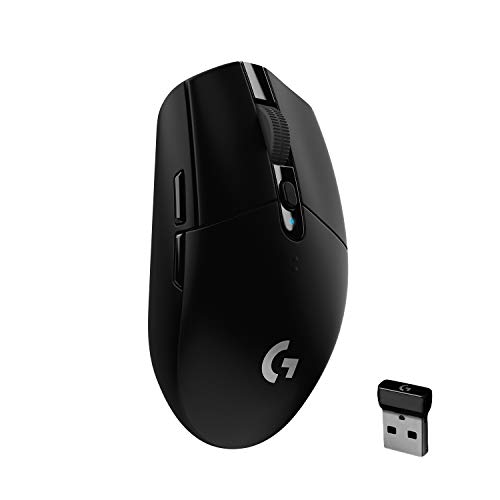
The G305 has been around long enough to earn genuine respect in the community. It uses Logitech's HERO 12K sensor - a step below their flagship sensors but still accurate and smooth enough for serious play - and runs on a single AA battery rated to 250 hours. That's not a typo. You'll forget what it's like to charge a peripheral.
The mouse sits at 99g, which isn't ultralight by current standards but isn't heavy either. Six programmable buttons, a 12,000 DPI ceiling, and the G305 connects via a tiny USB receiver that stores neatly inside the battery compartment when not in use. Clean design, zero fuss. At around A$69 on Amazon AU, it's one of the strongest value propositions in the Australian wireless mouse market - especially if you're upgrading from a budget wired mouse and want to see what LIGHTSPEED wireless actually feels like without risking serious money.
The good: Extraordinary battery life, proven HERO 12K sensor, dead-simple setup, LIGHTSPEED wireless at a fraction of premium prices.
The trade-off: Runs on AA rather than USB-C rechargeable, no RGB, and the shape is fairly basic compared to more sculpted ergonomic mice.
2. Razer Viper V3 HyperSpeed - Best for Claw and Fingertip Grip
 Razer Viper V3 HyperSpeedCheck Price
At around A$83 on Amazon AU, the Razer Viper V3 HyperSpeed sits between the G305 and the Corsair on price. Razer describe it as a right-handed symmetrical shape best suited to claw and fingertip grip, with finger grooves and a raised rear hump, so if you hold a mouse with your fingertips rather than resting your palm on it, this is the shape to look at.
You get Razer's Focus Pro 30K optical sensor, Gen-2 mechanical switches rated to 60 million clicks, and up to 280 hours on a single AA battery in HyperSpeed wireless mode at 1,000Hz. Competitive players typically cap sensitivity at 800 to 1,600 DPI, so the 30,000 DPI ceiling is marketing rather than something you will use. Razer list it at about 82g with the included AA battery fitted and 59g without, which is the cost of that battery life: it is more than double the weight of the Sabre v2 PRO.
The good: up to 280 hours on one AA, Focus Pro 30K sensor, 60-million-click switches, and the lowest price of any mouse here bar the G305.
The trade-off: right-handed only, so it is no use to a left-hander; no RGB; no USB-C charging; and Razer's Synapse software can feel bloated if all you want is to set your DPI and get on with it.
3. Corsair Sabre v2 PRO - Best Overall and Lightest Here
 Corsair Sabre v2 PROCheck Price
The Sabre RGB PRO Wireless we used to recommend here has gone out of stock on Amazon AU and shows no sign of returning, so the pick is now its direct successor, the Sabre v2 PRO. It is a better mouse in every dimension that matters, and it sits at around A$119 on Amazon AU as of October 2026, which makes it the outright value pick of this guide as well as the lightest mouse in it.
The headline change is weight. The old Sabre was 79g; the v2 PRO is 36g, which puts it among the lightest wireless mice you can buy and well under the 55g Razer above it. If you play anything that involves flicking your aim around, that difference is immediately obvious in a way spec sheets undersell. The 33,000 DPI sensor and 8,000Hz hyper-polling are both genuine step-ups on the 26K sensor and 1,000Hz polling of the model it replaces.
It stays USB-C rechargeable with up to 70 hours per charge, which is a solid improvement on the old model's 45. Corsair's iCUE software still handles configuration, and it is still heavier on system resources than Logitech's equivalent.
The good: Extremely light at 36g, USB-C rechargeable, 70-hour battery, 33K sensor with 8,000Hz polling, mechanical switches.
The trade-off: The ultralight FPS shell drops the RGB scroll wheel and some of the bulk that larger hands liked on the original Sabre; iCUE remains resource-heavy on older systems.
4. Logitech G502 X Plus LIGHTSPEED - Best Premium Wireless Gaming Mouse in Australia
 Logitech G502 X Plus LIGHTSPEEDCheck Price
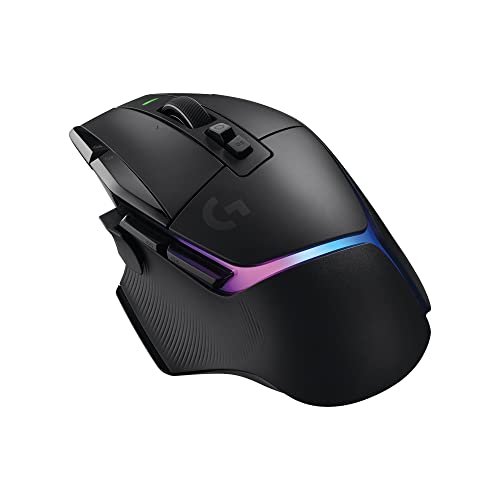
The G502 has been one of the most popular gaming mice in Australia for years. The G502 X Plus is the wireless evolution of that design, and it arrives with Logitech's HERO 25K sensor - one of the most accurate optical sensors available anywhere - paired with LIGHTFORCE hybrid optical-mechanical switches. Logitech's published specs claim these switches actuate faster than traditional mechanical micro-switches, and third-party testing backs that up.
At 114g it's on the heavier side compared to the ultralight options above, but the G502 was designed for players who prefer a mouse that fills the palm. You get 13 programmable buttons including a dedicated sniper button that drops DPI on hold for precise shots, a magnetic scroll wheel with both freespin and tactile ratchet modes, and LIGHTSYNC RGB. Wireless charging works with the Logitech POWERPLAY mousepad if you want to charge continuously during play - a dead handy option for anyone who can't remember to plug things in.
At around A$168 on Amazon AU, it's a real step up in price. But for serious PC gamers who want a mouse to last three or four years, the combination of sensor quality, switch technology, and build makes it worth every dollar.
The good: HERO 25K sensor, LIGHTFORCE switches, excellent right-hand ergonomics, magnetic scroll wheel, POWERPLAY wireless charging support.
The trade-off: Heavier than current ultralight competition at 114g; meaningfully more expensive than the other three in this guide.
What to Look for in a Wireless Gaming Mouse
Sensor Quality
For most players, any sensor rated at 3,200 DPI and above will be accurate enough for daily gaming. The gap between a budget sensor and a flagship one matters most at very high sensitivity settings or during extreme flick movements. Look for mice that specify zero acceleration and zero smoothing - these indicate a sensor that tracks accurately without software interpolation adding lag or unpredictability.
Battery Life and Charging
There are two camps: AA-battery mice like the G305 and the Viper V3 HyperSpeed, and rechargeable mice like the Sabre v2 PRO and the G502 X Plus. An AA model gives you absurd runtime - the G305 is rated to 250 hours and the Viper to 280 - while the rechargeable Sabre v2 PRO runs up to 70 hours per charge. If you reckon you'll forget to plug things in regularly, an AA mouse is a more practical daily driver. If you prefer USB-C charging and a tidier desk, go rechargeable.
Weight and Shape
Grip style matters here. Palm grip players typically prefer larger, heavier mice that fill the hand. Claw and fingertip grip players generally favour lighter, more compact designs. The Sabre v2 PRO at 36g is the lightest here by a distance, and the Viper V3 HyperSpeed at about 82g with its battery sits in the middle. The G502 X Plus at 114g suits players who genuinely like a bit of heft. There's no right answer; it's personal.
Wireless Technology
All four mice use dedicated 2.4GHz USB receiver technology. This is faster and more reliable than Bluetooth for gaming. LIGHTSPEED, HyperSpeed, and SLIPSTREAM are all rated at sub-1ms latency in manufacturer specs. Bluetooth is fine for productivity but not ideal when a fraction of a second can be the difference between winning and watching the respawn screen.
Our Pick for Most Aussie Gamers
The Corsair Sabre v2 PRO at around A$119 is the one to buy for most people. At 36g it is the lightest mouse here by a distance, it charges over USB-C, and the 33K sensor with 8,000Hz polling is specification you would have paid double for two years ago. If you use a claw or fingertip grip and would rather keep A$36 than shave grams, the Razer Viper V3 HyperSpeed at around A$83 is the alternative. On a tight budget, the Logitech G305 LIGHTSPEED at A$69 is still hard to argue against and will outlast the batteries in everything else on your desk. And if you want to invest properly in a mouse you will still be using in 2029, the Logitech G502 X Plus LIGHTSPEED is the one.
Building out your whole gaming setup? Have a look at our best gaming headsets in Australia 2026 guide, our picks for the best mechanical keyboards in Australia, and our best gaming laptops under A$1,500. For all our peripherals and accessories content in one place, head to the keyboards and accessories category.
More Accessories Reading
Best Portable Power Bank Australia 2026: Ranked by Capacity, Speed & Value
The best portable power banks in Australia for 2026 - real AUD prices, Amazon AU availability, and picks for phones, tablets, and laptops.
Best Wireless CarPlay Adapter Australia 2026: Cut the Cable in Your Car
The best wireless CarPlay adapter picks for Australia in 2026, with live Amazon AU prices in AUD, honest trade-offs and a 10 second compatibility check.
Best Wireless Keyboard Australia 2026: 7 Top Picks Compared on the Specs
The best wireless keyboard picks for Australia in 2026, from a $59 ultraportable to a low-profile mechanical. Real Amazon AU prices, battery life and typing feel compared.