27 April 2026 · Storage · AI-assisted · published by Jaco Olwagen · How we rank
Best microSD Card for Nintendo Switch 2 in Australia (2026)
The best microSD Express cards for Nintendo Switch 2 in Australia 2026. Verified Amazon AU prices, capacity guide and why regular microSD cards won't work.
Last updated: October 2026. All prices in AUD, sourced from Amazon AU listings at the time of writing.
Quick Picks - Best microSD Express Cards for Switch 2
| Card | Best for | Approx. Price (AUD) |
|---|---|---|
| SanDisk 256GB microSD Express (Switch 2 licensed) | The safe pick | ~A$69 |
| TEAMGROUP APEX 512GB microSD Express | Best 512GB | ~A$220 |
| Silicon Power Hypera 512GB microSD Express | Cheapest 512GB (new listing) | ~A$195 |
| Gigastone 1TB microSD Express | Best 1TB | ~A$450 |
The microSD Card Question Everyone Gets Wrong
The Nintendo Switch 2 has been on Aussie shelves since June 2025, and the one accessory question that keeps tripping people up is also the most important: which memory card actually works. Walk into JB Hi-Fi, scroll Amazon AU, or chat to your mate at the servo, and you will hear a different answer every time. Here is the short version. Switch 2 is fussy. It needs a microSD Express card to install games on, and a regular microSD card will not cut it.
If you have been wondering why your bargain 1TB Lexar Play card from your original Switch refuses to do anything useful in your Switch 2, that is why. We have rounded up the best microSD Express cards you can actually buy on Amazon AU right now, with current prices in AUD and sensible picks for every budget. For a wider look at storage gear, our Top 7 storage rankings cover SSDs and external drives too. And if you have just landed yourself a Switch 2 and need something to fill that new card, our cheapest Switch 2 games on Amazon AU roundup updates weekly.
What is microSD Express, and Why Does Switch 2 Need It?
A microSD Express card looks identical to a regular microSD on the outside. The difference sits underneath the card: an extra row of pins on the back that runs PCIe NVMe rather than the older UHS-I bus most microSD cards use. In practice that means roughly 4x to 8x the read speed of even a top-tier UHS-I card. We are talking 800-900MB/s territory versus 160-200MB/s on a regular microSD.
Nintendo built the Switch 2 around that speed. The console assumes any card you install games on can keep up with PCIe-class transfer, which is why every Switch 2 game cartridge runs on the same fast bus. Plug in a regular UHS-I card and the system will let you use it for screenshots, video clips and downloaded software updates, but it will not let you install or move full games to it. That is a Nintendo restriction enforced in firmware, not a hardware fluke.
The trade-off: Express cards are still pricey. A 256GB Express card on Amazon AU costs about what a 1TB UHS-I card costs. Capacities are also limited - 1TB is the practical ceiling on Australian shelves in early 2026, even though the Switch 2 officially supports up to 2TB.
How Much Storage Do You Actually Need?
Switch 2 itself ships with 256GB of internal storage, which sounds plenty until you realise modern games regularly chew through 60-80GB each. Mario Kart World, Donkey Kong Bananza, the new Zelda port, plus a couple of third-party releases, and you are out of room.
Rough rule of thumb for Aussie buyers:
- 256GB - The minimum upgrade most people should consider. Comfortable for around 4-6 modern AAA downloads plus a stack of indie titles.
- 512GB - The sweet spot. Holds 10-15 modern games without thinking about it, with room for screenshots and gameplay clips.
- 1TB - For library hoarders who want every game they own loaded at once. Pricey, and on current Amazon AU prices it costs a little more per GB than two 512GB cards, but one card means no swapping and you will not need to redownload for years.
If you mostly play physical cartridges and only need extra space for indie downloads and the odd big release, 256GB is plenty. If you live in the eShop, jump to 512GB and stop worrying about it.
The 4 Best microSD Express Cards for Switch 2 in Australia
October 2026 update: this list is shorter again, for the same reason as last time. The Lexar Play PRO 256GB and the TEAMGROUP APEX 1TB have both gone out of stock on Amazon AU, and the Samsung P9 Express 256GB we linked has switched to being shipped from Amazon US. That means overseas shipping, possible import charges and a warranty claim that goes offshore, which our own buying tips below tell you to avoid, so all three are out. The Silicon Power Hypera 512GB is new to the list. Every card linked here ships from Amazon's Australian warehouses.
1. SanDisk 256GB microSD Express (Switch 2 licensed) - The Safe Pick
 SanDisk 256GB microSD Express (Switch 2 licensed)Check Price
 This is the card with the Mario red cap and the official Nintendo licensing on the front. SanDisk has been making memory cards since the early 2000s, and the licensing program means the card has been validated by Nintendo for full Switch 2 compatibility. Lifetime limited warranty as well, which is the longest in this list.
Speeds are quoted at up to 880MB/s read. Capacity is 256GB advertised, with around 236GB usable after the system formats it. Sits at around A$69 on Amazon AU, sold and shipped by Amazon AU, and it is still the cheapest genuine Express card in this guide. It also carries one of the strongest ratings here, 4.8 stars from close to 3,000 Amazon AU reviews.
Best for: First-time Switch 2 buyers who do not want to spend an evening reading speed comparison charts. The Nintendo licensing makes warranty claims a non-issue if anything ever goes pear-shaped.
2. TEAMGROUP APEX 512GB microSD Express - Best 512GB
 TEAMGROUP APEX 512GB microSD ExpressCheck Price
 TEAMGROUP is better known in Australia for RAM and SSDs than memory cards, but the APEX is sold specifically for Switch 2 and it is the only 512GB Express card on Amazon AU that ships locally and already has a real review history, a 4.2-star average across more than 190 ratings. Around A$220 on Amazon AU, up about A$20 since our last check, sold by TEAMGROUP and shipped by Amazon.
Best for: Players who download more from the eShop than they buy on cartridge, and want the headroom for several full triple-A installs without juggling.
3. Silicon Power Hypera 512GB microSD Express - Cheapest 512GB, With a Caveat
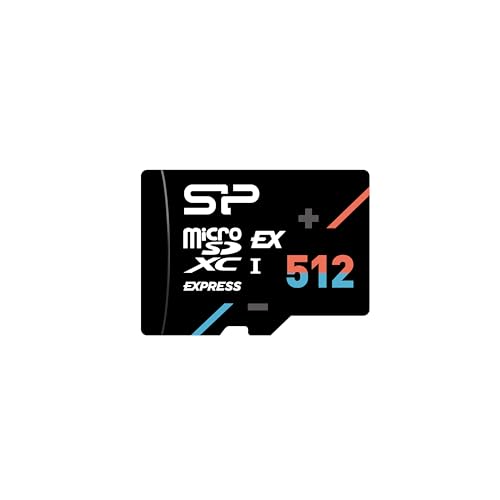 Silicon Power Hypera 512GB microSD ExpressCheck Price
 A newcomer that has undercut the TEAMGROUP. Silicon Power quotes up to 880MB/s read and 700MB/s write on the newer SD Express 7.1 controller, and backs the card with a 10-year warranty, the longest of any card here bar the SanDisk's lifetime cover. It is sold by Silicon Power's Australian seller account and shipped by Amazon, at around A$195.
The caveat: the listing is so new it has no customer ratings yet, so there is no track record to lean on. Silicon Power is an established memory brand, not a no-name, but if you would rather buy a card other Switch 2 owners have already run for months, the TEAMGROUP is the safer 512GB.
Best for: Buyers who want 512GB for the least money and are comfortable being early.
4. Gigastone 1TB microSD Express - Best 1TB
 Gigastone 1TB microSD ExpressCheck Price
 Gigastone is a Taiwanese flash storage brand with its own Australian seller account. Its 1TB Express card is rated up to 800MB/s read and 650MB/s write, ships from Amazon AU, and sits around A$450. It is now the only 1TB Express card on Amazon AU that ships locally: the TEAMGROUP APEX 1TB we used to recommend here has gone out of stock, and the Lexar and SanDisk 1TB cards are only offered as Amazon US imports. The rating is excellent (4.8 stars) but across only 16 reviews so far, and the box includes a USB-C card reader, handy for copying clips off the card on a PC. At roughly A$450 it costs a little more per gigabyte than two 512GB cards, but one card means no swapping.
Best for: Library completionists who want everything they have bought on the eShop loaded at once, from a seller with a local presence.
What About Regular microSD Cards on Switch 2?
If you walk into Officeworks looking for a microSD and the staff member hands you a $40 SanDisk Ultra 256GB UHS-I, hand it back. That is a regular microSD, not Express. Switch 2 will let you slot it in, but it will not let you install games to it.
What UHS-I cards can do on Switch 2:
- Store screenshots and video clips
- Hold downloaded software updates
- Act as a transfer pad if you are migrating data from your original Switch
That is the lot. UHS-I cards are not a substitute for a real Express card if you want to install Mario Kart World, Hogwarts Legacy or anything else from the eShop. Look for the small EX mark printed on the front of the card. No EX, no Switch 2 game installs.
Tips for Aussie Buyers
- Check the EX logo. Genuine Switch 2 compatible cards have an "EX" mark printed on the front, alongside the standard SDXC/A2 markings. If you do not see it, it is not Express.
- Watch for fakes on marketplace sellers. Counterfeit high-capacity SD cards have been a problem for over a decade. Stick to listings that ship from Amazon AU, JB Hi-Fi, Officeworks, or Harvey Norman, and check the "Ships from" line on Amazon before you buy - several popular Express cards are only sold there as imports. Avoid suspiciously cheap eBay listings claiming 1TB Express for under $100.
- Format in the console. After buying, use the Switch 2's internal format option to set up the card before installing anything. Skipping this step can cause download dropouts and corrupted save data on big games.
- Keep the receipt. Memory cards do occasionally fail, and warranty claims need proof of purchase. Amazon AU keeps your receipts in your account, which makes claims simple if it ever comes to that.
- Skip the SD-to-microSD adapter bundles. Some retailers still sell them as "Switch storage upgrades". They have nothing to do with Switch 2 and will not make a UHS-I card any faster.
Bottom Line
For the average Aussie Switch 2 owner who just wants more space without overthinking it, the SanDisk 256GB microSD Express at around A$69 is the easiest win: Nintendo-licensed, sold by Amazon AU and the cheapest card here. Samsung fans should note that the P9 Express is currently only sold on Amazon AU as an import, so the SanDisk is the pick until that changes.
If you live in the eShop and want to avoid juggling cards, jump to the TEAMGROUP APEX 512GB, or go straight to the Gigastone 1TB if you know you will fill it.
Whatever you choose, stick to Express cards from a known brand, format in-console before installing anything, and keep the receipt. The Switch 2 is a cracker of a handheld, and the right card just makes sure you spend time playing rather than wrestling with downloads.
Keep Reading
For more on storage choices, our Top 7 storage page ranks the best portable drives, SSDs and memory in Australia right now. If you have just unboxed your Switch 2 and need something to play, our cheapest Switch 2 games on Amazon AU guide is updated every week with the sharpest deals. Already covered on storage and looking for something faster for PC or PS5? The best portable SSDs in Australia 2026 breakdown covers everything from budget 1TB drives to USB4 monsters. Browse the full Top 7 video games picks for accessories and games beyond storage, or read the SSD vs HDD guide if you are still deciding which type of storage suits you best.
Top Picks - Check Latest Prices


See Our Top 7 Storage for Australia
Ranked by the Top7 Score: specs, owner ratings and published reviews. Honest pros and cons, and Aussie pricing.
More Storage Reading
Best Portable SSD Australia 2026: Ranked & Compared
The best portable SSDs in Australia for 2026 - ranked by speed, durability and value. Prices in AUD, available from Amazon AU, JB Hi-Fi and more.
SSD vs HDD: Which Storage Drive Do You Actually Need?
A plain-English guide to choosing between SSDs and HDDs in Australia, covering speed, capacity, pricing in AUD, and which type suits different use cases.
Best SSD for PS5 Australia 2026: M.2 NVMe Upgrades That Actually Fit
The best SSD for PS5 in Australia for 2026: licensed, fastest and best-value M.2 NVMe drives compared, with Amazon AU pricing and install tips.