11 May 2026 · Accessories · AI-assisted · published by Jaco Olwagen · How we rank
Best Wireless Mouse Australia 2026: Productivity Picks for Work and Home
Best wireless mouse Australia 2026. The Logitech MX Master 4, MX Master 3S, MX Anywhere 3S, Lift, Razer Pro Click Mini and Signature M650 compared with Amazon AU pricing.
Best Wireless Mouse Australia 2026: Productivity Picks for Work and Home
The wireless mouse you bought five years ago is fine. The wireless mouse you can buy in 2026 is something else entirely. Battery life measured in months, scroll wheels that can flick through a thousand-row spreadsheet in a second, and ergonomics that won't have your wrist screaming by Friday afternoon. If you're sitting at a desk for the thick end of eight hours a day, a decent wireless mouse pays for itself in comfort alone. Pair it with one of our best mechanical keyboards or a USB-C hub and your home setup starts feeling proper.
This guide covers the best wireless mouse Australia has on Amazon AU right now, ranked for productivity, comfort and value. We've stuck to current-generation models with verified Amazon AU stock. No grey-market imports, no US-only ASINs - just mice you can actually click buy on today. If you're after a gaming mouse instead, check our best wireless gaming mouse guide for that side of the market.
Quick Picks - Best Wireless Mouse Australia 2026
| Product | Best For | Price (AUD) |
|---|---|---|
| Logitech MX Master 4 | Best overall | ~A$199 |
| Logitech MX Master 3S | Best value premium | ~A$149 |
| Logitech MX Anywhere 3S | Best portable | ~A$129 |
| Logitech Lift Vertical | Best ergonomic | ~A$109 |
| Logitech Signature M650 | Best under $50 | ~A$49 |
1. Logitech MX Master 4 - Best Wireless Mouse Overall
 Logitech MX Master 4Check Price
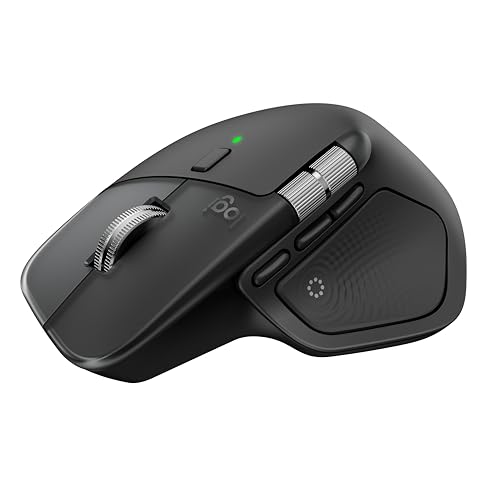
 The MX Master line has been the mouse to beat for serious office work for the better part of a decade, and the MX Master 4 is the first version that actually feels like a meaningful step forward in years. The new bit is haptic feedback. There's a Haptic Sense panel under your thumb that buzzes back when you trigger an action, and an Actions Ring that lets you summon a wheel of shortcuts without lifting a finger off the mouse. Sounds gimmicky on paper. In practice, once you've set it up to switch desktops or kick off your favourite Photoshop tool, it's the kind of thing you stop noticing because it just works.
Underneath the new tricks, the MX Master 4 keeps everything that made the 3S good. The MagSpeed scroll wheel still flicks 1,000 lines per second and stops on a pixel - dead handy if you live in long PDFs or spreadsheets. The 8K DPI Darkfield sensor tracks on glass, on a kitchen bench, on a clear desk pad. Battery life is 70 days on a charge, USB-C is the charging port, and a one-minute top-up is enough to get you through a meeting.
It pairs over Bluetooth or Logi Bolt to up to three devices, and the new Logi Bolt receiver is supposed to be twice as resilient in busy wireless environments. Translation: it won't stutter when half the office is on Teams. Logitech is selling it at $199.95 RRP in Australia, with retailer pricing landing around AU$179-$199 on Amazon AU. There's a Mac version in Space Black with macOS-tuned shortcuts and matching Apple finishes if your daily driver is a MacBook Pro.
The good: Haptic feedback adds a real productivity layer once you set it up. Best-in-class scroll wheel and sensor. Quiet click is whisper-quiet for shared offices and cafes.
The trade-off: $199 RRP is the dearest mouse on this list. The shape suits medium to large hands - smaller hands may prefer the Anywhere 3S.
2. Logitech MX Master 3S - Best Value Premium Wireless Mouse
 Logitech MX Master 3SCheck Price
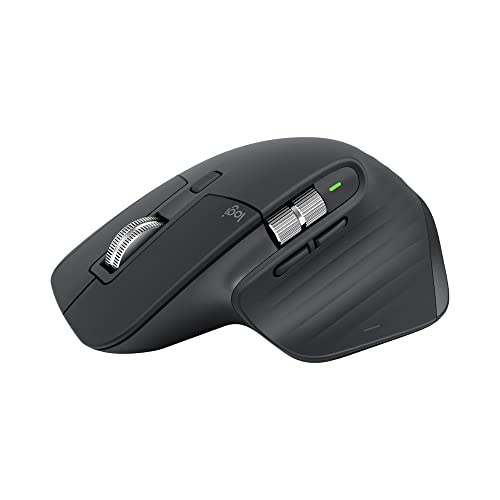
 If the MX Master 4 sounds great but $199 is more than you want to spend on a mouse, the MX Master 3S is the answer. It was the flagship until late 2025, and it's still one of the best mice money can buy. You lose the haptic panel and the Actions Ring, and that's basically it. Same MagSpeed scroll wheel, same 8K DPI sensor, same quiet click, same shape, same 70-day battery.
For most people doing day-to-day work - email, browser tabs, docs, the occasional Photoshop session - the 3S is functionally identical to the 4. Amazon AU has it sitting around AU$149, sometimes lower in EOFY sales. That's a fifty-dollar saving for features most users won't miss. If you're kitting out a home office on a budget, this is the smart pick.
The 3S also has a Mac variant in pale grey with USB-C charging and macOS-friendly key bindings. It pairs to three devices, transfers files between Macs and PCs through Logi Flow, and the surface tracking is accurate enough that you can use it on a glass coffee table without it stuttering.
The good: Flagship-tier productivity at a mid-range price. Mature software ecosystem with Logi Options+. Available in graphite, pale grey, white and rose.
The trade-off: No haptic feedback or Actions Ring if those features matter to you. Same large-hand shape as the MX Master 4.
3. Logitech MX Anywhere 3S - Best Portable Wireless Mouse
 Logitech MX Anywhere 3SCheck Price
 The MX Anywhere 3S is the MX Master's smaller cousin - same engine, half the body. It's the mouse you throw in a laptop bag without thinking about it, and the one to grab if you work from cafes, hot desks, or trains between Sydney and the Central Coast.
It's compact enough to forget you're carrying it but ergonomic enough to use for a full day's work. The 8K DPI sensor still tracks on glass. The MagSpeed scroll wheel is shrunk down but still has that 1,000-lines-per-second flick mode. Battery life is 70 days off a full charge, three hours of use from a one-minute USB-C top-up. Quiet clicks mean you won't get the side-eye from the bloke at the next table at the cafe.
It pairs to three devices and supports Logi Flow for cross-computer file transfers. At around AU$129 on Amazon AU, it's the same price as a midrange keyboard but vastly more portable than any of the MX Masters. There's also a Mac variant tuned for MacBook Pro, MacBook Air and iPad workflows.
The good: Genuine portability without giving up performance. Quiet clicks. Same scroll wheel tech as the MX Master line.
The trade-off: Smaller body suits palm-grippers less well than the MX Master shape. Two side buttons instead of the full MX Master button cluster.
4. Logitech Lift - Best Ergonomic Vertical Wireless Mouse
 Logitech LiftCheck Price
 If you've ever finished a long day with a sore wrist, a vertical mouse is worth a serious look. The Logitech Lift is shaped at a 57-degree angle - your hand sits in something close to a handshake position rather than flat on the desk. It sounds like a small change. Owners commonly report that after a week with one, going back to a flat mouse feels like turning your wrist sideways for no reason.
The Lift is sized for small to medium hands - if you've got bigger paws, the older but still very capable Logitech MX Vertical is the bigger sibling and worth a look. The Lift connects via Bluetooth or Logi Bolt receiver, pairs to three devices, has quiet clicks and a four-month battery on a single AA. Yes, AA - no USB-C charging here, which is a bit old-school but means you can keep it running with a fresh battery from the servo.
It's available in graphite, pale grey and rose, and there's a left-handed Lift too - rare in this category. At around AU$109 on Amazon AU, it's the cheapest gateway into vertical mice from a brand with proper software support.
The good: Genuinely reduces wrist strain over long days. Quiet clicks. Available for both left and right hands.
The trade-off: AA battery rather than rechargeable USB-C. Sized for small and medium hands - bigger hands should look at the MX Vertical.
5. Razer Pro Click Mini - Best for Multi-Device Workflows
 Razer Pro Click MiniCheck Price
 Razer is better known for gaming mice, but the Pro Click Mini is a quietly excellent productivity option that often gets overlooked. It pairs to up to four devices via 2.4GHz dongle and Bluetooth, which is one more than the Logitech competition - useful if you're juggling a work laptop, personal laptop, tablet and a desktop.
It's a small, low-profile mouse with silent mechanical switches that are rated to 15 million clicks. Seven programmable buttons, 12,000 DPI 5G optical sensor, and a HyperScroll wheel that switches between free-spin and tactile modes. Two AA batteries get you several months of use.
It's a slick option for hot-desking professionals or anyone whose workflow doesn't fit Logitech's three-device limit. Pricing on Amazon AU sits around AU$119, which puts it in the same neighbourhood as the MX Anywhere 3S.
The good: Four-device pairing is rare at this price. Silent mechanical switches feel premium. Compact for travel.
The trade-off: Razer's productivity software is less polished than Logi Options+. AA batteries rather than rechargeable.
6. Logitech Signature M650 - Best Wireless Mouse Under $50
 Logitech Signature M650Check Price
 If you just need a mouse that works, plugs in via Bluetooth, doesn't cost much and lasts ages, the Signature M650 is the obvious answer. Around AU$49 on Amazon AU. Two-year battery life on a single AA. Silent clicks. Smart scroll wheel that switches between line-by-line precision and free-spinning fast scroll automatically. Two customisable side buttons.
It's available in two sizes (medium and large) and a left-handed variant, which is more thoughtful than most sub-$50 mice manage. The shape isn't as sculpted as the MX Master line and you don't get USB-C charging or Logi Flow file transfer, but for a kid's homework machine, a guest setup, or just a basic spare mouse, it's the obvious pick.
This is the mouse you buy when you don't want to think about it. Set and forget for a couple of years.
The good: Two-year battery life. Sub-$50 price. Available in multiple sizes including left-handed.
The trade-off: No rechargeable battery. Less precise scroll wheel than MagSpeed. Software customisation is more limited than Logi Options+ on the MX line.
What to Look for in a Wireless Mouse for Productivity
A few things worth thinking through before you click buy:
Connection type: Bluetooth means no dongle eating a USB port. A 2.4GHz USB receiver (like Logi Bolt) gives you slightly lower latency and better reliability in busy wireless environments. The premium picks here support both, which is the right answer.
Multi-device pairing: If you switch between a work laptop, a personal laptop and a tablet, look for a mouse that pairs to three or four devices. The MX line tops out at three. The Razer Pro Click Mini does four.
Scroll wheel: The Logitech MagSpeed wheel is genuinely better than a standard ratchet wheel for working in long documents and spreadsheets. If you live in Excel or Google Sheets, it's worth the extra spend.
Ergonomics: If you're getting wrist pain, a vertical mouse like the Lift or MX Vertical is a step change in comfort. If you're using a laptop trackpad most days and just want a mouse for occasional use, ergonomics matter less.
Battery type: Rechargeable USB-C (MX Master 4, MX Master 3S, MX Anywhere 3S) is the most convenient. AA batteries (Lift, Signature M650, Razer Pro Click Mini) last longer between swaps but mean keeping spares around.
Quiet clicks: Every mouse on this list has them. If you work in a shared office, on a video call, or next to a sleeping baby, quiet clicks are the difference between using your mouse and sneaking around it.
Our Pick
For most people working full-time at a desk, the Logitech MX Master 4 is the wireless mouse to buy in 2026. The haptic feedback and Actions Ring genuinely speed up day-to-day work once you've spent a couple of hours learning them, and the rest of the package is the best office mouse Logitech has ever made.
If $199 is too rich, the Logitech MX Master 3S at around AU$149 gets you 90% of the experience for less money. If you spend half your week working from cafes or hot-desks, the MX Anywhere 3S is more portable without giving up the good scroll wheel. And if your wrist is starting to complain, the Logitech Lift is the easiest way to fix it.
Looking for more? Check our best keyboards guide to pair with your new mouse, our best mechanical keyboard picks for 2026, or browse our top laptops if your setup needs a refresh. If you've gone wireless on the keyboard side too, our USB-C hub guide for MacBooks covers the rest of the desk-tidying puzzle, and our best wireless gaming mouse guide is the place to go if you'd rather frag than format.
More Accessories Reading
Best Wireless CarPlay Adapter Australia 2026: Cut the Cable in Your Car
The best wireless CarPlay adapter picks for Australia in 2026, with live Amazon AU prices in AUD, honest trade-offs and a 10 second compatibility check.
Best Wireless Keyboard Australia 2026: 7 Top Picks Tested Against the Specs
The best wireless keyboard picks for Australia in 2026, from a $59 ultraportable to a low-profile mechanical. Real Amazon AU prices, battery life and typing feel compared.
Best Mechanical Keyboard for Tax Claim Australia 2026 - 7 EOFY Picks
Best mechanical keyboard for tax claim Australia 2026. Seven Amazon AU picks for sole traders, freelancers, and WFH workers to deduct before 30 June.
Weekly AU tech deals, in your inbox
We check prices on every product we cover daily. Once a week we send the biggest genuine price drops we spot - the ones worth your attention.
- One email a week, max
- No spam, ever
- Unsubscribe in one click