6 May 2026 · Monitors · AI-assisted · published by Jaco Olwagen · How we rank
Best Home Office Monitor Australia 2026: 7 Picks That Actually Earn Their Spot On Your Desk
Best home office monitor Australia 2026: 7 picks for WFH, from a sub-$300 1440p workhorse to a 4K Thunderbolt hub - all on Amazon AU, just in time for EOFY.
If your home setup still revolves around a 24-inch panel from the Kevin Rudd era, EOFY is the nudge to fix it. The right screen makes spreadsheets less of a slog, video calls less awkward, and gives you the sort of desk real estate that lets you stop pretending alt-tab is a productivity tool. The trick is matching the panel to the work, not just chasing pixels.
This guide rounds up the best home office monitor Australia shoppers can actually buy on Amazon AU right now in 2026, sorted by what each one is best for. Prices below sit between the thick end of $250 and just under a grand, with picks for graphic designers, accountants, hot-deskers, and anyone juggling a laptop with a second screen at the kitchen table. For a wider sweep across all categories, our top 7 monitors for Australia page is the next stop, or compare resolutions in our 4K vs 1440p monitor guide.
Quick note before you dive in: any work-related screen over $300 generally needs to be depreciated rather than written off in one hit on your tax return, and you can only claim the work-use percentage. Hold onto your invoice, log your work-from-home hours honestly, and chat to your accountant if you're unsure. The ATO has flagged WFH claims as a focus for 2026, so it's not the year to wing it.
Quick Picks - Top 7 Home Office Monitors Australia 2026
| Monitor | Best For | Price (AUD) |
|---|---|---|
| Dell UltraSharp U2725QE | Best overall - 4K Thunderbolt hub with KVM | ~A$919 |
| BenQ GW2786TC | Best for long days - eye-care 1080p with USB-C | ~A$319 |
| MSI PRO MP275Q | Best on a tight budget | ~A$259 |
Why Your Home Office Monitor Matters More Than You Think
Most people pick a monitor the way they pick a kettle: cheapest one that boils. That's fine for a kettle. It's a costly mistake when you're staring at the thing for eight hours a day.
A decent home office monitor does three things at once. It gives you enough pixels to keep two windows open without squinting, an IPS panel so colours stop shifting every time you tilt your head, and ergonomics that mean your neck isn't complaining by 4pm. Bonus points if there's a USB-C port that powers your laptop with a single cable, because cable spaghetti behind a desk is genuinely depressing.
For most Australian WFH setups in 2026, that means a 27-inch IPS panel at 1440p (QHD) with USB-C Power Delivery. Bigger budgets push you to 4K and a 32-inch screen. Smaller budgets drop the USB-C and the height-adjustable stand. We've covered all three in this list.
1. Dell UltraSharp U2725QE - Best Home Office Monitor Australia Overall
 Dell UltraSharp U2725QECheck Price
 If you live in Excel, Figma, and a dozen Chrome tabs all at once, this is the panel that earns its keep. The U2725QE is a 27-inch 4K IPS Black display running at 120Hz, with a Thunderbolt 4 hub, a built-in KVM switch, and Dell's first monitor to wear TÜV Rheinland's full 5-star eye-comfort badge.
What makes it the standout for hybrid workers is the dock. One Thunderbolt cable to your laptop carries 4K video, 90W of power, gigabit Ethernet, and access to five USB-A and two USB-C ports. Walk in, plug in, you're working. Walk out for a flat white at the local servo and your laptop unplugs from a single connector. The KVM lets you flip between a personal MacBook and a work Windows machine with a button press.
The good: outstanding contrast for an IPS panel, factory-calibrated colour, ridiculously good cable management, three-year advanced exchange warranty.
The trade-off: price. At AU$919 on Amazon AU, this is a serious purchase. Worth it if you're at the desk full-time. Overkill if you're using it three days a week to read PDFs.
2. BenQ GW2786TC - Best for Long Workdays
 BenQ GW2786TCCheck Price
 The GW2786TC is the monitor for people who finish a workday with sore eyes. BenQ has been pushing eye-care tech for years, and this 27-inch 1080p IPS panel pulls together their full kit: anti-flicker, Brightness Intelligence (auto-adjusts to ambient light), low blue light, and Eyesafe certification from TÜV Rheinland.
It's also a USB-C monitor, with 65W power delivery and daisy-chain support so you can run a second screen off a single cable, plus a built-in ergonomic stand that tilts, swivels, pivots and adjusts in height. Sit it next to a MacBook Air or a Surface Pro and you've got a clean, single-cable setup. Speakers are decent enough for Teams and Zoom calls, which saves you from buying a USB mic-and-speaker combo.
The good: thorough eye-care features, real ergonomic stand, USB-C with 65W PD and daisy-chain, white finish that doesn't date the desk.
The trade-off: 1080p rather than 1440p, so you get less desktop real estate than the sharper QHD panels elsewhere on this list.
3. MSI PRO MP275Q - Best Budget Home Office Monitor Australia
 MSI PRO MP275QCheck Price
 Around AU$259 on Amazon AU, the PRO MP275Q is the price-to-performance pick that punches above its weight. It's a 27-inch 1440p IPS panel with 100Hz refresh, 100% sRGB coverage, anti-flicker and a low-blue-light mode, plus a frameless design that looks tidy in a dual-monitor setup.
It's not fancy. The stand is tilt-only, there's no USB-C, the speakers are forgettable, and the on-screen controls are basic. But for spreadsheets, email, browsing and the occasional video call, it ticks every box you actually need at this price. Pair it with a cheap monitor arm from your local Officeworks if you want height adjustment.
The good: 1440p resolution at a price that used to get you 1080p, three-year warranty, sensibly chunky range of inputs (HDMI, DisplayPort).
The trade-off: tilt-only stand, no USB-C, boring speakers. You're trading polish for pixels.
4. LG 27UP850N - Best 4K USB-C Pick Under $600
 LG 27UP850NCheck Price
 The 27UP850N is the LG that won a permanent spot on a lot of Australian desks for one reason: it crams a 4K IPS panel, USB-C with 96W power delivery, and a height-adjustable stand into a sub-$600 package. VESA DisplayHDR 400 is on board for HDR video on a break. DCI-P3 95% means your photos and design work look closer to what your audience will actually see.
One USB-C cable charges most laptops up to about 96W and carries the video signal. That covers the M-series MacBook Air comfortably and most slim Windows ultrabooks. The white chassis is a polarising look, but it brightens up a small home office and doesn't cast as much glare-back as the gloss-black brigade.
The good: 4K sharpness for under AU$600, useful USB-C power delivery, ergonomic stand, decent colour for content work.
The trade-off: 60Hz only, the built-in speakers aren't worth using, and HDR 400 is more of a label than a real HDR experience.
If 4K versus 1440p is the question keeping you up at night, our 4K vs 1440p monitor comparison walks through the trade-offs in detail.
5. Philips 27B2U3601 - Best Docking Monitor for a Cluttered Desk
 Philips 27B2U3601Check Price
 If your desk is a tangle of dongles and adapters, this is the monitor that clears it. The Philips 27B2U3601 is a 27-inch QHD (2560x1440) IPS display running at 120Hz, but the real draw is the built-in USB-C dock: one cable delivers 90W of power to your laptop, carries the video signal, and adds wired gigabit Ethernet through the monitor's RJ45 port. Plug in once and you've replaced a separate dock entirely.
The 120Hz refresh keeps scrolling and window-shuffling smooth, the stand tilts, swivels, pivots and adjusts in height, and Philips backs it with a four-year advance-replacement warranty - unusually generous at this price. Sit it next to a MacBook Air or a Windows ultrabook and you get power, display and a hardwired network connection from a single connector.
The good: proper USB-C dock with 90W PD and RJ45 Ethernet, sharp QHD panel, 120Hz refresh, four-year Philips advance-replacement warranty.
The trade-off: it's a productivity and docking monitor, not a factory-calibrated design display, so serious colour work still wants a dedicated ProArt-class screen.
6. Samsung ViewFinity S60UD 32-inch - Best Big-Screen Home Office Monitor
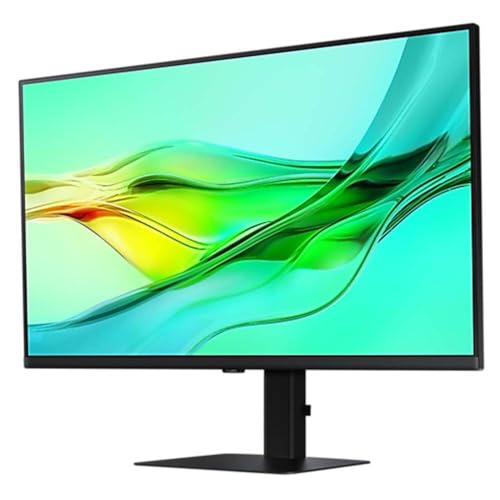 Samsung ViewFinity S60UD 32-inchCheck Price
 For some people, 27 inches feels cramped. Open up Final Cut, drop a Zoom window beside it, leave Slack visible at the side, and suddenly you want more glass. The Samsung ViewFinity S60UD is a 32-inch 1440p IPS panel with 100Hz refresh, 90W USB-C, a KVM switch, and daisy-chain support over USB-C.
Pixel density is the catch with a 32-inch QHD panel. Text isn't quite as crisp as it would be on a 27-inch QHD or a 32-inch 4K screen. For most office work that's a non-issue. For tiny font in a Word document at 100% zoom, you'll notice. The flip side is a bigger workspace for pretty much the price of a smaller 4K, plus easier scaling on Windows than 4K at this size.
The good: huge 32-inch workspace, KVM and USB-C dock, easier scaling than 4K, daisy-chain for dual monitors.
The trade-off: 1440p on 32 inches isn't as sharp as 4K, glossy plastic stand feels less premium than Dell.
7. Philips 27E1N1600AE - Best Mid-Range Workhorse Pick
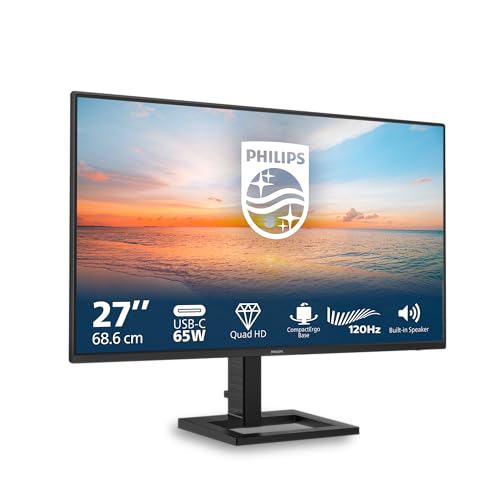 Philips 27E1N1600AECheck Price
 The Philips 27E1N1600AE slots in between the budget MSI and the premium Dell, and for a lot of WFH setups it's the sensible middle. It's a 27-inch 1440p IPS panel with a 120Hz refresh rate, USB-C with PD, height-adjustable stand, built-in USB hub, and HDR10 support. Specs that would have been flagship-tier two years ago, sitting at a sub-$400 price point now.
The 120Hz refresh is the under-rated bit here. Even if you never touch a game, scrolling a long document, swiping between desktops in macOS, or moving windows around all feel noticeably smoother than on a 60Hz screen. Once you've used 120Hz for office work, it's hard to go back.
The good: 120Hz on a non-gaming productivity monitor, USB-C with PD, full ergonomic stand, four-year Philips advance replacement.
The trade-off: brand recognition is lower than Dell or LG, so resale value isn't as strong if you ever upgrade.
How to Choose the Best Home Office Monitor for Your Setup
A few practical filters to narrow the field down:
- Single laptop user? USB-C with at least 65W power delivery is the upgrade that pays for itself daily. The BenQ GW2786TC, LG 27UP850N, Philips 27B2U3601, Samsung ViewFinity S60UD, Dell U2725QE and Philips 27E1N1600AE all qualify.
- Two computers, one desk? KVM is what you want. The Dell U2725QE and Samsung ViewFinity S60UD both have it built in.
- Drowning in dongles? A monitor with a proper USB-C dock replaces a separate hub. The Philips 27B2U3601 adds 90W charging and wired Ethernet over a single cable.
- On a tight budget? The MSI PRO MP275Q gets you 1440p for under AU$300. Add a $40 monitor arm and you've got a working ergonomic setup for under $300.
- Long days, sore eyes? Eye-care features and matte finishes help. BenQ's GW2786TC is the most thoroughly engineered for this, but every monitor on this list uses an IPS panel and has a low-blue-light mode.
For more on USB-C connectivity and what to look for in cables and ports, our USB-C monitor guide for Australia has the full breakdown.
EOFY 2026 Buying Tips for Australian WFH Workers
EOFY sales typically kick off in early to mid-June and run through 30 June at JB Hi-Fi, Officeworks, Harvey Norman, The Good Guys, Bing Lee and Amazon AU. Discounts on monitors usually land around 10 to 25% off RRP at the major retailers. Amazon AU often matches or beats those prices ahead of EOFY rather than waiting for the date.
If you're planning to claim the monitor on tax, remember:
- Items over $300 are depreciated, not written off in one hit. The ATO's effective life for a monitor is generally four years.
- You can only claim the work-use percentage. If the screen is also used by the family for streaming Netflix on weekends, that's not 100% work use.
- Keep your tax invoice and a record of work hours. The ATO is pushing harder on WFH evidence in 2026.
- Talk to your accountant before going hard. This is general information, not tax advice.
Final Verdict: The Best Home Office Monitor Australia 2026
For most Australian WFH workers, the BenQ GW2786TC at around AU$319 is the sweet spot: USB-C single-cable simplicity, real ergonomics, and eye-care tech that pays off after a few long weeks. If your job involves a lot of detail work and you'd rather buy once and not think about it again, the Dell UltraSharp U2725QE is the no-compromise pick. And if money's tight, the MSI PRO MP275Q proves you can get a proper 1440p setup for less than the cost of a decent restaurant meal for two.
If you're also upgrading the rest of the desk this EOFY, our best EOFY laptops Australia 2026 guide pairs nicely with this list, and the best budget 4K monitor roundup is worth a look if 4K is the only resolution that'll do. For everything else, head over to our top 7 monitors for Australia hub or browse our full best laptops for Australia picks.
Top Picks - Check Latest Prices


See Our Top 7 Monitors for Australia
Ranked by the Top7 Score: specs, owner ratings and published reviews. Honest pros and cons, and Aussie pricing.
More Monitors Reading
Best Gaming Monitors Australia 2026: 1440p Picks for Every Budget
The best gaming monitors in Australia for 2026 - from budget 1440p IPS panels to Mini LED with HDR 1000. All on Amazon AU with prices in AUD.
Best Budget 4K Monitors Under $500 in Australia
The best 4K monitors you can buy in Australia for under A$500. We compare panel types, USB-C connectivity, and ergonomic features for working from home.
4K vs 1440p Monitors: What's Worth It in Australia?
A practical comparison of 4K and 1440p monitors for Australian buyers, covering gaming, productivity, content creation and local pricing.