7 April 2026 · Laptops · AI-assisted · published by Jaco Olwagen · How we rank
Best Laptops to Buy Before EOFY 2026 - Tax-Deductible Picks for Australians
EOFY is coming and the ATO's instant asset write-off makes June 30 the best date on the laptop calendar. Our top picks for every budget in Australia 2026.
Why EOFY Is the Best Time to Buy a Laptop in Australia 2026
Every year, around the same time Australians start thinking about tax returns, the country's best laptop deals quietly appear. End of Financial Year - June 30 - is when JB Hi-Fi, Harvey Norman, and Amazon AU sharpen their pencils. But here's the thing most people miss: you don't have to wait for the sale. If you buy a laptop before June 30 and you use it for work, there's a solid chance the ATO will help you pay for a chunk of it through the instant asset write-off provisions. So right now, in April, you've got first pick of the current range before the shelf-stripping chaos of late June. Browse our full laptops guide for the bigger picture, but if you're ready to pull the trigger, here's where to start.
This guide covers four picks across different budgets - from Apple's just-released MacBook Air M5 down to a capable Windows machine under A$1,000 that'd survive anything a busy work week throws at it.
Quick Picks - Best Laptops for EOFY Australia 2026
| Laptop | Best For | Price (AUD) |
|---|---|---|
| Apple MacBook Air M5 13-inch | Best overall - premium work machine | ~A$1,799 |
| Apple MacBook Air M4 13-inch | Best value Apple - M4 now discounted | ~A$1,399 |
| ASUS ZenBook 14 OLED (Ryzen AI 7) | Best Windows ultrabook - stunning screen | ~A$1,799 |
| Lenovo IdeaPad Slim 5 16-inch | Best budget pick - full-size 16-inch | ~A$999 |
A Quick Word on the Tax Bit
This isn't financial advice - talk to your accountant. But the broad strokes: if you're a sole trader, small business owner, or employee who uses a laptop for work and isn't reimbursed by your employer, you may be able to claim some or all of the cost as a tax deduction. The ATO's temporary full expensing provisions have changed over time, but the instant asset write-off for small businesses (turnover under A$10 million) continues to apply. Buying before June 30 means the deduction lands in the 2025–26 financial year. A A$1,799 laptop at a 32.5% marginal tax rate saves you roughly A$585 - more if you're a business. Again, ask your accountant. But do it soon.
Apple MacBook Air M5 13-inch - Best Premium Pick
Apple launched the MacBook Air M5 in March 2026, and if you've been holding off on upgrading, this is a proper reason to stop waiting. The M5 chip is built on second-generation 3nm architecture - Apple says it's about 20–25% faster than the M4 in CPU-intensive tasks, and the GPU gains are meaningful for anyone who works with photos, video exports, or even just running a dozen browser tabs and a Zoom call at the same time.
What hasn't changed: the form factor. Still 1.24 kg, still fanless (no moving parts means no fan noise, ever), still that beautifully simple Liquid Retina display with 500 nits brightness that doesn't make you squint in a sunlit Sydney café. Apple quotes up to 18 hours of battery life, which in real-world use translates to getting through a full workday and most of the evening without hunting for a powerpoint.
The base model now starts at A$1,799 and comes with 512GB of SSD storage - that's double what the M4 base shipped with last year, for A$100 more. At that price, it's genuinely good value for a machine that'll still feel quick in four years. The jump to 16GB of unified memory is standard; if you're a heavy multitasker or work in creative apps, the 24GB or 32GB upgrade is worth considering.
The good: Fastest chip in this class, all-day battery, completely silent, ecosystem plays well with iPhone and iPad, strong resale value.
The trade-off: Starts at A$1,799, limited ports (two Thunderbolt 4 and a headphone jack), no upgradeable RAM or storage after purchase - spec it right from the start.
Apple MacBook Air M4 13-inch - Best Value Apple Pick
 Apple MacBook Air M4 13-inchCheck Price
 Here's the smart EOFY play that most people overlook: the MacBook Air M4 just got quietly cheaper. With the M5 launch in March, retailers and Amazon AU have been moving M4 stock at noticeably lower prices - you can now find the 13-inch M4 with 16GB RAM for around A$1,399, which is A$400 cheaper than the new model.
The M4 is still an outstanding chip. For email, spreadsheets, web, video calls, photo editing, and even light video work, the M4 Air handles everything without complaint. The difference between M4 and M5 performance is real but not dramatic for most everyday workloads. If you're not doing CPU-heavy creative work, the M4 is more than enough and the savings are yours to keep.
The base configuration comes with 16GB unified memory and 256GB of storage. The 256GB can feel tight if you store a lot locally - consider whether you're comfortable keeping documents in iCloud or an external SSD (which can be had for under A$100 these days). If storage matters, step up to the 512GB M4 model, which should be sitting around A$1,599 now.
The good: Same excellent build and battery as the M5, significantly cheaper, still plenty fast for typical work tasks, two colours available (Sky Blue is surprisingly nice in person).
The trade-off: 256GB base storage can feel snug, slightly older chip means it'll feel the age first as apps get heavier over time.
ASUS ZenBook 14 OLED (Ryzen AI 7 350) - Best Windows Ultrabook
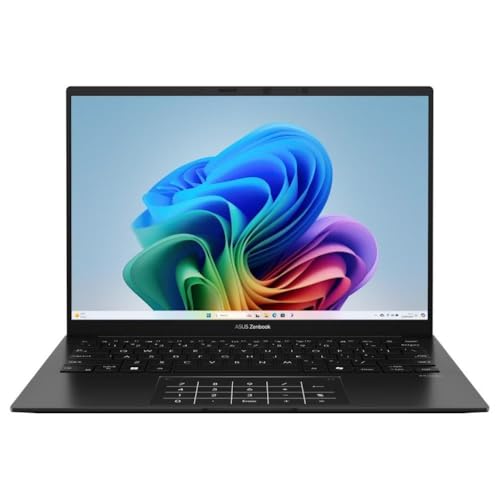 ASUS ZenBook 14 OLED (Ryzen AI 7 350)Check Price
 If you're in the Windows camp - either by preference, company IT policy, or because you need specific Windows software - the ASUS ZenBook 14 OLED is the machine to beat in this price bracket. The configuration on Amazon AU packs an AMD Ryzen AI 7 350 processor, 32GB of LPDDR5 RAM, a 1TB SSD, and the party piece: a 14-inch 3K OLED display at 120Hz.
That screen is genuinely something. OLED means true blacks and colours that pop in a way no IPS panel can match. If you're in marketing, design, sales presenting, or just someone who stares at a screen for eight hours and values not getting a headache, the ZenBook's display is worth the extra spend over a standard IPS competitor.
The Ryzen AI 7 350 is AMD's current mid-high Copilot+ AI capable chip. In practical terms it handles multitasking well and the integrated Radeon graphics are competent for casual photo editing and light video work. The 32GB RAM means you're not going to hit memory walls any time soon. ASUS rates battery life at around 12 hours, though real-world use with the OLED screen at full brightness will sit closer to 8–9 hours - still enough to get through a workday without the charger.
Build quality is solid. ASUS's military-grade MIL-STD-810H rating covers extreme temperatures, humidity, and vibration - useful if your laptop travels to sites or gets bounced around in a bag. At 1.2 kg, it's genuinely light for a Windows machine at this spec level.
The good: Stunning 3K OLED screen at 120Hz, 32GB RAM is generous, lightweight, Copilot+ AI features built in, Wi-Fi 6E connectivity.
The trade-off: OLED panels consume more power than IPS, battery life is a step behind the MacBook Air; Windows 11 AI features are still a work in progress for most people.
Lenovo IdeaPad Slim 5 16-inch (Ryzen 7 8845HS) - Best Budget Pick
 Lenovo IdeaPad Slim 5 16-inch (Ryzen 7 8845HS)Check Price
 Not everyone needs to spend the thick end of two grand on a laptop. If your work is documents, spreadsheets, emails, Teams calls, and the occasional PDF, the Lenovo IdeaPad Slim 5 16-inch does all of that without fuss, for around A$999.
The AMD Ryzen 7 8845HS is a potent processor for this price - it's the same chip used in some gaming laptops, which means it handles heavy multitasking and large spreadsheets without breaking a sweat. Pair that with 16GB of LPDDR5 RAM and a 512GB SSD and you've got a properly capable machine. The 16-inch 1920x1200 IPS touchscreen is sharp and comfortable for long work sessions, and the larger screen real estate means more spreadsheet columns visible, more code on screen, more browser tabs you can actually read.
It's not the lightest laptop on this list at around 1.9 kg, but for desk-to-desk use or commuting in a backpack, it's not a burden. The keyboard is comfortable for extended typing - Lenovo has always been good at keyboards, a legacy of the ThinkPad line. Battery life is rated at around 8–10 hours for everyday use.
This is a sensible EOFY buy for workers who don't need a premium machine - the tax write-off still applies, and you're spending less to start with. For a business claiming it back, the after-tax cost on a A$999 laptop could be well under A$700.
The good: Competitive processor at this price, 16-inch screen is great for productivity, 16GB RAM handles multitasking, decent keyboard.
The trade-off: Heavier than an ultrabook, IPS display (no OLED here), no Thunderbolt - just USB-C and USB-A ports.
EOFY Laptop Tips for Australians
Buy now, not in late June
The myth that EOFY sales are all in June is just that - a myth. Yes, prices often dip in late May and June, but popular configurations sell out fast and you may end up with your second choice. Buying in April or May means you get first pick of current stock. If a better deal emerges in June, check whether your retailer has a price-match policy (Officeworks does - they'll beat any competitor's price by 5%).
Spec it correctly from the start
This matters more for MacBooks (non-upgradeable RAM and storage) than Windows machines, but still applies generally. Think about what you'll be doing in three years, not just today. If you're considering a MacBook Air, the jump from 16GB to 24GB unified memory is worth considering for power users - it's the one upgrade you can't do later.
Check Amazon AU vs retail
Amazon AU regularly prices laptops below JB Hi-Fi and Harvey Norman sticker prices. It's worth checking before you walk into a store, especially for Windows machines where grey-market imports from Amazon's US marketplace sometimes appear at sharp discounts.
Where to Buy
All four laptops above are available on Amazon AU with affiliate links in this guide. For Apple products, JB Hi-Fi and Apple's own online store are reliable options; JB Hi-Fi will often price-match if you find a better deal elsewhere. For Windows machines, Lenovo's own website sometimes has outlet deals on end-of-line configurations that undercut everything else.
Our EOFY Pick
If we had one recommendation for the EOFY 2026 laptop purchase, it's the MacBook Air M5 13-inch. It's the most capable thin-and-light laptop on the Australian market right now, it'll last five or more years without feeling slow, and the A$1,799 price tag is easier to swallow when the ATO is sharing part of the cost. Windows users should look hard at the ASUS ZenBook 14 OLED - that screen alone is worth the price of admission.
For more laptop buying advice, check out our guides to the best laptops under A$1,000 in Australia, the best laptops for uni students, and the best gaming laptops under A$1,500. Or browse the full laptops category for our complete coverage.
Planning a full WFH desk setup before June 30? A USB-C monitor is the other purchase that pairs with any of the laptops above and is usually ATO-deductible when used for work. Our USB-C monitors explained guide covers which Power Delivery wattages match which laptops (the MacBook Air M5 and ZenBook 14 both want 65W+), and our best budget 4K monitors under A$500 shortlist is a sensible starting point if you want to knock out both purchases in the same financial year.
Top Picks - Check Latest Prices



See Our Top 7 Laptops for Australia
Hand-picked and ranked by our editors — with honest pros, cons, and Aussie pricing.
More Laptops Reading
Best Gaming Laptop Under $1,500 AUD in Australia (2026)
The best gaming laptops under $1,500 AUD in Australia right now - three machines actually in stock on Amazon AU, plus an honest look at why this price bracket has thinned out in 2026.
Best Laptops Under A$1,000 in Australia (2026)
A practical guide to finding the best budget laptops under A$1,000 in Australia, covering what specs matter and which models deliver real value.
Best Laptops for Uni Students in Australia (2026 Guide)
Our picks for the best uni laptops in Australia across three budget tiers. We cover battery life for all-day lectures, portability, and which specs actually matter for students.