12 March 2026 · Laptops · AI-assisted · published by Jaco Olwagen · How we rank
Best Laptops for Uni Students in Australia (2026 Guide)
Our picks for the best uni laptops in Australia across three budget tiers. We cover battery life for all-day lectures, portability, and which specs actually matter for students.
Choosing a Uni Laptop in Australia (Without Wasting Money)
Buying a laptop for uni in Australia is one of those purchases where it's remarkably easy to either overspend or underspend. Spend too little and you're stuck with a machine that lags through a couple of Chrome tabs and a Word doc. Spend too much and you've blown your HECS contribution on a gaming laptop you'll use for Netflix.
The sweet spot depends entirely on your course. An arts student writing essays needs something completely different from an engineering student running CAD software. But there are universal priorities: battery life that lasts a full day of lectures, a weight you can actually carry across campus, and a screen you won't hate staring at for hours.
We've broken this guide into three budget tiers that cover the vast majority of Australian uni students.
Quick Picks - Best Uni Laptops in Australia
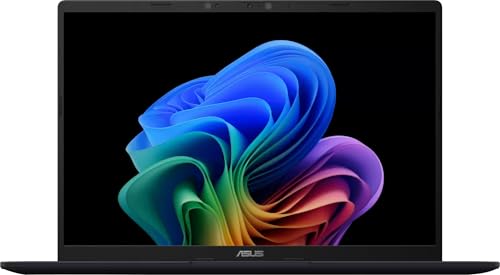 ASUS Vivobook 14 (Snapdragon X, 16GB, 512GB)Check Price
 If you'd rather skip to the recommendations, these are our three picks across the budget tiers. Every ASIN has been verified on amazon.com.au with current Australian stock.
| Product | Best For | Price (AUD) |
|---|---|---|
| ASUS Vivobook 14 (Snapdragon X, 16GB, 512GB) | Best value under A$1,000 - all-day battery, Copilot+ PC | ~A$985 |
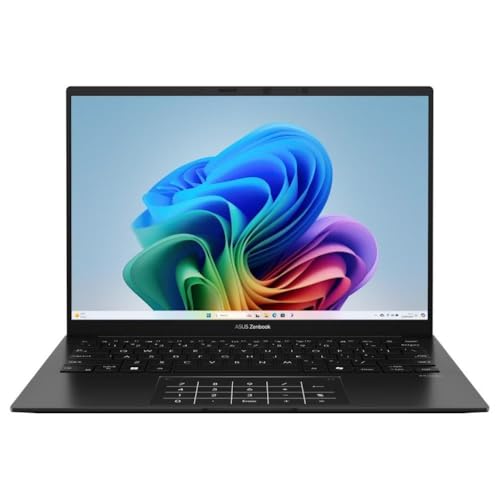
| ASUS Zenbook 14 OLED (Ryzen AI 7, 32GB, 1TB) | Best all-rounder - 3K 120Hz OLED, 32GB/1TB | ~A$1,799 |
| Lenovo IdeaPad Slim 5 OLED (Snapdragon X Plus, 32GB, 1TB) | Premium Snapdragon OLED alternative | ~A$1,799 |
Tax-time angle for working students: if you're already earning income (placements, casual work, sole-trader side hustle) and use the laptop for work, the work-use portion is typically claimable on your 2026-27 return. Items A$300 or less can be claimed in full; laptops between A$300 and the A$20,000 instant asset write-off threshold (sole traders) or the four-year ATO effective life (salaried) are depreciated. Our EOFY laptop vs desktop tax depreciation explainer walks through the calculations.
Under A$1,000 - The Essentials Tier
This is where most first-year students should start. Under a grand gets you a perfectly capable machine for essay writing, research, online lectures, and light multitasking. You're not editing video at this price, but for 80% of degrees, this tier is all you need.
ASUS Vivobook 14 (A$985)
The ASUS Vivobook 14 is the standout value pick, and at around A$985 it still sneaks under a grand - the Lenovo IdeaPad Slim 3X that held this slot has sold out. You get Qualcomm's Snapdragon X processor, 16GB of RAM and a 512GB SSD - a proper Copilot+ PC for essay-writing money. The 15.3-inch WUXGA display is roomy for split-screen note-taking alongside lecture slides.
Battery life is the real story with Snapdragon silicon: it comfortably covers a full day on campus without hunting for power outlets, and it stays cool and quiet doing it. WiFi 7 is a nice bonus if your uni has upgraded its network. The one caveat: some older x86 apps run via emulation on Snapdragon, so check your course-specific software is compatible before buying.
Lenovo IdeaPad Slim 5 (A$799)
If you want to squeeze every dollar, the IdeaPad Slim 5 at A$799 is hard to beat. It uses an AMD Ryzen 5 7535U with 16GB RAM and 512GB SSD. Performance is smooth for everyday uni tasks. The 15.6-inch screen is larger than the Acer, which some students prefer for split-screen note-taking alongside lecture slides.
Battery life sits around 8-10 hours. It's slightly heavier at 1.6kg, which is still very manageable. The keyboard is surprisingly good for a budget laptop - if you're writing 3,000-word essays regularly, that matters more than you'd think.
Under A$1,500 - The All-Rounder Tier
Step up to this tier and you get noticeably better screens, faster processors, and premium build quality. This is the sweet spot for students who need a bit more power - think data analysis, design work, coding, or just wanting a laptop that'll comfortably last all four years of a degree.
MacBook Air M4 - the benchmark, but check stock
The MacBook Air with the M4 chip is still the laptop we'd point most students to first. It handles everything from essay writing to light video editing without breaking a sweat, and it does it all fanlessly - completely silent in the quiet section of the library. Battery life is a genuine 15-18 hours for typical uni workloads, so you can leave the charger at home. The 13.6-inch Liquid Retina display is gorgeous, the build quality is unmatched at this price, and macOS is rock-solid for productivity. At around 1.24kg, it's featherweight, and the M4 base model now starts at 16GB of unified memory.
The catch as of July 2026: Amazon AU is largely sold out of the MacBook Air line after the EOFY rush, so we are not linking a listing that would land you on a "currently unavailable" page. For a Mac right now the smarter buy is the Apple Education Store (see Where to Buy below) - a valid university email knocks A$100-A$200 off and stock is reliable. If you would rather have a Windows machine that matches the Air on screen and battery, the ASUS Zenbook 14 OLED below is the in-stock pick.
ASUS Zenbook 14 OLED (A$1,799)
 ASUS Zenbook 14 OLEDCheck Price
 If you prefer Windows (or your course requires it), the ASUS Zenbook 14 OLED is the standout in-stock pick. The 14-inch 3K OLED panel runs at 120Hz - colours pop, blacks are true black, and HDR content looks incredible. For design, media, or anyone who stares at a screen for 8+ hours a day, an OLED panel is a genuine quality-of-life upgrade.
Under the hood, an AMD Ryzen AI 7 350 with a generous 32GB of RAM and a 1TB SSD gives you serious room to grow - more memory and storage than most students will ever need, and plenty for heavier data, design or coding work. Battery life comfortably covers a full day of lectures, the keyboard and trackpad are excellent, and at around 1.3kg it's just as portable as a MacBook Air. If you want the same OLED screen with Snapdragon efficiency and even longer battery, the Lenovo IdeaPad Slim 5 OLED (Snapdragon X Plus, 32GB, 1TB) is the alternative at the same price.
Under A$2,000 - The Power User Tier
This tier is for students in demanding courses: engineering, architecture, computer science, film production, 3D design. If your software has minimum GPU requirements or your assignments involve rendering, compiling, or processing large datasets, this is where you need to be.
MacBook Pro 14 M4 (A$1,999)
The MacBook Pro 14 with the M4 chip is a serious machine. The 10-core GPU handles 3D rendering, video editing, and machine learning workloads that would choke lesser laptops. 16GB of unified memory (with the option to configure to 24GB) keeps everything fluid under heavy multitasking.
The 14.2-inch Liquid Retina XDR display with ProMotion (120Hz) is the best screen you'll find on a laptop at this price. Battery life remains excellent at 12-15 hours for mixed use. The addition of three Thunderbolt 4 ports, HDMI, and an SD card slot means you don't need a dongle collection. At 1.55kg, it's heavier than the Air but still perfectly portable.
Dell XPS 14 (A$1,899)
The Dell XPS 14 is the Windows equivalent for power users. An Intel Core Ultra 7 155H with 16GB RAM and a 1TB SSD delivers strong performance across demanding applications. The 14.5-inch 3200x2000 display is sharp and colour-accurate - particularly useful for design students.
Dell's build quality is premium: the aluminium chassis feels built to last, and the keyboard is one of the best in the business. Battery life averages 8-10 hours, which is respectable for this level of performance. The XPS line holds its resale value well too, which matters when you're upgrading in a few years.
If your course needs serious GPU grunt for AAA gaming, simulation work, or CUDA development, a discrete-GPU machine makes more sense than a thin-and-light. Our best gaming laptop under A$1,500 guide covers RTX 4060/4070 options that double as study machines.
What Specs Actually Matter for Uni
- RAM: 16GB is the minimum in 2026. Don't buy 8GB unless it's a MacBook (Apple's memory management is more efficient). 32GB is unnecessary for most students.
- Storage: 512GB is the sweet spot. 256GB fills up fast with course materials, apps, and media. 1TB is nice but not essential if you use cloud storage.
- Battery: Aim for 10+ hours of real-world use. Manufacturer claims are typically optimistic - check reviews for actual numbers.
- Weight: Under 1.5kg is ideal for carrying to campus daily. Over 2kg and you'll start resenting the walk.
- Screen: At least 1920x1200 resolution. Higher is better for extended reading and split-screen work. OLED is a luxury, not a necessity.
- Ports: At least one USB-C and one USB-A. Thunderbolt is a bonus for connecting external monitors in your future graduate job.
👉 See our full Top 7 Laptops list
Pairing Your Uni Laptop with an External Monitor
Most students eventually set up a home desk with a proper external monitor - it's a genuine productivity and posture upgrade once you're writing 3,000-word essays or staring at code for hours. If your laptop is one of the USB-C picks above, the ideal setup is a single USB-C cable that carries video and charges the laptop at the same time. Our USB-C monitors explained guide walks through Power Delivery wattage, DisplayPort Alt Mode compatibility and the brands that actually work with MacBooks and Snapdragon-based Windows laptops, so you don't buy something that trickle-charges your laptop while you're trying to work.
Where to Buy in Australia
Officeworks is usually the smartest first stop - their price-beat guarantee (5% off any competitor's price) means you're almost always getting the lowest price. JB Hi-Fi runs frequent sales on laptops, especially around Back to Uni season in February and mid-year. The Apple Education Store knocks A$100-$200 off MacBooks for students with a valid university email, and often bundles free AirPods during their back-to-school promos.
Avoid buying from overseas - Australian consumer law gives you strong warranty protections that don't apply to grey imports.
Final Thoughts
For most uni students, the under-A$1,800 tier is the smart money. A MacBook Air M4 (via the Apple Education Store while Amazon AU stock is thin) or the in-stock ASUS Zenbook 14 OLED will handle virtually anything a typical degree throws at them, last 4+ years, and hold decent resale value when you graduate. Only step up to the A$2,000 tier if your course genuinely demands it - your bank account will thank you.
For broader EOFY laptop deals across all use cases (sole trader, full-time WFH, content creator), see our best EOFY laptop deals 2026 roundup - many of the picks above are included with current sale pricing.
Top Picks - Check Latest Prices



See Our Top 7 Laptops for Australia
Hand-picked and ranked by our editors — with honest pros, cons, and Aussie pricing.
More Laptops Reading
Best Laptop for Video Editing Australia 2026: 7 Picks From $1,799 to $4,799
The best laptop for video editing in Australia 2026, from a $1,799 Asus V16 to the M5 MacBook Pro. Every pick price-checked and in stock on Amazon AU.
Best Gaming Laptop Australia 2026: 5 Picks Actually In Stock Right Now
The best gaming laptops you can buy in Australia in 2026, from a $1,389 starter to an RTX 5070 desktop replacement. Every pick verified in stock on Amazon AU with real AUD prices.
Best USB-C Hubs for MacBook Australia 2026: Top Picks for Travel, Home Office & Dual Monitors
The best USB-C hubs for MacBook in Australia 2026 - compact travel hubs to dual-monitor docking stations. AUD prices with Amazon AU affiliate links.
Weekly AU tech deals, in your inbox
We check prices on every product we cover daily. Once a week we send the biggest genuine price drops we spot - the ones worth your attention.
- One email a week, max
- No spam, ever
- Unsubscribe in one click