10 July 2026 · Laptops · AI-assisted · published by Jaco Olwagen · How we rank
Best Gaming Laptop Australia 2026: 5 Picks Actually In Stock Right Now
The best gaming laptops you can buy in Australia in 2026, from a $1,389 starter to an RTX 5070 desktop replacement. Every pick verified in stock on Amazon AU with real AUD prices.
Best Gaming Laptop Australia 2026: What's Actually Worth Your Money
Shopping for a gaming laptop in Australia right now is a moving target. The RTX 40-series models that dominated every 2025 buying guide are quietly vanishing from shelves as stock sells through, and RTX 50-series machines are landing to replace them - sometimes at better prices than the laptops they succeed. That churn is exactly why we built this guide the hard way: every single pick below was checked against its live Amazon AU listing before publishing, and we only recommend machines you can actually put in a cart today.
This is our top-to-bottom guide covering everything from a $1,389 entry point to a 17-inch RTX 5070 desktop replacement. If your budget has a hard ceiling, we also keep dedicated guides for gaming laptops under $1,500 and everyday laptops under $1,000, and our Top 7 laptops page covers the premium all-rounders.
Quick honesty note: we haven't personally benchmarked every unit here. These picks lean on published specs, GPU-class performance data, and the pile of Aussie user reviews on Amazon AU. Prices are accurate as of publishing but move around - always check the listing.
Updated September 2026: this guide is now five picks, not seven. Two machines came off it earlier this month: the MSI Thin 15 budget pick and the original MSI Cyborg 15 listing both lost every Amazon AU seller, and every cheaper replacement we screened was a US or UK grey import with no Australian warranty. Rather than pad the list back to seven, we cut it. Then the MSI Katana 15 HX, which had become the cheapest RTX 5060 pick here, went out of stock too. Its slot now goes to a newer Australian-model MSI Cyborg 15 listing sold by Amazon AU itself at around A$2,049 - still the cheapest RTX 5060 laptop in this guide, though with a 1080p screen rather than the Katana's QHD panel. The Katana listings still on Amazon AU are US-configured units from a third-party importer at A$2,400 and up, so we left them out.
Quick Picks - Top 3 Gaming Laptops
| Laptop | Best For | Price (AUD) |
|---|---|---|
| Lenovo Legion 5i (RTX 5060, OLED) | Best overall | ~A$2,899 |
| MSI Cyborg 15 (RTX 5060) | Cheapest RTX 5060 | ~A$2,049 |
| ASUS Gaming V16 (RTX 3050 6GB) | Best budget | ~A$1,389 |
What actually matters in a gaming laptop
Three things decide how a gaming laptop feels in two years: the GPU class, the screen, and the cooling. The GPU is the one you can't upgrade, so buy the best one your budget allows. An RTX 4050 handles 1080p high settings in most titles today; an RTX 5060 or 5070 gives you headroom for QHD, ray tracing, and whatever 2027 throws at you. DLSS frame generation on the 50-series cards is genuinely useful at these price points - it's the difference between 60fps and 100fps+ in supported games.
RAM and storage are the specs manufacturers skimp on to hit a price. 16GB is the floor for gaming in 2026 - a few picks here ship with 24GB or 32GB, which is worth paying for. A 512GB SSD fills up after roughly four modern AAA installs, so check whether the machine has a spare M.2 slot (most of these do).
One more Australian-specific tip: gaming laptop stock on Amazon AU turns over fast. Several of the most popular RTX 4060 models from autumn are now unavailable entirely. If a pick below says limited stock and it's the one you want, don't sit on it for a month.
1. Lenovo Legion 5i (RTX 5060, OLED) - Best Gaming Laptop Overall
 Lenovo Legion 5i (RTX 5060, OLED)Check Price
 Lenovo's Legion line has been the straight-A student of gaming laptops for years - our readers click on Legions more than any other gaming laptop, and there's a reason. This 2026 Legion 5i pairs a 14th-gen Intel Core i7-14700HX with the new RTX 5060, and mounts it all behind a 15.1-inch OLED display. OLED on a gaming laptop at this price used to be fantasy: you get perfect blacks, huge contrast, and colour that makes the average gaming IPS panel look washed out.
The spec sheet is generous where it counts - 24GB of RAM out of the box and a 1TB SSD, so you're not budgeting for upgrades on day one. The i7-14700HX is a 20-core desktop-class chip that will not be the bottleneck in anything you play, and it doubles as a genuine workstation CPU for video editing or code compilation.
The good: OLED display in a class where everyone else ships IPS, 24GB RAM and 1TB storage standard, desktop-class CPU, and Lenovo's cooling is consistently among the best in segment.
The trade-off: OLED brings some burn-in anxiety for static HUDs over many years, and the price has moved against it. At around A$2,899 - up from A$2,297 in August - the Legion is now the most expensive laptop in this guide. The MSI Cyborg below has the same GPU for roughly A$850 less, and the LOQ 17 has a faster RTX 5070 for about A$400 less, both without the OLED. If the screen is not the reason you are buying, look at those two first.
2. MSI Cyborg 15 (RTX 5060) - Cheapest RTX 5060
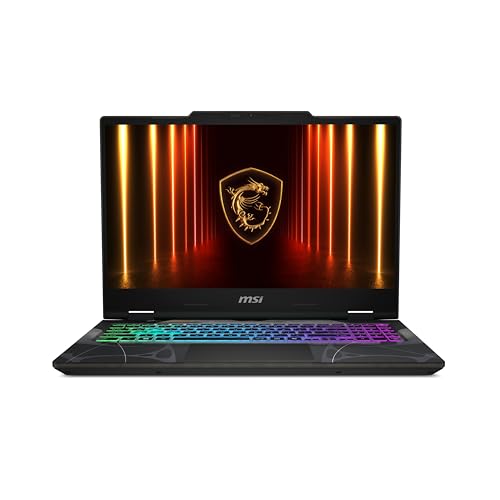 MSI Cyborg 15 (RTX 5060)Check Price
 The Cyborg 15 is MSI's cheapest route onto a 50-series card, and this Australian-model listing (B13WFKG-1247AUNN) is sold and shipped by Amazon AU rather than a marketplace importer. For around A$2,049 you get an RTX 5060, a 13th-gen Intel Core i5-13420H, a 15.6-inch full-HD 144Hz display, 16GB of DDR5 and a 512GB SSD.
The GPU is the part you cannot upgrade later, and here it is the same RTX 5060 as the Legion above, DLSS frame generation included, for roughly A$850 less. At 1080p that is enough for high settings in current AAA titles and high refresh rates in esports games. What the lower price gives up is everything around the GPU.
The good: the cheapest RTX 5060 laptop in this guide, Australian stock sold by Amazon AU, 144Hz screen, DDR5 memory.
The trade-off: the i5-13420H is an 8-core mainstream chip rather than the HX-class processors in the Lenovos, so CPU-heavy games and video work will feel it; the screen is 1080p rather than QHD; and 512GB fills after about four big installs, so budget for a second SSD.
3. Lenovo LOQ 17 (RTX 5070) - Best Big-Screen Gaming Laptop
 Lenovo LOQ 17 (RTX 5070)Check Price
 If the laptop mostly lives on a desk and travels twice a year, buy screen real estate. The LOQ 17 gives you a 17.3-inch 165Hz full-HD panel with 100% sRGB coverage, an i7-14700HX, an RTX 5070, and a 24GB/1TB memory-storage combo for around $2,502. The LOQ line is Lenovo's value tier below Legion, but the gap has narrowed to mostly cosmetics.
A 5070 pushing 1080p at 17 inches means you'll pin that 165Hz refresh rate in esports titles and hold high settings in AAA games for years. It's heavy - big-screen laptops always are - but as a desktop replacement that skips the monitor purchase, the maths works.
The good: huge 165Hz display, RTX 5070 with headroom to spare at 1080p, 24GB/1TB standard.
The trade-off: portability is theoretical at this size, FHD resolution on 17.3 inches is less crisp than the QHD options up close, and it is heavy. The price has also swung back down, from A$2,831 earlier in September to around A$2,502, which puts it under the Legion despite the faster GPU and makes the "skip the monitor purchase" argument work again.
4. ASUS V16 (RTX 4050) - Best Mid-Range All-Rounder
 ASUS V16 (RTX 4050)Check Price
 The V16 is ASUS's quiet achiever: a 16-inch WUXGA 144Hz laptop with Intel's Core 7 240H and an RTX 4050, priced around $1,679 - down about A$170 since August. It doesn't look like a gaming laptop - no RGB shouting, a clean lifestyle-laptop design - which makes it the pick for anyone who needs one machine for the office, uni, and an evening session.
The RTX 4050 is entry-level for AAA gaming but entirely capable at 1080p/1200p with sensible settings, and DLSS covers the gap in demanding titles. The 16:10 WUXGA panel gives you more vertical space for documents than any 16:9 gaming panel.
The good: understated design you can take into a meeting, 144Hz 16:10 display, well priced for the class.
The trade-off: RTX 4050 means medium-high rather than ultra settings in new AAA titles, and 512GB fills quickly. It is also, now that the budget pick has gone, the cheapest RTX 4050 laptop sold as Australian stock on Amazon AU - so if A$1,679 is over your ceiling, the next rung down is the RTX 3050 machine below, not a cheaper 4050.
5. ASUS Gaming V16 (RTX 3050) - Best Entry Point
 ASUS Gaming V16 (RTX 3050)Check Price
 The ASUS Gaming V16 at around $1,389 is for the buyer who mostly plays esports titles and refuses to pay for GPU headroom they will not use. You get a 16-inch WUXGA 144Hz screen - more usable vertical space than the 16:9 panels elsewhere in this guide - with an Intel Core 5 210H, an RTX 3050 with 6GB of video memory, 16GB of RAM and a 512GB SSD.
Know what you are buying: this is the floor of real gaming laptops, not a bargain AAA machine. The RTX 3050 will hold 100fps-plus in Valorant, CS2, Rocket League and Fortnite at 1080p, but it has no DLSS frame generation, so demanding new releases will need settings turned down. If your library leans on big single-player titles, stretch to the ASUS V16 above or the RTX 5060 tier.
The good: best screen in the entry tier, RTX 3050 with 6GB rather than 4GB, understated design that works in a lecture theatre.
The trade-off: no DLSS frame generation, the Core 5 210H is modest - this is an esports machine first - and stock on this listing runs thin, so it will not always be there at A$1,389.
Comparison Table - Best Gaming Laptops Australia 2026
| Laptop | GPU | Display | RAM/SSD | Price (AUD) |
|---|---|---|---|---|
| Lenovo Legion 5i | RTX 5060 | 15.1" OLED | 24GB/1TB | ~A$2,899 |
| MSI Cyborg 15 | RTX 5060 | 15.6" FHD 144Hz | 16GB/512GB | ~A$2,049 |
| Lenovo LOQ 17 | RTX 5070 | 17.3" FHD 165Hz | 24GB/1TB | ~A$2,502 |
| ASUS V16 | RTX 4050 | 16" WUXGA 144Hz | 16GB/512GB | ~A$1,679 |
| ASUS Gaming V16 | RTX 3050 6GB | 16" WUXGA 144Hz | 16GB/512GB | ~A$1,389 |
How to pick the right one for you
Playing mostly esports titles? The ASUS Gaming V16 will pin high refresh rates in Valorant and CS2 without breaking $1,400, and its 6GB RTX 3050 is a meaningful step up on the 4GB versions you will see at similar money.
Want one machine for AAA gaming for the next four years? The Lenovo LOQ 17's RTX 5070 is the strongest silicon here, and at around A$2,502 it now costs less than the Legion; the Legion 5i is the better-screened all-rounder, and the MSI Cyborg 15 is the cheapest way onto a 50-series card.
Work and play on the same laptop? The Legion 5i's OLED screen and 1TB drive, or the understated ASUS V16, depending on budget.
It never leaves the desk? LOQ 17. Buy once, skip the external monitor.
Whatever you pick, complete the setup properly - our guides to the best wireless gaming mice, gaming keyboards and gaming headsets cover the rest of the desk.
Claiming a gaming laptop on tax in Australia
This section used to live in a separate end-of-financial-year guide. That guide has been retired and folded in here, because the question comes up all year, not just in June.
None of these laptops are deductible by default. Claimability depends on your work-use percentage, your business structure, and whether the work you do on the machine actually earns you income. A streamer earning Twitch or YouTube revenue, a freelance video editor, a sole-trader developer, or a small business owner running a creator side hustle are the buyers who often have a legitimate work-use claim. Someone who games on it and occasionally answers email does not.
If you are a salaried employee, anything over A$300 is depreciated over its effective life rather than claimed outright - the ATO's general rule for laptops is two years. A gaming chassis is harder to defend as a pure work tool than a business notebook, because the obvious assumption is that it exists for gaming. Keep an honest log of work versus personal use; the ATO expects you to justify the percentage you claim.
If you are a sole trader or small business under the turnover cap, the instant asset write-off can let you claim the work-use portion in full in the year of purchase rather than depreciating it. Every laptop on this page has historically sat well under the threshold - but the threshold and the turnover cap are legislated year to year (it was A$20,000 per asset for eligible small businesses in 2025-26), so confirm the current figures before you count on them. Pty Ltd structures and larger businesses fall into depreciation pools instead, where the rules differ.
Two things buyers get wrong. Claiming 100% of a gaming laptop when you also play games on it does not survive scrutiny - be honest about the split. And keep the proof of purchase; the Amazon AU invoice email is usually enough.
This is general information, not tax advice. top7.au is not a registered tax agent. Talk to a registered tax agent or check ato.gov.au before claiming anything based on what you read here.
Our verdict
The Lenovo Legion 5i is the laptop we'd buy with our own money - the OLED panel is a step-change in how games look, and the 24GB/1TB config means no upgrade errands. If the cheapest way onto an RTX 5060 is the whole question, the MSI Cyborg 15 is the answer - same GPU, a 1080p 144Hz screen instead of OLED, and around A$850 less. And if you want the most GPU for the money, the Lenovo LOQ 17 now puts an RTX 5070 under the Legion's price. And at the sensible end, the ASUS Gaming V16 is proof that A$1,389 still buys a real gaming laptop in 2026, provided you are honest with yourself about playing esports titles rather than the latest AAA release. Stock on the cheaper machines here is thin, so check today's price on Amazon AU before it rotates again.
Top Picks - Check Latest Prices



See Our Top 7 Laptops for Australia
Hand-picked and ranked by our editors — with honest pros, cons, and Aussie pricing.
More Laptops Reading
Best Laptop for Video Editing Australia 2026: 7 Picks From $1,799 to $4,799
The best laptop for video editing in Australia 2026, from a $1,799 Asus V16 to the M5 MacBook Pro. Every pick price-checked and in stock on Amazon AU.
Best USB-C Hubs for MacBook Australia 2026: Top Picks for Travel, Home Office & Dual Monitors
The best USB-C hubs for MacBook in Australia 2026 - compact travel hubs to dual-monitor docking stations. AUD prices with Amazon AU affiliate links.
Best Laptops to Buy Before EOFY 2026 - Tax-Deductible Picks for Australians
EOFY is coming and the ATO's instant asset write-off makes June 30 the best date on the laptop calendar. Our top picks for every budget in Australia 2026.
Weekly AU tech deals, in your inbox
We check prices on every product we cover daily. Once a week we send the biggest genuine price drops we spot - the ones worth your attention.
- One email a week, max
- No spam, ever
- Unsubscribe in one click