As an Amazon Associate, top7.au earns from qualifying purchases. Product prices and availability are accurate as of the date/time indicated and are subject to change. Any price and availability information displayed on amazon.com.au at the time of purchase will apply.
Rankings re-checked weekly · Last re-checked 14 October 2026
·Prices updated daily·AI-assisted, run by Jaco Olwagen
3 quick taps — we'll match you to a pick using the same scores we rank with.
The picks, in order
7 picks
Number one at the top, number 7 at the bottom. The tier label on each card says which price bracket it sits in.
★Editor's Choice
1
Reolink
Reolink Altas 2K Solar
2k-videopre-recordingsolar
ValueOn Sale
Rank #1
Reolink Altas 2K Solar
Our Verdict
The battery camera that records what happened before the motion alert - 2K solar coverage with a claimed 540 days between charges.
Why it's number one: Leads on all three dimensions: 2K with ColorX colour night vision, person, animal and vehicle alerts to local storage with no subscription, and a 20,000mAh battery with the solar panel included; critics average 4.5/5 across 2 reviews (Trusted Reviews 4, Expert Reviews 5), and owners rate it 4.3 stars from 326 Amazon AU reviews.
Battery cameras have one classic failure: motion wakes them, and by the time they are recording the thing you wanted to see has already left the frame. The Altas is Reolink's answer. It buffers continuously and saves the seconds before the trigger as well as after, so a clip starts with a car pulling into the driveway rather than with a figure already at your door. That single behaviour makes it far more useful for the job people actually buy these for - working out what happened, not just that something did. The rest is the sensible Reolink formula. 2K resolution is sharp enough to identify a face at gate distance, ColorX night vision produces colour rather than grey infrared footage in low light, and the included solar panel means that in most Australian positions it simply never needs charging - Reolink quotes up to 540 days on a charge before the panel is even considered. Footage lands on a local microSD card with no subscription, which is the reason a lot of buyers choose Reolink over the Ring and eufy ecosystems. It replaces the Argus Eco, a 2019 camera that was still selling but had been comprehensively out-specced by its own maker.
Video
9.3
App
9.3
Power
9.6
Owners
7.4
Critics
9.0
Owners is the 4.3★ Amazon AU rating from 333 reviews, weighted toward the category average when there are few. Critics averages 2 published reviews. Tick marks show the category average.
How we scored it
Each measure is marked against the category's rubric, where 10 is the best you can buy, 8 is strong, 6 is basic but sound and 4 falls short. The bars show that mark on the Top7 scale (a 6 reads as 7.0, an 8 as 8.5); the notes quote the rubric mark.
Video 9.3 (rubric 9): 2K at 15fps that Trusted Reviews calls excellent in daylight, with ColorX colour night vision both outlets rate excellent; the 110-degree view is solid rather than wide.
App 9.3 (rubric 9): Person, animal and vehicle alerts with size thresholds and privacy zones to local microSD with no subscription, plus 10s pre-recording; Trusted Reviews says the app can overwhelm.
Power 9.6 (rubric 9.5): 20,000mAh battery with the solar panel included; Trusted Reviews saw it stay above 85% through a cloudy summer with pre-recording on; up to 540 days per the card.
The SoloCam S220 is the pick for anyone allergic to subscriptions. A solar panel is built into the top of the camera itself, so a couple of hours of decent sun a day keeps the battery topped up - no charging trips up the ladder, no cables, no accessory panel to buy and position separately. Footage records in 2K to the camera's own local storage, and that's the eufy difference: no paid plan is required for a recording history. What you pay at checkout is the whole cost. eufy's on-device human detection also does a solid job of filtering out swaying branches and passing cars, so alerts stay meaningful. The trade-offs are modest: it needs a mounting spot with reasonable daily sunlight to stay self-sufficient, and its 4.2-star rating trails the Ring picks a touch. But run the numbers over two years of ownership and it can undercut a cheaper camera plus a cloud plan - which is exactly the maths this category rewards.
Video
8.5
App
8.9
Power
9.3
Owners
7.0
Critics
9.7
Owners is the 4.2★ Amazon AU rating from 6,522 reviews, weighted toward the category average when there are few. Critics averages 3 published reviews. Tick marks show the category average.
How we scored it
Each measure is marked against the category's rubric, where 10 is the best you can buy, 8 is strong, 6 is basic but sound and 4 falls short. The bars show that mark on the Top7 scale (a 6 reads as 7.0, an 8 as 8.5); the notes quote the rubric mark.
Video 8.5 (rubric 8): 2K footage T3 calls crisp and clear with excellent night vision; Trusted Reviews notes the infrared-only night vision loses some detail and there is no spotlight.
App 8.9 (rubric 8.5): On-device Human Detection that Trusted Reviews and T3 found cut false alerts, local 8GB storage and no subscription; pet and vehicle types only with a HomeBase 3 per Expert Reviews.
Power 9.3 (rubric 9): Integrated solar panel needing about three hours of sun a day per all three reviews, local recording with no cloud dependence; 2.4GHz Wi-Fi only.
The indoor pick - a 2K pan-and-tilt camera that tracks movement across a whole room, with free person and pet alerts and a physical lens cover for when you are home.
Every other camera on this list points outward; the Tapo C225 is the one for inside the house. It sits on a shelf and pans a full 360 degrees and tilts 149 degrees, and its motion tracking follows a person or pet across the room rather than waiting for them to walk into a fixed frame. The 2K QHD sensor is a starlight type with an f/1.6 lens, so dim rooms stay usable, and the infrared night vision reaches about 9 metres with invisible 940nm LEDs that do not glow red in a bedroom. The alert set is the strongest at this price: person, pet and vehicle detection, line crossing, and sound events such as a baby crying or glass breaking, all processed free of charge with recordings kept on a microSD card of up to 512GB. Tapo Care cloud storage exists but is optional. The feature that sells it for a family home is the physical privacy mode: press a button or tap the app and the housing swings over the lens, so there is no question of whether it is watching. Its limits are a 2.4GHz-only Wi-Fi radio, a 15fps default frame rate that you will want to raise in settings, and a wired design that needs a powerpoint nearby.
Video
8.5
App
8.9
Power
8.1
Owners
8.1
Owners is the 4.5★ Amazon AU rating from 2,729 reviews, weighted toward the category average when there are few. Fewer than two published reviews of this exact model, so the owner rating carries that weight too. Tick marks show the category average.
How we scored it
Each measure is marked against the category's rubric, where 10 is the best you can buy, 8 is strong, 6 is basic but sound and 4 falls short. The bars show that mark on the Top7 scale (a 6 reads as 7.0, an 8 as 8.5); the notes quote the rubric mark.
Video 8.5 (rubric 8): 2K QHD (2688 x 1520) on a 1/2.9-inch starlight sensor with an f/1.6 lens and 360-degree pan per the TP-Link AU spec sheet; night vision is infrared only at about 9 metres, with no colour night mode.
App 8.9 (rubric 8.5): Person, pet and vehicle detection, line crossing and baby-cry, bark and glass-break sound alerts all free per the TP-Link AU spec sheet; local microSD up to 512GB with Tapo Care cloud optional; no package detection and no review verifies alert accuracy.
Power 8.1 (rubric 7.5): Mains-powered by a 12V adapter per the TP-Link AU spec sheet, so no charging but it needs a powerpoint; a physical privacy shutter covers the lens on demand and footage stays on local storage; 2.4GHz Wi-Fi only.
Pros
+ 360-degree pan and 149-degree tilt with motion tracking
+ Free person, pet, vehicle and sound detection
+ Physical privacy shutter covers the lens
+ microSD recording up to 512GB with no plan required
Cons
− 2.4GHz Wi-Fi only
− Infrared night vision only, no colour after dark
At A$98 the Tapo is the budget outdoor camera to beat. Video is 2K - sharper than the 1080p you'd normally get at this price - and the full-colour night vision is the standout feature: where cheap cameras drop to grainy black-and-white after dark, this keeps colour in the frame, which makes footage far more useful when you're trying to identify a car or a jacket. Recording goes to a microSD card in the camera (card sold separately), so there's no forced subscription - Tapo's cloud plan exists, but it's genuinely optional rather than the price of admission. The Tapo app is straightforward, with motion zones and notifications that behave themselves, and if you already run TP-Link routers or smart plugs, everything sits in one ecosystem. This is a camera you position once and leave rather than redeploy on a whim, but for covering a driveway, carport or entryway on a tight budget, it's excellent - and the 9,600-plus reviews back that up.
Video
8.9
App
8.1
Power
7.8
Owners
8.1
Owners is the 4.5★ Amazon AU rating from 9,979 reviews, weighted toward the category average when there are few. Fewer than two published reviews of this exact model, so the owner rating carries that weight too. Tick marks show the category average.
How we scored it
Each measure is marked against the category's rubric, where 10 is the best you can buy, 8 is strong, 6 is basic but sound and 4 falls short. The bars show that mark on the Top7 scale (a 6 reads as 7.0, an 8 as 8.5); the notes quote the rubric mark.
Video 8.9 (rubric 8.5): 2K with full-colour night vision that keeps colour in the frame after dark per the card, on a 360-degree pan-and-tilt body per the Amazon AU listing; no review of the C510W found.
App 8.1 (rubric 7.5): Local microSD recording with a strictly optional cloud plan, and motion zones and notifications that behave per the card; the card does not describe person or vehicle detection.
Power 7.8 (rubric 7): Mains-powered, so no charging but it needs a powerpoint; footage stays on a local microSD card with no cloud required, per the card.
Pros
+ 2K video at a genuine budget price
+ Full-colour night vision keeps detail after dark
+ Local microSD recording - cloud plan strictly optional
+ Simple, reliable Tapo app
Cons
− microSD card sold separately
− Less flexible placement than the battery cameras here
The Nest Doorbell (Battery) is the premium doorbell pick, and the intelligence is what you're paying for. Detection runs on the device itself and reliably tells people, packages, animals and vehicles apart, so the alert that reaches your phone says a parcel has arrived rather than just 'motion detected' - a small distinction that transforms day-to-day usefulness. The tall frame shows visitors head to toe and catches parcels sitting on the doorstep, battery operation means renters can install it without touching any wiring (it can also run wired), and it's the natural choice for a Google household: alerts and live view land in the Google Home app and on Nest displays. The subscription caveat applies here as it does with Ring: a short window of recent event clips is included, but a proper recording history needs a paid plan, so price that into any comparison with eufy's fee-free approach. If you're already in the Google ecosystem, it's worth the premium.
Video
7.8
App
8.9
Power
8.1
Owners
7.7
Critics
8.3
Owners is the 4.4★ Amazon AU rating from 271 reviews, weighted toward the category average when there are few. Critics averages 4 published reviews. Tick marks show the category average.
How we scored it
Each measure is marked against the category's rubric, where 10 is the best you can buy, 8 is strong, 6 is basic but sound and 4 falls short. The bars show that mark on the Top7 scale (a 6 reads as 7.0, an 8 as 8.5); the notes quote the rubric mark.
Video 7.8 (rubric 7): 960x1280 HDR at 145 degrees; Tom's Guide found day and night video detailed and colourful, while TechRadar calls it the lowest-resolution doorbell it has tested.
App 8.9 (rubric 8.5): Free on-device person, animal, package and vehicle detection and three hours of event history without a plan per Tom's Guide; longer history needs Nest Aware.
Power 8.1 (rubric 7.5): Battery or wired; Google quotes up to two and a half months per charge per Expert Reviews, detection runs on the device, but the battery is not swappable and history is cloud.
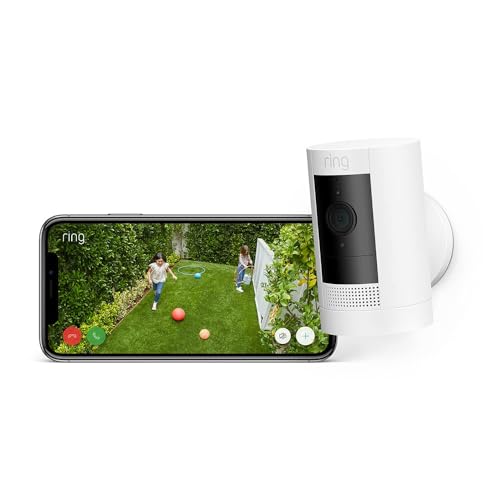
The Stick Up Cam Battery is Ring's do-anything camera and the best all-round outdoor pick on this list. It's fully wireless: charge the battery, mount it to a wall, fence post or eave, and it's watching within minutes - and because it's built for indoor or outdoor use, you can redeploy it as your needs change. Video is 1080p HD with night vision and two-way talk, motion zones in the Ring app stop footpath traffic from spamming your phone, and Ring sells a compatible solar panel accessory if you'd rather never think about charging again. If you already own the Ring doorbell above, both cameras live in the same app under the same plan, which is the tidiest path to a proper multi-camera setup in an Australian home. The same caveat as all Ring gear applies, though: a saved recording history needs a paid plan - without one you're limited to live view and alerts. At A$98, it's an easy camera to recommend.
Video
7.4
App
7.4
Power
7.8
Owners
8.1
Owners is the 4.5★ Amazon AU rating from 18,881 reviews, weighted toward the category average when there are few. Fewer than two published reviews of this exact model, so the owner rating carries that weight too. Tick marks show the category average.
How we scored it
Each measure is marked against the category's rubric, where 10 is the best you can buy, 8 is strong, 6 is basic but sound and 4 falls short. The bars show that mark on the Top7 scale (a 6 reads as 7.0, an 8 as 8.5); the notes quote the rubric mark.
Video 7.4 (rubric 6.5): 1080p with a 130-degree view; Tom's Guide found night vision good all round and the image about as clear as a typical consumer HD Wi-Fi camera, rating it 3.5/5.
App 7.4 (rubric 6.5): Tom's Guide praises a slick app with motion and privacy zones but lists no local storage and calls it useless without a subscription; recordings need a paid Ring plan.
Power 7.8 (rubric 7): Fully wireless with good battery life per Tom's Guide and a solar-panel accessory option per the card, but footage is cloud only and a plan is required to keep it.
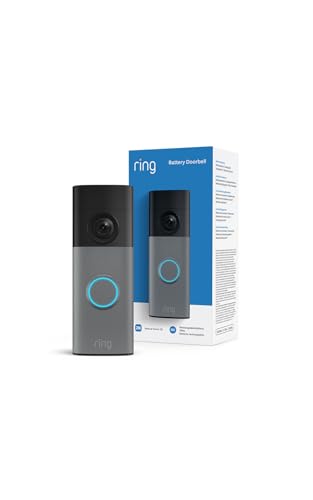
Ring has replaced the old HD battery doorbell with this 2K version, and Amazon AU has merged the two listings, so this is now the entry point to the range. The jump matters more than the spec sheet suggests: the head-to-toe field of view means a parcel left on the doormat is actually in frame rather than cropped off the bottom, and 6x Enhanced Zoom gives you a chance of reading a number plate or recognising a face at the gate instead of a smear of pixels. Everything that made the previous model the default first camera for Australian homes carries over. It is battery powered with no wiring, so renters can fit it beside the door with a bracket and take it with them; setup is charge, mount, pair in the app; and you get Live View, Two-Way Talk and motion alerts to your phone, plus Alexa door announcements on Echo devices. Recharging is USB-C via a removal tool, so the doorbell comes off the wall rather than the wall coming off the house. The honest caveat is unchanged and applies to the whole Ring line: without a paid Ring plan you get live view and real-time notifications but no saved recording history, so if reviewing footage after the fact matters to you, budget for the subscription on top. Reviews sit lower than the old model's because the 2K is newer and early buyers weight the score, so read the ratings as provisional rather than settled.
Video
8.1
App
7.4
Power
7.4
Owners
7.0
Owners is the 4.2★ Amazon AU rating from 6,012 reviews, weighted toward the category average when there are few. Fewer than two published reviews of this exact model, so the owner rating carries that weight too. Tick marks show the category average.
How we scored it
Each measure is marked against the category's rubric, where 10 is the best you can buy, 8 is strong, 6 is basic but sound and 4 falls short. The bars show that mark on the Top7 scale (a 6 reads as 7.0, an 8 as 8.5); the notes quote the rubric mark.
Video 8.1 (rubric 7.5): Provisional: 2K head-to-toe sensor and 6x Enhanced Zoom per the card, but night vision is not described and no review of this entry-level 2K model was found.
App 7.4 (rubric 6.5): Live view, two-way talk and motion alerts with Alexa announcements per the card, but no saved recordings or smart alerts without a paid Ring plan, and no local storage.
Power 7.4 (rubric 6.5): Battery unit with USB-C recharging via a removal tool per the card; the battery needs periodic recharging and every recording goes to Ring's cloud.
Pros
+ 2K head-to-toe view captures parcels on the doormat, not just the visitor
+ 6x Enhanced Zoom makes faces and plates at a distance actually legible
We researched the security cameras and video doorbells available on Amazon Australia, evaluating each on resolution and night vision, power options (battery, solar and wired), local versus cloud storage and the ongoing cost of any plan, app quality and alert accuracy, and value at AU retail prices. Cameras were matched to real jobs - front door, driveway, backyard - rather than headline megapixels, then scored across video quality, features, app & alerts and value. Prices are in AUD and refreshed regularly.
Scored on Video quality 35%, App alerts and storage 35%, Power and privacy 30%, plus owner ratings and critic reviews
Battery cameras install anywhere but need recharging every few months depending on how busy the camera is. Solar - built into the eufy picks, or via an accessory panel for Ring cameras - removes that chore almost entirely in the Australian climate. Plug-in cameras like the Reolink Lumus never need charging and never throttle features to save power, but need a powerpoint within reach. Choose based on where the camera is going, not the spec sheet.
Subscription or Not
This is the biggest hidden cost in the category. Ring and Nest store recordings in the cloud and need a paid plan for a proper recording history; eufy and Reolink record locally to on-camera storage or a microSD card at no ongoing cost. Add up the total over two years before you buy - a cheap camera plus a cloud plan can end up dearer than a pricier camera with free local storage.
Doorbell vs Camera
A video doorbell covers one thing brilliantly: the front door - visitors, couriers and parcel theft. An outdoor camera covers everything else: driveway, side gate, carport, backyard. Most homes eventually want one of each, so it pays to choose gear that shares an app - the two Ring picks here live in one app, as do the two eufy cameras - rather than juggling separate ecosystems.
Resolution & Night Vision
1080p is enough to see that something happened; 2K gives you the detail to see what - a face at the door or a numberplate at the kerb. Night performance matters more than daytime sharpness, because that's when you'll actually need the footage. Colour night vision (the Tapo) or a built-in spotlight (the Reolink) keeps usable colour in the frame where basic infrared drops to grainy black-and-white.
Renters & Installation
Every battery pick here installs without an electrician, and no-drill mounting options exist for most of them. Renters should still check the lease before putting screws in a wall, and apartment owners should check body-corporate rules before pointing anything at common property. Portability cuts both ways, too - easy for you to take when you move, so mount cameras out of easy reach.
Home security has quietly gone DIY in Australia. A category that once meant a monitored alarm contract and an electrician's invoice is now a battery camera you screw to the fascia, or a doorbell you fix beside the front door - installed in minutes, managed from your phone, and just as easy to take with you when you move. Battery and solar power have done most of the work here: renters, apartment dwellers and anyone unwilling to run cables can now cover the front door and driveway properly.
This list spans the whole spend, from the A$52 Ring Battery Video Doorbell - the most-reviewed security device on Amazon AU - through solar cameras that keep themselves charged, to the premium Google Nest Doorbell with its genuinely smart alerts. Every pick is available on Amazon AU, priced in AUD, and chosen for how it works on Australian homes and Australian Wi-Fi rather than overseas spec sheets.
One thing we're upfront about: subscriptions. Ring and Google Nest cameras only keep a proper recording history with a paid cloud plan - without one you mostly get live view and alerts. eufy and Reolink take the opposite approach, storing footage locally on the camera or a microSD card with no ongoing fees. Neither model is wrong, but the total cost over a couple of years can differ a lot, so every review below tells you which camp its camera sits in.
Security Cameras — Frequently Asked Questions
Do I need a subscription for a home security camera?+
It depends entirely on the brand. Ring and Google Nest cameras work without one, but you lose most of the point: Ring gives you live view and alerts only, and Nest keeps just a short window of recent clips - a proper recording history on either needs a paid plan. eufy and Reolink store footage locally (on the camera itself or a microSD card), so recording works in full with no ongoing fees. Work out the total cost over two years before buying, not just the sticker price.
Is it legal to point a security camera at the street or my neighbour's property in Australia?+
Surveillance laws vary by state and territory, so there's no single national answer - but the safe general rule is to aim cameras at your own property: your door, driveway and yard. Incidentally capturing a public footpath is generally accepted, but deliberately pointing a camera into a neighbour's windows or backyard can breach state surveillance-device laws, and recording audio is regulated more tightly than video in some states. Apartment owners should also check body-corporate bylaws before installing anything facing common areas. When in doubt, check the rules for your state.
Do battery security cameras work with solar panels?+
Yes, and Australia's climate is well suited to it. Some cameras have solar built in - the eufy SoloCam S220 and eufyCam C37 both have integrated panels - while others, like Ring's battery cameras, accept an accessory solar panel sold separately. A few hours of direct sun a day is typically enough to keep the battery topped up; a north-facing mount helps in the southern hemisphere, and heavy shade or a south-facing eave will mean occasional manual charging.
Will these cameras work on NBN Wi-Fi?+
Yes. Security cameras connect to your home Wi-Fi router, not to the NBN directly, so they work on any NBN plan - they use relatively little bandwidth, mostly upload. The real issue is Wi-Fi reach: the front door or back corner of the yard is often the weakest point of a home network. Check your phone's Wi-Fi signal at the intended mounting spot before you buy, and consider a mesh node or extender if it's marginal. Most cameras use the longer-range 2.4GHz band; the Reolink Lumus also supports 5GHz.
Can renters install security cameras and video doorbells?+
Mostly, yes - this list is deliberately renter-friendly. Battery doorbells and wireless cameras need no wiring or electrician, and no-drill mounting options exist for many of them, so you can avoid touching the wall at all. Check your lease before adding screws to render or brick, and note that apartment buildings may have body-corporate rules about cameras facing common property. The upside of DIY gear is that it all comes with you when you move.
Reference
After you've bought one
Owner's records for security cameras— the maker's support channels, Australian warranty, manual and firmware links, origin, and each product's ranking history here, including the picks we have retired.