As an Amazon Associate, top7.au earns from qualifying purchases. Product prices and availability are accurate as of the date/time indicated and are subject to change. Any price and availability information displayed on amazon.com.au at the time of purchase will apply.
Rankings re-checked weekly · Last re-checked 7 September 2026
·Prices updated daily·AI-assisted, run by Jaco Olwagen
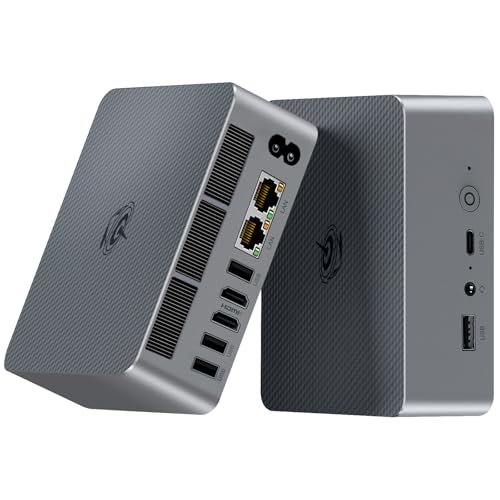
The A9 Max is GEEKOM's current flagship and the machine that takes over from the IT15 at the top of this list. The AMD Ryzen AI 9 HX 470 pairs 12 cores and 24 threads with a dedicated NPU for a combined 86 TOPS, which makes this a genuine Copilot+ PC and, more usefully, a box that will run local LLMs and Stable Diffusion without pinning the CPU. The Radeon 890M graphics are the real step up over the Intel Arc silicon in the old IT15: 16 RDNA 3.5 compute units put 1080p gaming in Cyberpunk 2077 and Baldur's Gate 3 genuinely within reach, and FSR gives you headroom on top. Memory is 32GB of socketed DDR5 upgradeable to 128GB, and the 2TB PCIe 4.0 SSD can be extended to 4TB across two M.2 slots. Connectivity is the most complete in this category - dual USB4 at 40Gbps with power delivery and display output, five USB-A 3.2 Gen2, dual HDMI 2.1, dual 2.5GbE, an SD 4.0 reader, Wi-Fi 7 and Bluetooth 5.4. The IceBlast cooling keeps it quiet in Balanced mode and the all-metal chassis still fits behind a monitor. It is the most expensive pick here, and the 3-year GEEKOM warranty is a large part of why we think it is worth it.
Performance
10
Build Quality
9
Connectivity
10
Value
8
Tick marks show the category average
Pros
+ Ryzen AI 9 HX 470 with 86 TOPS - runs local LLMs and image generation comfortably
+ Radeon 890M is a real 1080p gaming GPU, not just a display adapter
+ Dual USB4, dual 2.5GbE, Wi-Fi 7 and a 3-year warranty
Cons
− Easily the priciest mini PC here
− 32GB ships as either 1x32GB or 2x16GB - the single-module units lose a little iGPU performance
The Minisforum UM890 Pro pairs a Ryzen 9 8945HS with the one feature you won't find on the new GEEKOM A9 Max - OCuLink, which lets you wire up an external GPU dock at PCIe x4 speeds for genuine gaming or GPU-accelerated work without Thunderbolt's overhead. That's still the standout trick in the mini PC space and makes this the most expandable pick on our list. 32GB of DDR5 at 5600MHz and a 1TB PCIe 4.0 SSD provide plenty of headroom, dual 2.5G Ethernet ports cover networking enthusiasts and home-server duty, and quad display output via HDMI, DisplayPort 1.4, and USB-C handles multi-monitor setups. The chassis is compact and well-ventilated, though it runs warm under sustained loads. At $1,349, it sits well under the A9 Max while preserving that unique eGPU upgrade path. If your workload leans more on raw GPU power than the A9 Max's NPU, this is still the smarter buy.
Performance
10
Build Quality
9
Connectivity
10
Value
8
Tick marks show the category average
Pros
+ OCuLink port for external GPU - unique at this price
With the GEEKOM A8 gone from Amazon AU, the K8 Plus is the machine we would point most Australians at around the thousand-dollar mark. The Ryzen 7 8845HS gives you 8 cores and 16 threads boosting to 5.1GHz, which is comfortably enough for Office work, dozens of browser tabs, photo editing and light video work, and the Radeon 780M handles 1080p gaming in less demanding titles. Where it improves on the A8 it replaces is memory and expansion: 32GB arrives as two 16GB DDR5-5600 modules rather than 16GB in a single channel, so the integrated graphics actually get the bandwidth they need, and it is upgradeable to 128GB. The 512GB PCIe 4.0 SSD is the one place it gives ground - it is half what the A8 shipped with - but the slot takes up to 8TB and NVMe drives are cheap. The OCuLink port is the headline feature at this price: it is a direct PCIe link for an external graphics card, and it was the one thing the old A8 could not do. Dual 2.5GbE, Wi-Fi 6E, dual USB4 and quad 8K display output round it out, and three BIOS-selectable power modes let you trade fan noise for performance. It is sold by GMKtec's Australian storefront with Amazon fulfilment.
Performance
9
Build Quality
9
Connectivity
9
Value
9
Tick marks show the category average
Pros
+ 32GB in dual channel - noticeably better iGPU performance than single-channel rivals
+ OCuLink port takes an external GPU, rare at this price
+ Three power modes, from a 35W silent profile to 65W performance
Cons
− 512GB SSD is stingy for the money - budget for an upgrade
− Radeon 780M is a step behind the 890M in the A9 Max
The GEEKOM A6 leans on the one thing budget mini PCs from unknown brands can't offer: a track record. GEEKOM has been building compact desktops for years, and the A6 shows the polish - a solid aluminium-topped chassis, quiet cooling and Windows 11 Pro pre-installed. The AMD Ryzen 7 6800H (8 cores, 16 threads, 4.7GHz boost) is a genuinely capable chip that handles multi-app workloads, 4K playback and light photo/video editing without complaint, and GEEKOM rates it ahead of the newer Ryzen 5 7640HS. Connectivity is the standout: dual USB4 ports drive external GPUs or 8K displays, and the machine pushes four independent 4K screens at once - rare at this price. The 16GB of DDR5 is upgradable to 96GB and the 1TB PCIe SSD leaves room to grow. At around $729 it isn't the cheapest way to get Ryzen 7 performance, but with 4.2 stars across dozens of Australian reviews and GEEKOM's warranty behind it, it's the value pick you can actually trust to still be supported next year.
Performance
8
Build Quality
8
Connectivity
9
Value
8
Tick marks show the category average
Pros
+ Established GEEKOM brand with real Australian reviews and warranty support
+ Dual USB4 and quad 4K display output - premium connectivity for the price
+ 16GB DDR5 upgradable to 96GB, 1TB PCIe SSD
Cons
− Ryzen 7 6800H is last-gen - newer chips are faster per watt
− 16GB base RAM where some rivals ship 32GB
− Integrated Radeon 680M is fine for casual use, not serious gaming
The KAMRUI Hyper H1 punches well above its price by pairing AMD's Ryzen 7 7735HS - eight cores, sixteen threads, boosting to 4.75GHz - with 16GB of LPDDR5 memory and a 512GB NVMe SSD. That is a genuine desktop-class chip rather than the entry-level N-series silicon most budget mini PCs settle for, so it handles heavy multitasking, photo editing and light video work without complaint. Radeon 680M graphics are good enough for older titles and esports at 1080p. Connectivity is generous for the money: triple-screen output over HDMI, DisplayPort and USB-C, Wi-Fi 6 and Bluetooth 5.2, and enough USB ports to run a full desk setup without a hub. Windows 11 Pro comes pre-installed and activated. Memory and storage are both user-upgradeable, so the machine has room to grow. If you want real Ryzen 7 performance in a box that fits behind a monitor and still lands under A$700, this is the pick.
Performance
8
Build Quality
8
Connectivity
9
Value
9
Tick marks show the category average
Pros
+ Ryzen 7 7735HS is a genuine 8-core desktop-class chip, not entry-level N-series
+ 16GB LPDDR5 and 512GB NVMe included, both user-upgradeable
+ Triple 4K display output plus Wi-Fi 6 and Bluetooth 5.2
Cons
− Radeon 680M graphics suit esports, not modern AAA titles
− Sold by a third-party seller rather than Amazon AU directly
Beelink has earned a reputation as one of the most reliable mini PC brands, and the EQR7 shows why. The AMD Ryzen 7 7735HS is a capable 8-core/16-thread processor that handles productivity, media consumption, and light creative work with ease - and the HS-class chip runs at a higher power ceiling than the 7735U variant, so sustained workloads hold their clocks for longer. This configuration pairs it with 24GB of LPDDR5 RAM and a 500GB PCIe NVMe SSD - enough for a smooth daily-driver experience and fast app loading, with room for your core files. Dual 2.5G Ethernet, Wi-Fi 6, and Bluetooth 5.2 tick all the connectivity boxes, and dual display output via HDMI handles most desk setups. It won't match the Zen 4+ efficiency of newer chips like the GEEKOM A8, but as a quiet, dependable mini PC for office and home use it represents genuine value from a brand people trust. Note it ships from Amazon US, so allow extra delivery time.
Performance
9
Build Quality
9
Connectivity
8
Value
9
Tick marks show the category average
Pros
+ Reliable 8-core Ryzen 7 7735HS for everyday productivity
The KAMRUI P1 takes this slot from the BOSGAME E4 after that listing went unavailable on Amazon AU, and it is the better buy anyway on storage alone. The AMD Ryzen 3 3300U is an older quad-core chip, but with Radeon Vega graphics it stays comfortably ahead of the Intel N95 and N150 processors that dominate this price band - the difference shows up as app responsiveness and in how many browser tabs you can leave open before the machine starts swapping. 16GB of DDR4 is generous here and upgradeable to 64GB, and the 1TB NVMe SSD is twice what most budget mini PCs ship with, which matters if this is going to be a media box or a small file server. Windows 11 Pro is included rather than Home, so Remote Desktop and BitLocker are available out of the box. Connectivity is the strong suit: triple 4K@60Hz display output over HDMI, DisplayPort and USB-C, gigabit Ethernet, dual-band Wi-Fi, Bluetooth and a VESA mount so it can hide behind a monitor. The compromises are honest ones at this price - Zen+ architecture rather than a current Ryzen, DDR4 not DDR5, and no Wi-Fi 6 - and none of them stop it being a genuinely usable Windows desktop for home, study or light office work.
Performance
6
Build Quality
7
Connectivity
8
Value
9
Tick marks show the category average
Pros
+ 16GB RAM and a full 1TB NVMe SSD for under A$450
+ Triple 4K@60Hz display output over HDMI, DisplayPort and USB-C
+ Windows 11 Pro included, RAM upgradeable to 64GB
We researched over 20 mini PCs available on Amazon Australia, evaluating CPU benchmarks, RAM and storage configurations, thermal performance, port selection, and build quality. Each machine was assessed for its intended use case - from basic office tasks to content creation - and scored across four categories. Products were ranked based on performance, build quality, value at Australian retail prices, and verified user reviews.
Scored 0–10 on Performance, Build Quality, Connectivity, Value
For basic office work, web browsing, and streaming, an Intel N95 or N150 processor with 8–16GB RAM is plenty. For productivity, photo editing, and light gaming, look for AMD Ryzen 5 or Ryzen 7 with 16–32GB RAM. For serious content creation, video editing, or software development, step up to a Ryzen 9 with 32GB DDR5 and a fast NVMe SSD.
RAM and Storage
16GB RAM is the minimum for comfortable multitasking in 2026. Budget machines with 12GB will feel the pinch with lots of browser tabs. For storage, 500GB NVMe SSD is a good starting point - check whether the machine has a second M.2 slot for future expansion. DDR5 RAM is preferable to DDR4 for newer processors.
Display Outputs and Ports
Check how many monitors you need to run. Most mini PCs support dual displays via HDMI and DisplayPort or USB-C, but some budget models only have dual HDMI. Look for USB-C with DisplayPort Alt Mode for flexibility. Also check for USB 3.2 ports, Ethernet (2.5G is a nice bonus), and Wi-Fi 6 or 6E.
Size and Mounting Options
Most mini PCs are small enough to mount behind a monitor with a VESA bracket - check if one is included. Fanless designs run silently but may throttle under heavy load. If noise matters (bedroom or lounge room), look for models with low-noise fans or passive cooling.
Operating System
Most mini PCs ship with Windows 11 Pro or Home. Windows 11 Pro is worth the premium if you need BitLocker encryption, Remote Desktop, or domain joining for work. Some machines ship without an OS - great if you're running Linux, but factor in a Windows licence cost otherwise.
Mini PCs have gone from niche curiosity to genuine desktop replacement in the past couple of years. Whether you're setting up a clean home office, building a media centre for the lounge room, or just sick of a massive tower taking up desk space, there's a compact machine that'll handle whatever you throw at it.
The sweet spot right now sits in the $600–$1,000 range, where AMD Ryzen 7 machines deliver serious productivity and light gaming performance in a box smaller than a sandwich. At the budget end, Intel N95-based machines around $300–$500 are brilliant for basic office work, web browsing, and streaming. And for power users, Ryzen 9 machines with 32GB DDR5 push into genuine content-creation territory.
We've verified every product on this list for availability on Amazon Australia, cross-checked performance claims against published benchmarks, and priced everything in AUD. These are all compact enough to mount behind a monitor or tuck away on a shelf.
Found this useful? Share it with fellow Aussies.
Share:
Weekly AU tech deals, in your inbox
We check prices on every product we cover daily. Once a week we send the biggest genuine price drops we spot - the ones worth your attention.