17 August 2026 · Tablets · AI-assisted · published by Jaco Olwagen · How we rank
Best Drawing Tablet Australia 2026 - 7 Picks From A$40 to A$999
Best drawing tablet Australia 2026: 7 picks with live Amazon AU prices, from a A$40 XPPen Deco to the Huion Kamvas 16 Gen 3, and what is actually in stock.
Last updated: 17 August 2026. All prices in AUD, pulled from live Amazon AU listings on the day of writing. Prices move around a lot in this category, so check before you buy.
Buying the best drawing tablet in Australia in 2026 is a weirder job than it looks. Every global review site opens with the same line, that Wacom is the safe default, and then you go to Amazon AU and find that half the Wacom range is either delisted or sitting there with no seller attached. What actually ships to an Australian address, at a sane price, in a week, is mostly Huion and XPPen. That is not a downgrade story either. Those two have quietly closed the gap on pen feel and driver stability, and they undercut Wacom by a lot. If you want the wider picture on screens you draw on versus screens you carry, our tablets category is the place to start.
The other thing nobody tells you up front: the single biggest decision is not brand. It is whether you want a screen or not. A screenless pen tablet is a slab you draw on while looking at your monitor, which sounds impossible and takes about a fortnight to click, and then never bothers you again. A pen display puts the artwork under the nib, feels natural on day one, and costs four to ten times as much. Get that call right and the rest is detail. If you are also shopping for the monitor you will be staring at, our monitors category and the budget 4K monitor guide pair well with a screenless tablet.
Quick Picks - Top 3 Drawing Tablets in Australia
| Product | Best For | Price (AUD) |
|---|---|---|
| Huion Inspiroy 2 Medium | Best overall for most people | ~A$110 |
| XPPen Deco 640 | Cheapest honest way in | ~A$40 |
| Huion Kamvas 16 (Gen 3) | Best pen display, draw on the screen | ~A$799 |
How we picked the best drawing tablet Australia 2026 has actually got in stock
Every ASIN in this guide was checked against a live Amazon AU listing on 17 August 2026. That matters more than usual here. In the process of writing this we found the Wacom Intuos Pro Medium delisted from Amazon AU entirely, the Wacom One 13 Touch listed but with no live price, and two XPPen Artist pen displays gone. Those are the exact models the big international guides tell you to buy. So the shortlist below is not the theoretical best drawing tablet in the world. It is the best you can actually put in a cart from an Australian address today, which is a more useful list to have.
We have not physically tested these units. What follows is built from published manufacturer specs, live Amazon AU pricing, and the patterns that come up over and over in owner reviews. Where something is a known common complaint, we say so.
1. Huion Inspiroy 2 Medium - best drawing tablet for most Australians
 Huion Inspiroy 2 MediumCheck Price
 About A$110 on Amazon AU. This is the one we would hand to nine out of ten people who ask.
You get a 9 x 5 inch active area, which is the sweet spot for a 16:9 or 16:10 monitor, eight programmable keys, a scroll wheel, and Huion's battery free PW517 style pen with 8192 pressure levels and 60 degree tilt. The pen never needs charging because it draws power from the tablet surface itself, which is one of those small things you stop noticing and would hate to lose.
The good: the price. A hundred and ten bucks for a tablet with tilt, a proper wheel, and a genuinely low profile 8mm body is the kind of value that used to take a sale to reach. The build does not feel like a hundred and ten bucks either. Huion moved to a matte surface that has a bit of tooth to it, close enough to cartridge paper that you go through nibs slower than the old glossy models.
The trade-off: the drivers. Huion has got a lot better here and most people install once and forget, but if you are on a Mac and you live in Clip Studio Paint or Photoshop, expect one afternoon of fiddling with permissions and driver versions. It is a one off tax, not a daily one, but it is real and it is the honest reason Wacom still charges a premium.
Worth knowing: there is a 10 x 6 inch Large at about A$140 and a 6 x 4 inch Small at about A$90. Bigger is not automatically better. A large tablet means bigger arm movements for the same stroke, which is great for loose gestural line work and annoying if you are doing fiddly icon work at a cramped desk.
2. XPPen Deco 640 - cheapest way to find out if you even like this
 XPPen Deco 640Check Price
 About A$40. Roughly the cost of two rounds and a parma.
The Deco 640 is a 6 x 4 inch slab with no express keys, a battery free X3 stylus, and 16384 pressure levels, which is a spec number that is frankly more than anyone needs but there it is. It is 3mm thick and weighs about 170 grams, so it lives in a laptop sleeve without you noticing.
The good: at forty dollars, the question "do I actually want to draw digitally, or do I just like the idea of it" gets answered for the price of a takeaway dinner. It is also the standard recommendation for osu! players and for anyone who just wants better handwriting in OneNote or annotated PDFs, where express keys are irrelevant.
The trade-off: no shortcut keys at all, and a small active area that will feel cramped the moment you get serious. There is no bundled stand and the cable is fixed length. This is a starter and a scratchpad, not a tool you grow into.
If you would rather spend a touch more for shortcut keys at the entry level, the Huion Inspiroy H640P at about A$49 adds six programmable buttons for nine dollars more, and it is the better buy for almost everyone who is not specifically playing rhythm games.
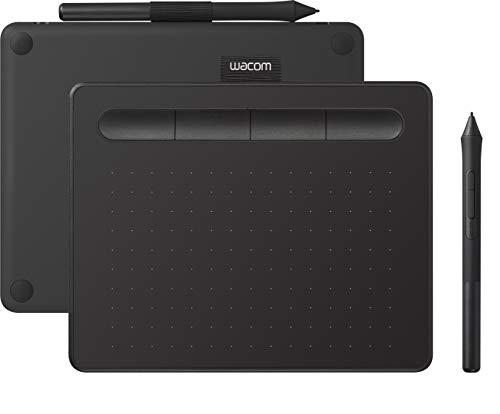
3. Wacom Intuos Small (CTL-4100) - the Wacom option, if the name matters to you
 Wacom Intuos Small (CTL-4100)Check Price
 About A$94 on Amazon AU for the CTL-4100 in black.
Let us be straight about this. On paper the Intuos Small loses to the Huion. Four thousand pressure levels instead of sixteen thousand, no tilt support on the base model, a smaller active area, four express keys. And it costs the same as the Inspiroy 2 Small.
The good: Wacom's drivers. Twenty odd years of them. If you are on a work machine you cannot freely install things on, if you are a student whose course notes assume Wacom, or if you simply do not want to spend an afternoon troubleshooting, you are buying support and predictability, and that is a legitimate thing to buy. The bundled creative software downloads are a decent sweetener for a beginner too. The pen is battery free and Wacom's nibs are stocked at physical stores like Officeworks and JB Hi-Fi, which is handy when you chew through one on a Sunday.
The trade-off: you are paying a brand tax for older hardware. Pressure levels above about 2048 are largely academic in practice, so do not lose sleep over that number, but the missing tilt is a real functional gap if you want brush behaviour that responds to pen angle. The Wacom Intuos S variant sits around A$116 and is the same basic proposition.
The bigger Wacom problem in Australia: the Intuos Pro line, which is the one professionals actually use, has largely vanished from Amazon AU. If you want an Intuos Pro you will be going through a specialist retailer or Wacom direct, and paying the thick end of five hundred dollars for it.
4. Huion Kamvas 13 (Gen 3) - the cheapest pen display worth owning
 Huion Kamvas 13 (Gen 3)Check Price
 About A$419. This is where you cross from "drawing blind" to drawing on the picture.
The Kamvas 13 Gen 3 is a 13.3 inch 1080p fully laminated display with 99% sRGB coverage, dual dials, PenTech 4.0 with 16384 pressure levels, and Huion's anti sparkle Canvas Glass. Full lamination is the spec to care about: it means there is no air gap between the glass and the panel, so the cursor sits directly under your nib instead of hovering a millimetre away like a badly aligned print. Cheap pen displays skip this and it is immediately obvious.
The good: at just over four hundred dollars this is the honest entry point for a screen you draw on. The dual dials are properly useful once you assign brush size to one and canvas rotation to the other. Thirteen inches is portable enough to take to a class or a cafe.
The trade-off: 1080p across 13.3 inches is fine but not sharp, and you will notice pixel edges on fine line work if you zoom in habitually. It also needs a computer, plus power, plus a video connection, so the cable situation on your desk gets worse. Check your laptop supports USB-C DisplayPort alt mode before you buy, otherwise you are on the three in one HDMI cable and a spare power point.
5. Huion Kamvas 16 (Gen 3) - best pen display in Australia right now
 Huion Kamvas 16 (Gen 3)Check Price
 About A$799, and the one we would buy if this were going to be a daily tool.
15.8 inches, 2.5K QHD, fully laminated, 99% sRGB, anti sparkle etched glass, dual dials, and the newer PW600L pen with the HV200 chip. The jump from 1080p to 2.5K at this size is the single most noticeable upgrade in this whole guide. Line work stops looking approximate.
The good: it is the size most people settle on. Sixteen inches gives you room for a canvas plus a couple of docked palettes without squinting, and it still fits on a normal desk in front of a monitor. Dual USB-C ports means that with a modern laptop you can genuinely run it on one cable, which sounds minor until you have wrestled a three headed HDMI octopus behind a desk.
The trade-off: eight hundred dollars is real money, and a pen display is a commitment to a desk. It is not a device you casually pick up on the couch. Colour is good but 99% sRGB is a consumer target, not a print production one.
If colour accuracy is the actual job, the Huion Kamvas Pro 16 Plus 4K sits around A$630 with a 4K panel and 145% sRGB coverage, which is a wider gamut than the Gen 3 at a lower price. The catch is that it is an older generation pen and an older chassis, so you trade the newer pen tech and dual dials for the better panel. For illustration, take the Gen 3. For photo retouching and print work, the Pro 16 Plus is the smarter A$630.
6. Huion Kamvas Pro 16 Plus 4K - the colour accuracy pick
 Huion Kamvas Pro 16 Plus 4KCheck Price
 About A$630. Covered above as the alternative to the Kamvas 16 Gen 3, but it deserves its own line because the value is unusual: a 15.6 inch 4K UHD panel with 145% sRGB and full lamination for less than the 2.5K model costs. If your work ends up printed, or you are grading photos and video as often as you are drawing, the panel matters more than the pen generation and this is the one to get. Pair it with a decent second screen from our portable monitor guide if you work away from the desk.
7. XPPen Magic Drawing Pad 12.2 - the standalone one, with a price warning
 XPPen Magic Drawing Pad 12.2Check Price
 Listed around A$1,000 on Amazon AU at the time of writing, and that is the problem.
The Magic Drawing Pad is a genuinely interesting device. It is a 12.2 inch Android tablet built specifically for drawing, with a 2160 x 1440 paper textured screen, 109% sRGB, the X3 Pro battery free stylus with 16384 pressure levels, 8GB of RAM, 256GB of storage and an 8000mAh battery rated to around thirteen hours. No computer, no cables, draw on the train. It is the closest thing to an iPad for artists that is not an iPad, and it ships with proper drawing software rather than asking you to subscribe to something.
The good: total freedom from a desk, a pen that never charges, and a matte screen that does not fight you under a window. As a sketchbook replacement it is lovely.
The trade-off: the Amazon AU price is well above XPPen's own list price for this device, so the listing at a thousand dollars is not a good deal. Check XPPen's own Australian pricing before you commit, because at A$1,000 you are within reach of an iPad plus Apple Pencil, which has a vastly deeper app ecosystem. At its proper price it is a strong recommendation. At this one it is a "know what you are paying for" purchase. If a tablet that does everything is closer to what you want, our best tablet guide covers that ground.
Screenless or pen display? The only question that matters
| Screenless pen tablet | Pen display | |
|---|---|---|
| Price in AU | A$40 to A$140 | A$419 to A$800+ |
| Learning curve | 1 to 2 weeks of feeling stupid | Basically none |
| Desk footprint | Slides in a drawer | Permanent resident |
| Cables | One USB | Video plus power plus data |
| Neck and posture | Better, you look straight ahead | Worse, you look down |
| Best for | Photo editing, retouching, learning, budget | Illustration, inking, anyone who has bounced off a screenless tablet |
The honest advice: if you have never drawn digitally, buy a screenless tablet under A$120 first. Most people adapt inside a fortnight, and the ones who do adapt often prefer it, because you sit up straight and look at a good monitor instead of hunching over a small mediocre one. If you have already tried a screenless tablet and hated it, do not try again. Go straight to a pen display, you will not change your mind.
What about an iPad?
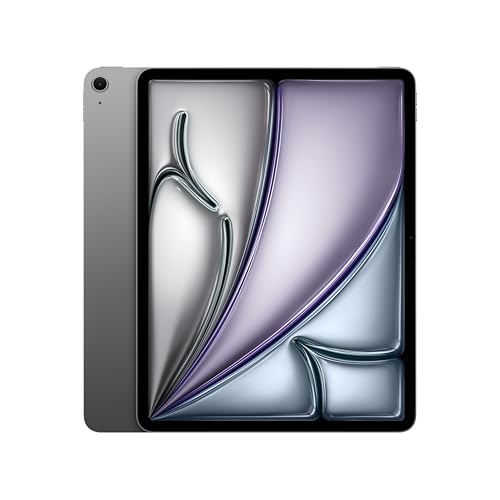
Fair question, and a lot of Australian artists land there. An iPad plus Apple Pencil gives you Procreate for about seventeen dollars once, which is the best value in the entire digital art world, and the tablet does everything else in your life as well. The catch is that it is a closed loop. You cannot use it as your main Photoshop or Clip Studio machine, and if your workflow already lives on a desktop, an iPad becomes a second device to sync with rather than a tool that plugs into what you have. A A$419 Kamvas 13 hooked to the computer you already own is often the cheaper and less fiddly answer. Our tablet guide for uni students goes deeper on the iPad side if that is the direction you are leaning.
Buying notes for Australian shoppers
Check the seller, not just the price. Drawing tablets on Amazon AU are frequently listed by third party sellers at wild markups, and the same model can swing two hundred dollars in a week. If a price looks odd against the numbers in this guide, it probably is.
Nibs are consumable. Every tablet here ships with spares, usually ten to twenty. A heavy user goes through them in months. Huion and XPPen replacement nibs are cheap and on Amazon AU. Wacom nibs are also stocked in physical stores, which is the small practical advantage of the brand tax.
Confirm your ports before buying a pen display. A single USB-C connection only works if your machine supports DisplayPort alt mode over that port. Plenty of budget Windows laptops do not. Check before you order, not after.
Australian consumer guarantees still apply. Regardless of what a manufacturer warranty card says, goods sold here have to be of acceptable quality and fit for purpose. A pen display that develops dead pixels or a failing pen inside a reasonable period is a warranty claim, and buying through Amazon AU rather than an overseas grey import keeps that simple.
The verdict
For most people the answer to the best drawing tablet Australia 2026 question is the Huion Inspiroy 2 Medium at about A$110. It has tilt, a wheel, eight keys and a good surface, it costs less than a night out, and it is enough tablet to carry you well past beginner. Spend A$40 on the XPPen Deco 640 instead if you genuinely just want to find out whether digital drawing is your thing.
If you already know you want to draw on the screen, the Huion Kamvas 16 (Gen 3) at A$799 is the best pen display you can reliably buy in Australia right now, with the Kamvas 13 (Gen 3) at A$419 as the sensible smaller version and the Kamvas Pro 16 Plus 4K at A$630 as the pick if colour accuracy pays your bills.
More gear reading
A drawing tablet is one part of a creative setup. If the machine behind it is the weak link, our best laptop for video editing guide covers the specs that also matter for large canvases and heavy brush work. For the screen you will be staring at all day, start with the budget 4K monitor picks or the full monitors category. If a paper feel matters more to you than colour, the best e ink tablet guide is a different but related answer. Or browse the full tablets and laptops categories to build the rest of the desk.
Top Picks - Check Latest Prices

See Our Top 7 Tablets for Australia
Hand-picked and ranked by our editors — with honest pros, cons, and Aussie pricing.
More Tablets Reading
Best E-Ink Tablet Australia 2026: The Digital Notebooks Worth Your Money
The best e-ink tablet Australia has in 2026, from the reMarkable Paper Pro to the Kindle Scribe and BOOX Note Air 4 C. Prices, picks and honest trade-offs.
Best Tablet Australia 2026: 6 Picks From a $329 Android to the M5 iPad Pro
Best tablet Australia 2026: six picks from a $329 Galaxy Tab to the M5 iPad Pro, with Amazon AU prices, who each one suits, and the catches worth knowing.
Best Tablet for Uni Students in Australia (iPad vs Android, 2026)
iPad or Android tablet for Aussie uni students? We break down the best options at every budget so you pick the right one for your degree.
Weekly AU tech deals, in your inbox
We check prices on every product we cover daily. Once a week we send the biggest genuine price drops we spot - the ones worth your attention.
- One email a week, max
- No spam, ever
- Unsubscribe in one click