13 May 2026 · Monitors · AI-assisted · published by Jaco Olwagen · How we rank
Best Portable Monitor Australia 2026: 7 Picks for Laptops, Gaming and Travel
The best portable monitor in Australia for 2026 - ASUS, INNOCN, AOC, Arzopa, UPERFECT and Verbatim compared with current AUD pricing and Amazon AU availability.
Best Portable Monitor Australia 2026: What's Actually Worth Plugging Into
The portable monitor went from a niche product for travelling consultants to a permanent fixture on millions of Australian desks somewhere around the second year of hybrid work. Drag a 15-inch USB-C screen out of your laptop bag at a Melbourne cafe and nobody blinks anymore. The good ones weigh less than a Surface Pro, run off a single cable, and turn a 13-inch MacBook into a proper two-screen workstation for under $300. This guide ranks the best portable monitor picks in Australia for 2026, with prices in AUD and live Amazon AU stock. For the full desk picture, our monitors rankings covers everything from budget 1080p panels to 4K OLEDs.
Portable monitors split roughly into three jobs: a second screen for your laptop when you're working remotely, a travel display for a small PC or console, and a flexible secondary screen that lives in your bag. The picks below cover all three. If you're more interested in a fixed home setup, our best home office monitor guide and our best budget 4K monitor picks are more useful starting points.
Quick Picks - Top 7 Portable Monitors Australia 2026
| Monitor | Best For | Resolution | Price (AUD) |
|---|---|---|---|
| ASUS ZenScreen MB16ACV | Best overall | 15.6" FHD | ~$257 |
| INNOCN 15.6" OLED | Best OLED for creatives | 15.6" FHD OLED | ~$549 |
| UPERFECT 15.6" Touchscreen | Best touchscreen | 15.6" FHD Touch | ~$220 |
| AOC 16T20 | Best budget pick | 15.6" FHD | ~$130 |
| Arzopa Z1FC | Best for gaming (144Hz) | 16.1" FHD 144Hz | ~$170 |
| Arzopa Z1RC | Best 2.5K productivity | 16" 2560x1600 | ~$240 |
| Verbatim Portable Monitor 14" | Best ultra-portable | 14" FHD | ~$173 |
What to Look For in a Portable Monitor
Spec sheets on portable monitors look almost identical at a glance. The differences that actually matter when you're using one day to day:
- USB-C with power delivery in a single cable. This is the make-or-break feature. A modern portable monitor should run off a single USB-C cable from a laptop that puts out at least 15W. If your machine doesn't, you'll need a model with a separate power input or a USB-A fallback. Older MacBook Pros, M1/M2/M3 Airs, and most recent Windows ultrabooks handle this without a hitch.
- Brightness. 250 nits is the floor; 300 nits is comfortable indoors; anything below 250 will look washed out in a sunny cafe. Don't bother trying to use a portable monitor outdoors in direct Australian sun, no matter what the brightness rating claims.
- Panel type. Stick to IPS or OLED. TN panels still show up in the cheapest models and look dreadful off-axis - skip them. OLED gives you proper blacks and saturated colour but costs roughly double.
- Refresh rate. 60Hz is fine for work. If you're plugging in a Switch, PS5, or gaming laptop, a 120Hz or 144Hz panel makes a real difference. Anything above 144Hz is overkill on a 15-inch screen at 1080p.
- Built-in stand vs case-stand. Kickstand-equipped models like the Arzopa Z1FC and the ASUS ZenScreen Go are quicker to set up than smart-cover models, but they're slightly thicker. For frequent travel, the smart-cover approach is more durable.
- Resolution. 1080p is the default and looks sharp on a 14-15 inch panel. 2.5K (2560x1600) is worth the extra spend if you're doing serious work or editing; 4K on a 15-inch panel is impressive but you'll need to scale the UI anyway.
Best Portable Monitors Australia 2026 - Full Reviews
1. ASUS ZenScreen MB16ACV - Best Overall
 ASUS ZenScreen MB16ACVA$277.84Check Price
 If you only want one pick, take the ASUS ZenScreen MB16ACV. It hits the sweet spot for build quality, image, and reliable single-cable USB-C connection at a price that doesn't take the piss for what you get. The 15.6-inch IPS panel runs at 1920x1080, peaks at 250 nits with a flicker-free, blue-light-filtered surface that's easy on the eyes for an eight-hour day, and the anti-glare coating cuts reflections in a way the glossy panels on cheaper models do not.
The Hybrid Signal connection is the bit that matters in practice: plug a single USB-C cable into a modern MacBook, Surface, or Dell XPS and the screen lights up. No second power cable, no driver software, no fiddling. If your laptop is older or only has USB-A, ASUS bundles a USB-A to USB-C cable that uses ASUS's DisplayLink-style driver to push video over USB-A. Slower refresh and slightly higher CPU load, but it works.
The smart cover doubles as a stand in two angles - portrait or landscape. Anti-bacterial treatment on the surface is a nice touch for shared desks. Pricing on Amazon AU has come down since launch and now sits around $257 AUD; JB Hi-Fi and Officeworks carry it too.
The good: Reliable single-cable USB-C. Anti-glare IPS panel. Trusted brand with a real Australian warranty. Smart cover with two stand angles.
The trade-off: 250 nits is fine indoors but tight in bright environments. No touch, no battery.
Available on Amazon AU, JB Hi-Fi, and Officeworks. ~$257 AUD.
2. INNOCN 15.6" OLED - Best OLED for Creatives
 INNOCN 15.6" OLEDCheck Price
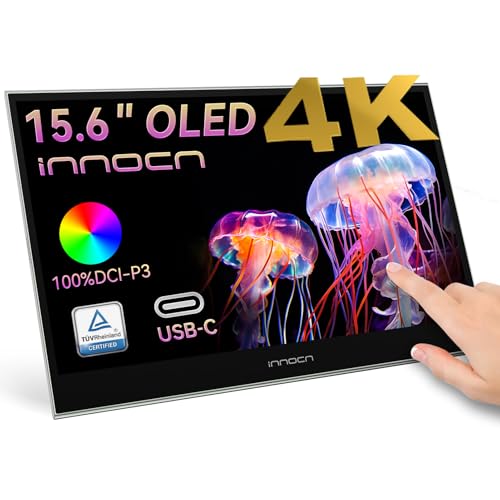
 The INNOCN 15.6-inch OLED is the portable monitor to look at if colour accuracy and contrast matter more than saving $300. The 15.6-inch OLED panel hits 100% DCI-P3, a 100,000:1 contrast ratio, and proper inky blacks - the sort of image that looks unbelievable next to an IPS screen sitting beside it. For Lightroom edits, video colour grading, or just watching something on a flight, OLED on a portable display is a genuine upgrade.
1ms response time and HDR support make it a credible gaming option as well, particularly for plugging into a Switch or PS5 in a hotel room. Two USB-C ports (one for power, one for signal) and a mini HDMI cover most input options. The detachable stand is a sensible touch - flat-pack the screen for travel and pop the stand back on at the desk.
Note that the exact INNOCN OLED model on Amazon AU has changed since we first published this guide - the 15A1F we originally picked is no longer listed. The current 15.6-inch OLED in its place keeps the same panel characteristics and the same rough price, around $549 AUD. That is roughly double what the IPS picks cost, but you get a panel quality that no IPS portable currently matches.
The good: Genuine OLED with 100% DCI-P3 colour. 1ms response. HDR support. Detachable stand.
The trade-off: Some users report brightness resets at very high settings - keep it below 80% for stability. Glossy panel shows reflections.
Available on Amazon AU. ~$549 AUD.
3. UPERFECT 15.6" Touchscreen - Best Touchscreen
 UPERFECT 15.6" TouchscreenA$219.99Check Price
 A quick note on what changed here, because it matters if you read this guide earlier in the year: we previously gave this slot to the espresso Display 15 Touch V2. espresso is a Sydney company and the hardware is still excellent, but it is no longer listed on Amazon AU. If the Australian-design angle is what you were after, buy it direct from espresso rather than chasing a marketplace listing. For everyone shopping on Amazon, the UPERFECT 15.6-inch touchscreen is now the sensible touch pick, and at around $220 AUD it costs a third of what the espresso did.
You get a 15.6-inch 1080p IPS panel with a matte finish, which is the right call on a touchscreen - glossy touch panels turn into mirrors the moment you tilt them, and they collect fingerprints you will spend your life wiping off. Ten-point touch works as a plain USB HID device on Windows, so there is no driver to install. On macOS you get the display but not the touch layer, which is a limitation of macOS rather than the monitor.
The built-in adjustable stand is the real differentiator against cheaper touch panels. Rather than a folding smart cover that only gives you two fixed angles, this one hinges through a wide range and holds position when you prod the screen. That sounds minor until you try to use a touchscreen propped on a flimsy cover and it tips backwards every time you tap something.
The good: Matte touch panel that resists fingerprints and reflections. Sturdy adjustable stand that survives being poked. Driver-free ten-point touch on Windows. A third of the price of the premium touch options.
The trade-off: No touch support on macOS. 1080p only. A generic brand rather than a name with established Australian warranty support, so keep your receipt and rely on your ACL rights.
Available on Amazon AU. ~$220 AUD.
4. AOC 16T20 - Best Budget Pick
 AOC 16T20A$150.47Check Price
 If $257 is more than you want to drop on a second screen, the AOC 16T20 is the budget pick that punches well above its price - and unlike the Arzopa A1 Gamut we used to recommend in this slot (now delisted from Amazon AU), it comes from a monitor brand that has been in the Australian market for years. A 15.6-inch IPS panel at 1920x1080, two USB-C ports plus mini HDMI, and a premium smart cover, for around $130 AUD.
It is an honest little screen. The bezels are not as slim as the ASUS, the built-in speakers are useful in emergencies but you would not watch a film on them, and there is no height-adjustable stand. None of that matters when you are using it for a Trello board, a second monitor for spreadsheet work, or as a Switch screen at a mate's house. It pairs nicely with our best laptops under $1000 picks for a sub-$1100 dual-screen setup.
The dual USB-C arrangement is the part worth paying attention to at this price: one port takes power, the other takes signal, so a laptop that only puts out 5W over USB-C can still drive it with a phone charger plugged into the second port. Cheaper panels often force you into a fiddly USB-A plus HDMI arrangement instead.
The good: Genuinely cheap. Established monitor brand with Australian distribution. Two USB-C ports for flexible power and signal. Smart cover included.
The trade-off: Speakers are weak. 60Hz and 1080p only. Cover-style stand rather than a proper hinge.
Available on Amazon AU. ~$130 AUD.
5. Arzopa Z1FC - Best for Gaming
 ARZOPA Z1FC 16.1" 144HzA$169.99Check Price
 Plugging a Switch or PS5 into a portable monitor used to be a compromise - 60Hz panels with grim response times that made fast-paced games feel like wading through treacle. The Arzopa Z1FC changed that conversation. A 16.1-inch IPS panel at 1920x1080 running at a genuine 144Hz, 100% sRGB, HDR support, all in a 0.3-inch slim chassis with a built-in kickstand.
For a PS5 player who wants a screen in their bedroom that isn't the loungeroom TV, this is the cheap-and-cheerful answer. The kickstand sets up in three seconds, the bezels are slim enough that it doesn't feel cramped, and the panel keeps up with 120fps modes in games like Spider-Man 2 and Call of Duty. Pair it with a decent controller and you've got a complete portable gaming setup.
Two USB-C ports and a mini HDMI cover all the modern consoles and laptops. Switch handheld play feels great on the 16.1-inch panel - far better than the tiny built-in screen, and a comfortable size for couch sessions. Pricing on Amazon AU sits around $170 AUD, having drifted down steadily since launch.
The good: Genuine 144Hz at a sub-$250 price point. 16.1-inch panel feels generous for handheld console use. Built-in kickstand.
The trade-off: 1080p only - no 1440p option in this Arzopa range. Speakers are again a weak link, use headphones.
Available on Amazon AU. ~$170 AUD.
6. Arzopa Z1RC - Best 2.5K Productivity Pick
 ARZOPA Z1RC 16" 2.5KA$239.99Check Price
 A 1080p panel on a 15.6-inch portable monitor is fine. A 2560x1600 panel on a 16-inch portable monitor is noticeably better for spreadsheet work, coding, and anything else where reading dense text at distance matters. The Arzopa Z1RC at around $240 AUD is the value champion of the 2.5K class.
16:10 aspect ratio is the right choice for productivity - that extra vertical space is a real upgrade over 16:9 when you're working in Excel, reading PDFs, or running a code editor with a terminal docked at the bottom. 500 nits brightness is the highest in this guide and noticeably brighter than the 250-300 nit panels above. 8-bit colour at HDR400 covers most colour-accurate work that isn't print-bound.
USB-C with full DisplayPort Alt Mode means a single cable from a modern laptop. The kickstand is sturdy enough for daily use. The trade-off is the weight - at around 1.05kg this is the heaviest portable on the list, and the 16-inch footprint pushes the bag-friendly boundary. Worth it for anyone doing serious work on the go.
The good: 2.5K resolution at a sane price. 500 nits is brilliant for bright cafes. 16:10 aspect ratio for productivity. Excellent value-per-pixel.
The trade-off: Heavier than 15.6-inch options. 16-inch footprint is bag-line big.
Available on Amazon AU. ~$240 AUD.
7. Verbatim Portable Monitor 14" - Best Ultra-Portable
 Verbatim Portable Monitor 14"Check Price
 When weight and bag footprint matter more than screen size, a 14-inch panel is the answer. We previously pointed to the Lenovo ThinkVision M14 here, but it has dropped off Amazon AU, and the Verbatim Portable Monitor 14" now covers the same job for well under what the Lenovo cost - around $173 AUD against the M14's $379.
It is a 14-inch IPS panel at 1920x1080 in a metal-bodied chassis that slips into a laptop sleeve alongside a 13-inch MacBook without argument. USB-C carries power and signal on a single cable from any modern laptop, and there is mini HDMI for older machines and consoles. Verbatim is a long-established brand in Australia with proper local distribution, which is worth something when a screen develops a fault in month seven.
The 14-inch size is the whole point. A 15.6-inch portable is only marginally smaller than the laptop it sits next to, whereas a 14-inch one genuinely disappears into a bag. If you carry a second screen several days a week rather than leaving it on a desk, this is the size that stops you leaving it at home.
The good: Small, light, and easy to actually carry. Metal chassis rather than plastic. Established Australian brand and distribution. Materially cheaper than the Lenovo it replaces.
The trade-off: Smaller screen than the 15.6-inch standard. 1080p at 14 inches means no extra desktop space, just a more portable version of the same. Cover-style stand.
Available on Amazon AU. ~$173 AUD.
Portable Monitor Comparison Table - Australia 2026
| Monitor | Size | Resolution | Refresh | Brightness | Price (AUD) |
|---|---|---|---|---|---|
| ASUS ZenScreen MB16ACV | 15.6" | 1920x1080 | 60Hz | 250 nits | ~$257 |
| INNOCN 15.6" OLED | 15.6" | 1920x1080 OLED | 60Hz | HDR | ~$549 |
| UPERFECT 15.6" Touchscreen | 15.6" | 1920x1080 Touch | 60Hz | 300 nits | ~$220 |
| AOC 16T20 | 15.6" | 1920x1080 | 60Hz | 250 nits | ~$130 |
| Arzopa Z1FC | 16.1" | 1920x1080 | 144Hz | 300 nits | ~$170 |
| Arzopa Z1RC | 16" | 2560x1600 | 60Hz | 500 nits | ~$240 |
| Verbatim Portable Monitor 14" | 14" | 1920x1080 | 60Hz | 300 nits | ~$173 |
Will My Laptop Drive a Portable Monitor Over USB-C?
The question that derails most first-time portable monitor purchases. Quick checklist:
- MacBook Air or Pro (M1 or later): Yes, every model. Plug and go.
- iPad Pro (M-series) and iPad Air (M2): Yes, but only as a mirror/extended display in apps that support it. iPadOS still treats portable monitors as secondary screens, not equal workspaces.
- Dell XPS 13/14/15/16 (2020 onwards): Yes, USB-C ports with DisplayPort Alt Mode.
- Surface Pro 8 and later, Surface Laptop 4 and later: Yes.
- ThinkPad X1 Carbon Gen 9+, T14, T16, X13: Yes.
- Most gaming laptops 2021+: Check the USB-C port spec - the port labelled with the DisplayPort logo or Thunderbolt symbol is the one you want.
- Older laptops with USB-C but no DisplayPort Alt Mode: The ASUS ZenScreen MB16ACV is the only pick here that includes a USB-A fallback via the bundled cable.
If you're unsure, the safest play is to grab the ASUS for guaranteed compatibility, or check your laptop's USB-C port specification before buying anything else.
Portable Monitor vs Tablet as a Second Screen
A reasonable question if you already own an iPad: why buy a separate monitor when Sidecar (macOS) or Universal Control turns an iPad into a second display? The honest answer:
An iPad as a second screen works well for occasional use. The screen is smaller (12.9 inches max for iPad Pro vs 15.6 inches for most portable monitors), battery life burns quickly when used as a display, and you can't use the iPad for anything else while it's mirroring. A dedicated portable monitor is a much better experience day to day - bigger screen, no battery drain on the iPad, and you can still use the tablet independently.
For mixed setups, our best tablets for uni students guide covers the iPad/Android tablet decision in detail. If you're doing heavy work on the road, a portable monitor and a tablet for note-taking is the better combo than trying to make one device do both jobs.
Our Pick
For most Australians, the ASUS ZenScreen MB16ACV at ~$257 is the safest, smartest buy. Solid IPS panel, reliable single-cable USB-C, a brand with real Australian warranty support, and anti-glare coating that earns its keep in most home and office lighting. You won't regret it, and the cost-vs-quality ratio is hard to beat.
If you're a creative, designer, or video editor who'll actually notice the panel difference, jump up to the INNOCN 15.6" OLED at ~$549 for proper OLED contrast and full DCI-P3 colour. If you want touch, the UPERFECT 15.6" touchscreen at ~$220 does the job for a third of what the old espresso pick cost. And if you just need a second screen on the cheap, the AOC 16T20 at ~$130 is genuinely good value for the money.
For more on monitors and home office gear, check out our best home office monitor picks, our best budget 4K monitor guide, our USB-C monitor guide for daisy-chain setups, and the full top 7 monitors Australia rankings updated weekly with current AUD pricing.
Top Picks - Check Latest Prices


See Our Top 7 Monitors for Australia
Hand-picked and ranked by our editors — with honest pros, cons, and Aussie pricing.
More Monitors Reading
Best Monitor Light Bar Australia 2026 - 7 Picks From A$54 to A$289
Best monitor light bar Australia 2026: 7 picks with live Amazon AU prices, from a A$54 Baseus i-Wok to the A$289 BenQ ScreenBar Halo 2.
Best Ultrawide Monitor Australia 2026: 7 Picks From Budget to QD-OLED
Best ultrawide monitor Australia 2026: 7 picks from a sub-$400 curved workhorse to 49-inch QD-OLED and 5K2K Thunderbolt, all on Amazon AU.
Best 4K Monitor Under $500 EOFY 2026 Australia - Seven Tax-Friendly Picks
Best 4K monitor under $500 EOFY 2026 Australia. Seven sub-A$500 picks on Amazon AU for sole traders and WFH workers buying before 30 June.
Weekly AU tech deals, in your inbox
We check prices on every product we cover daily. Once a week we send the biggest genuine price drops we spot - the ones worth your attention.
- One email a week, max
- No spam, ever
- Unsubscribe in one click