22 May 2026 · Home Office · AI-assisted · published by Jaco Olwagen · How we rank
Best Wireless Mouse and Keyboard Combo for WFH 2026 Australia - 7 EOFY Picks
Best wireless mouse and keyboard combo for WFH 2026 Australia. Seven Amazon AU combos for sole traders and home workers to claim before 30 June.
Best Wireless Mouse and Keyboard Combo for WFH 2026 Australia
A matched wireless keyboard and mouse is one of the cheapest WFH upgrades you can make, and one of the most defensible tax claims you can have with your accountant. You touch the things every working minute, the work-use percentage is almost never disputed, and the whole bundle usually lands well under A$300 - which means salaried WFH claimers can take the full deduction in one year. For the wider home-office catalogue, the keyboards category page on top7.au covers the rest of the desk kit, and our EOFY home office bundle under A$1,000 guide bundles a monitor, keyboard, mouse, and accessories into one shopping list.
The deal with mouse and keyboard combos in 2026: the entry point sits around A$59 on Amazon AU for a Logitech full-size unifying-dongle set, the sweet spot for most WFH workers is A$129 to A$199, and the premium picks for sole traders running a real business setup go to A$429 for the business-grade Logitech MX bundle. Every combo on this list is currently in stock on Amazon AU and every link is an Amazon AU affiliate link with our top7-22 tag. We get a small commission if you buy, no extra cost to you.
Quick Picks - Best Wireless Mouse and Keyboard Combos EOFY 2026
| Product | Best For | Price (AUD) |
|---|---|---|
| Logitech MK540 Advanced | Cheapest tax-claimable pick | ~A$59 |
| Logitech Signature MK650 | Best all-rounder for WFH | ~A$129 |
| Logitech MX Keys S Combo | Best premium combo for serious typists | ~A$299 |
| Logitech ERGO K860 and Lift combo | Best ergonomic combo for wrist pain | ~A$329 |
What You Can Claim and How
The 2025-26 financial year ends 30 June 2026. Buy your keyboard and mouse combo before that date, use it for work, and the cost typically becomes deductible against the 2025-26 tax return you'll lodge from July onwards. The path depends on how you're set up.
For salaried employees claiming a WFH deduction: items costing A$300 or less can usually be claimed in full in the year of purchase. Every combo on this list except the two MX Keys options sits under that threshold, which means the deduction lands in one year rather than getting depreciated. The Logitech MK540 at A$59 is the easiest single-year claim on the list, the Signature MK650 at A$129 sits comfortably under, and even the Microsoft Designer Bluetooth Desktop at around A$189 lands inside the threshold.
For sole traders and small businesses with turnover under A$10 million, the instant asset write-off currently sits at A$20,000 per asset for 2025-26. Every combo on this list lands miles inside that ceiling. That means the full work-use portion is deductible in a single year regardless of which combo you pick. The MX Keys S Combo at A$299 and the MX Keys for Business Gen 2 at A$429 are both well-suited to the sole-trader path because the per-year depreciation maths doesn't matter - it's a single-year claim either way.
The bits people get wrong every year. Work-use percentage matters: if the desk gets used for home accounts and family Netflix logins as much as work, claim the work portion only. Keep the Amazon AU invoice email - that's enough for the receipt. And the mouse and keyboard count as a combined accessory in most cases, so the A$300 threshold applies to the bundle price, not each piece.
Tax info on this page is general and educational only - not financial advice. Whether you can claim a deduction depends on your circumstances, your work-use percentage, and your business structure. Talk to a registered tax agent or check ato.gov.au before claiming.
Logitech MK540 Advanced - Cheapest Tax-Claimable Pick
 Logitech MK540 AdvancedCheck Price
 Around A$59 on Amazon AU. The MK540 is the cheapest defensible WFH keyboard and mouse combo on the Australian market and the easiest tax claim you'll make this year. Full-size keyboard with numpad, contoured wireless mouse with a thumb rest, single tiny Unifying USB receiver that pairs both pieces from one dongle. Spill-resistant keyboard, 36-month battery life on the keyboard and 18-month on the mouse according to Logitech, which means the AAAs in this thing will outlast a couple of federal elections.
The mouse is ambidextrous with rubber side grips and an 1,000 DPI optical sensor. Nothing fancy on the keyboard - no backlight, no Bluetooth, the receiver does the work via 2.4GHz. But for a sole trader who needs a working desk setup for under sixty bucks, it's the obvious answer. Sits about a fifth of what a single MX Master 3S mouse alone costs, and it covers both ends of the desk.
The good: Genuinely cheap, full-size with numpad for spreadsheet work, single-dongle pairing, batteries that last years.
The trade-off: No Bluetooth, no backlight, AAA batteries instead of rechargeable. The mouse shape is basic. Plastic build feels like the price.
Logitech Pebble 2 Combo - Best Compact and Portable
 Logitech Pebble 2 ComboCheck Price
 Around A$99 on Amazon AU in Tonal Graphite. The Pebble 2 is the combo to buy if your work happens at the kitchen table half the week and the home office the other half, or if you co-work from a Melbourne CBD shared space and the kit needs to slide into a laptop bag at 6pm. Slim, light keyboard with quiet scissor switches, low-profile mouse with a quiet click, Bluetooth and Logi Bolt receiver, multi-device pairing for up to three computers.
Logitech rates the keyboard battery at 36 months and the mouse at 24 months on AA cells. The whole combo sits flat enough to be genuinely portable - more so than the MK540, which is a desktop-only proposition. Pairs cleanly with Mac, Windows, iPad, and ChromeOS, so freelancers who move between client laptops won't get caught out. Comes in Tonal Graphite, Tonal White, Tonal Sand, and Tonal Rose if you want the kit to match the rest of your desk.
The good: Genuinely portable, multi-device pairing for three computers, quiet enough for a shared office, four colour options.
The trade-off: Smaller key travel takes a day to adjust to if you're coming from a mechanical. The mouse is light - some people prefer weight. No backlight on the keyboard.
Logitech Signature MK650 - Best All-Rounder for WFH
 Logitech Signature MK650Check Price
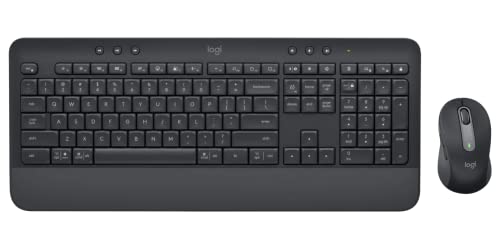
 Around A$129 on Amazon AU in Graphite. The MK650 is the keyboard and mouse combo most Aussie WFH workers should buy at EOFY. Full-size keyboard with numpad, integrated palm rest, full-size mouse with a SmartWheel that switches between ratcheted and free-spin scrolling on the fly. Logi Bolt receiver, Bluetooth backup, programmable shortcut keys, and rubber side grips on the mouse so it doesn't slide around when you're switching between Slack and a Notion doc.
Battery life is rated at 36 months on the keyboard and 24 months on the mouse. The keyboard has function-key shortcuts for emoji, screen capture, microphone mute, and dictation - all of which are more useful in 2026 than they were three years ago when video calls were still a novelty. Works on Windows, Mac, Chrome, and Linux. Sits in the price sweet spot where you're getting a properly comfortable workday setup without paying premium.
The good: Integrated palm rest is more comfortable than separate add-ons, SmartWheel mouse scroll is dead handy, full-size with numpad, three-device pairing.
The trade-off: No backlight on the keyboard. Larger desk footprint than a compact combo - not for cramped setups. AA batteries instead of rechargeable.
Microsoft Designer Bluetooth Desktop - Best Microsoft Alternative
 Microsoft Designer Bluetooth DesktopCheck Price
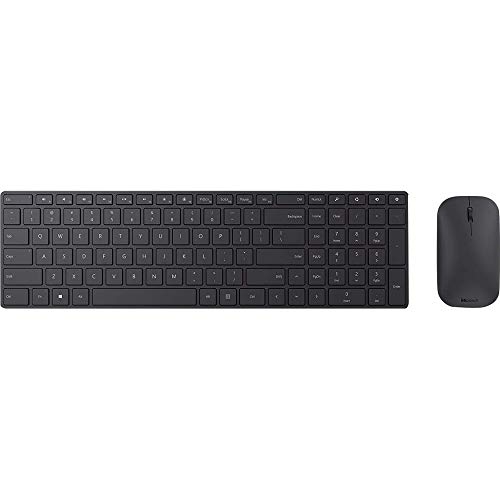
 Around A$189 on Amazon AU. The Designer Bluetooth Desktop is the combo for the buyer who lives inside Windows and Microsoft 365 and wants the keyboard and mouse to match that ecosystem the way an MX combo matches a Mac. Ultra-thin keyboard with a built-in numpad, separate ambidextrous mouse, Bluetooth 4.0 wireless for both pieces, and a low-profile design that sits flatter on a desk than any Logitech full-size on this list.
The keyboard has a separate numpad block, so you get the full data-entry layout without the long single-piece footprint of an MK650. The mouse is symmetric, which makes it usable by left- and right-handers. Battery life is rated for around a year on AA cells for both pieces. Works well on Windows obviously, and on Mac with a few function-key remappings. The keyboard feel is closer to a MacBook chiclet than a mechanical, which is what most people coming from laptop work actually prefer.
The good: Properly thin profile, separate numpad block for flexible layout, ambidextrous mouse, Microsoft-ecosystem polish.
The trade-off: Bluetooth-only - no fallback dongle, which means a flat-pair issue takes the whole combo offline until you re-pair. No backlight. Older model that hasn't had a meaningful update in a while.
Logitech MX Keys S Combo - Best Premium Combo
 Logitech MX Keys S ComboCheck Price
 Around A$299 on Amazon AU in Graphite. This is the combo most consultants, designers, and developers end up buying - the MX Keys S keyboard paired with the MX Master 3S mouse, the same two pieces that sit on a million desks across Sydney and Melbourne agencies. Full-size keyboard with backlight, USB-C rechargeable on both pieces, three-device pairing via Bluetooth or Logi Bolt, Logi Flow software that lets you copy-paste between a Mac and a Windows machine like they're one computer.
The MX Master 3S mouse has a 90 percent quieter click than the older 3 it replaced and an 8,000 DPI sensor that tracks on glass. The MX Keys S keyboard has Smart Backlight that adjusts to ambient light and a proximity sensor that lights the keys when your hands approach. Battery life is rated at 10 days with the backlight on, five months with it off, and 70 days for the mouse. Works across Mac, Windows, Linux, ChromeOS, and iPadOS.
At A$299 it's right at the salaried-employee single-year-deduction threshold - check whether your specific Amazon AU listing nudges over A$300 before you buy, because that one dollar changes the deduction path. For sole traders it doesn't matter because the instant asset write-off threshold is A$20,000.
The good: The premium Logitech mouse-and-keyboard pairing that sets the benchmark, smart proximity backlight, Logi Flow multi-computer paste, USB-C rechargeable both pieces.
The trade-off: Right at the A$300 deduction threshold for salaried claimers - prices fluctuate. Logi's software needs a sign-in for cloud sync. Not hot-swappable.
Logitech MX Keys Combo for Business Gen 2 - Best for Sole Traders and Small Business
 Logitech MX Keys Combo for Business Gen 2Check Price
 Around A$429 on Amazon AU in Graphite. The Business Gen 2 combo is the MX Keys S paired with the MX Master 3S for Business, plus an MX Palm Rest, plus a Logi Bolt USB-A receiver and USB-C charging cable in the box. The hardware is functionally the same as the consumer MX Keys S Combo, but the Business variant adds IT-department features that sole traders running a real business setup will actually use: encrypted Logi Bolt connection certified to enterprise security standards, Logi Options+ for Business management software, and longer warranty terms.
The MX Palm Rest is the bit you don't realise you needed until you have it. Magnetic, weighted, soft fabric, sits in front of the keyboard at the exact right height. For anyone who's looked at a physio invoice for wrist or forearm pain at the end of a long invoicing quarter, the palm rest alone justifies the gap between this and the consumer combo. The receiver is USB-A, which matters if your office PC is older or you don't want to occupy a USB-C port on a MacBook for a dongle.
At A$429, the price gap to the consumer MX Keys S Combo is roughly the cost of the palm rest plus a small Business-tier premium. For a sole trader claiming the full amount against the instant asset write-off, the deduction makes the gap close to negligible.
The good: Palm rest is properly good, enterprise-grade Logi Bolt receiver, USB-A dongle for older PCs, business warranty.
The trade-off: The same MX Keys and MX Master hardware as the consumer combo, just packaged differently. Pricey if you don't care about the Business features. Graphite-only.
Logitech ERGO K860 and Lift Vertical Mouse Combo - Best Ergonomic Combo
 Logitech ERGO K860 and Lift Vertical Mouse ComboCheck Price
 Around A$329 on Amazon AU. The K860 is Logitech's split, curved ergonomic keyboard with a built-in palm rest, and the Lift is their vertical mouse aimed at WFH workers who don't want the heavier MX Vertical. Together they're the combo for anyone who's started feeling their wrists at the end of a working day. The K860 frame splits at the centre to align your hands and wrists at a more natural angle, the palm rest is built into the front edge of the board so there's nothing extra to slide around, and the Lift's 57-degree vertical angle keeps the forearm in a handshake position instead of the standard flat-palm-down posture.
Logitech claims the K860 reduces wrist bending by 25 percent compared to a flat keyboard, and 88 percent of ergonomics professionals recommend the Vertical line. That's the manufacturer line, but the underlying point is supported by published ergonomics research: split keyboards and vertical mice reduce ulnar deviation and forearm pronation, which are the two postures behind most computer-related wrist pain. Both pieces are USB-C rechargeable, work via Bluetooth or Logi Bolt receiver, and pair with three devices.
For freelancers and sole traders who've had a physio recommend a setup change, this is the combo that does the work without looking like a hospital prop on your desk. For salaried WFH workers, A$329 puts it over the A$300 single-year threshold, so depreciation applies - though if the physio is part of the picture, the depreciation conversation is still the right one to have.
The good: Properly ergonomic on both pieces, built-in palm rest on the keyboard, USB-C rechargeable, three-device pairing.
The trade-off: Split layout takes a week to get used to - your typing speed drops before it climbs back. Bigger desk footprint than any non-ergonomic combo. Over the A$300 threshold for salaried claimers, so depreciation applies.
How to Pick the Right Combo for the Claim
The decision tree, roughly. If you want the cheapest defensible deduction and don't care about Bluetooth or backlight, the Logitech MK540 at A$59 is the easiest claim you'll make this year.
If your work moves between a home desk and a co-working space, the Logitech Pebble 2 Combo at A$99 is the only one thin and light enough to actually be portable.
If you want the best balance of price, comfort, and features for a full WFH day, the Logitech Signature MK650 at A$129 is the safest pick on the list.
If you live in the Microsoft 365 stack on Windows and want the kit to match, the Microsoft Designer Bluetooth Desktop at A$189 is the obvious choice.
If you want the premium Logitech setup that most consultants and developers end up on, the MX Keys S Combo at A$299 is the right level - just check the price hasn't tipped over A$300 if you're a salaried WFH claimer.
If you're a sole trader running a real business setup, the MX Keys Combo for Business Gen 2 at A$429 adds the palm rest and the Logi Bolt USB-A receiver, and the full amount is claimable against the instant asset write-off.
And if your wrists have started talking to you, the ERGO K860 and Lift combo at A$329 is the ergonomic setup that does the work without looking like a medical device.
Our EOFY Pick
For most Australian WFH workers and sole traders buying a wireless keyboard and mouse combo before 30 June 2026 to claim against the 2025-26 financial year, our pick is the Logitech Signature MK650. Around A$129, sits well under the A$300 single-year-deduction threshold for salaried claimers, well under the A$20,000 instant asset write-off for sole traders, integrated palm rest, SmartWheel mouse, three-device pairing, and battery life measured in years. It's the combo that does the working day properly without the premium price tag.
If you want the cheapest possible defensible claim, the Logitech MK540 at A$59 is the budget answer. If you want the premium setup and the deduction maths still works, the MX Keys S Combo at A$299 is the right level. Buy before 30 June 2026 to claim against this financial year. After that, you're waiting another twelve months for the deduction.
More EOFY Reading
For the bigger ticket WFH purchases that also fall inside the EOFY window, see our best monitor for tax claim Australia 2026 guide, the best laptops for EOFY 2026, the best mechanical keyboard for tax claim guide, and the best portable SSD for tax write-off guide. For a full WFH setup under A$1,000, the EOFY home office bundle guide wraps a monitor, keyboard, mouse, and accessories together. For the broader EOFY shopping calendar, our EOFY tech sales 2026 guide covers when each retailer's discounts start. Or browse the full keyboards, monitors, and laptops categories for the rest of the catalogue.
More Home Office Reading
Best Walking Pad Australia 2026: Under-Desk Treadmills to Beat the Winter Slump
The best walking pad Australia 2026 picks in AUD - MERACH, Everfit, WalkingPad and more under-desk treadmills to keep your steps up all winter, on Amazon AU.
Best Standing Desk Australia 2026: 7 Sit-Stand Desks and Risers Ranked for Every Budget
Best standing desk Australia 2026. Flexispot E7, EC1, Desky Dual, MAIDeSITe and sit-stand converters compared with Amazon AU pricing and honest trade-offs.
Best Monitor Arm Australia 2026: 7 Desk Mounts Ranked for Single, Dual and Ultrawide Setups
Best monitor arm Australia 2026. Ergotron LX, HUANUO, North Bayou F80 and more single, dual and ultrawide desk mounts compared with Amazon AU pricing.
Weekly AU tech deals, in your inbox
We check prices on every product we cover daily. Once a week we send the biggest genuine price drops we spot - the ones worth your attention.
- One email a week, max
- No spam, ever
- Unsubscribe in one click