21 May 2026 · Accessories · AI-assisted · published by Jaco Olwagen · How we rank
Best Mechanical Keyboard for Tax Claim Australia 2026 - 7 EOFY Picks
Best mechanical keyboard for tax claim Australia 2026. Seven Amazon AU picks for sole traders, freelancers, and WFH workers to deduct before 30 June.
Best Mechanical Keyboard for Tax Claim Australia 2026
A keyboard is the bit of work tech you touch every minute of every working day, which makes it one of the more sensible things to upgrade in the run to 30 June. It's also one of the easiest tax-deduction conversations to have with your accountant - the work-use percentage on a keyboard sitting on your home-office desk is rarely contested. We've rounded up seven mechanical keyboards that pair nicely with the EOFY deadline and are all available on Amazon AU right now. For the broader keyboards and desk-tech catalogue, the keyboards category page on top7.au has the rest of the range, and our 2026 mechanical keyboard guide covers the picks that aren't tax-focused.
The deal with EOFY mechanical keyboards: most fall between A$150 and A$400, which means a few options sit under the A$300 immediate-deduction threshold for salaried WFH workers, and every option on the list lands well inside the A$20,000 instant asset write-off for sole traders. Prices below are typical Amazon AU sticker prices in May 2026 - keep an eye out for the EOFY discounts in the final fortnight of June. Every link is an Amazon AU affiliate link with our top7-22 tag - we get a small commission if you buy, no extra cost to you.
Quick Picks - Best Mechanical Keyboards for Tax Claim EOFY 2026
| Product | Best For | Price (AUD) |
|---|---|---|
| Logitech POP Keys | Cheapest tax-claimable pick (under A$300) | ~A$149 |
| Keychron K8 Pro | Best all-rounder for WFH | ~A$179 |
| Logitech MX Mechanical | Best full-size for accountants and data work | ~A$299 |
| Keychron Q1 Max | Premium pick for serious typists | ~A$399 |
What You Can Claim and How
The 2025-26 financial year ends 30 June 2026. Buy your keyboard before that date, use it for work, and the cost typically becomes deductible against the 2025-26 tax return you'll lodge from July onwards. There are two paths depending on how you're set up.
For salaried employees claiming a WFH deduction: items costing A$300 or less can usually be claimed in full in the year of purchase. That puts the Logitech POP Keys, the Keychron K8 Pro, the Cherry KC 200 MX, the NuPhy Air75 V2, and the Logitech MX Mechanical Mini in single-year deduction territory. The two that creep over A$300 you can depreciate over the keyboard's effective life (the ATO's general rule for desktop computer accessories is three to four years).
For sole traders and small businesses with turnover under A$10 million, the instant asset write-off currently sits at A$20,000 per asset for 2025-26. Every keyboard on this list lands comfortably under that ceiling. That means you can claim the full work-use portion in a single year rather than depreciating it.
Two things people get wrong every year. First, work-use percentage. If the keyboard is on the desk where you do client work but you also game on it on the weekend, only the work portion is deductible. Be honest with the split - the ATO has gotten better at picking the people claiming 100 percent on hardware that's clearly shared with the family PS5. Second, keep the receipt. The Amazon AU invoice email is enough.
Tax info on this page is general and educational only - not financial advice. Whether you can claim a deduction depends on your circumstances, your work-use percentage, and your business structure. Talk to a registered tax agent or check ato.gov.au before claiming.
Logitech POP Keys - Cheapest Tax-Claimable Pick
 Logitech POP KeysCheck Price
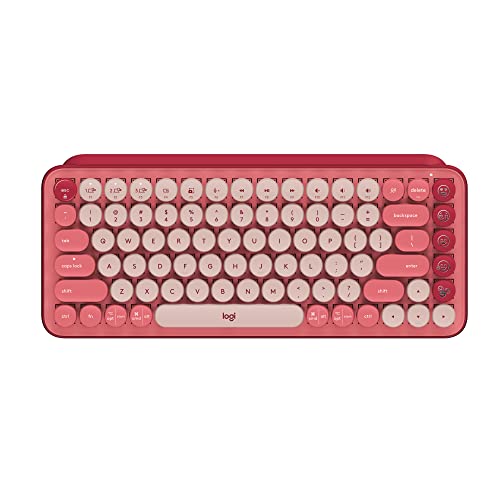
 Around A$149 on Amazon AU in Heartbreaker Rose. The POP Keys is the entry point if you want a real mechanical keyboard sitting on your home-office desk and you want to spend less than the cost of a decent restaurant meal in Surry Hills. TKL layout with no numpad, eight customisable emoji keys (four pre-installed, four spares in the box), Bluetooth or USB receiver, multi-device pairing for up to three computers, and Logitech's TTC Brown mechanical switches rated at 50 million keystrokes.
Battery life is rated at up to three years on the supplied AAAs, which is the kind of spec that means you'll forget where the charging cable is and that's fine. Sits at A$149, which keeps it well inside the A$300 single-year deduction threshold for salaried WFH workers - the lowest-friction tax claim on this list.
The good: Cheap enough that the tax claim covers most of the spend, fun colours that don't look out of place on a kitchen-bench desk setup, three-year battery, multi-device pairing.
The trade-off: No backlight. Rounded keycaps take a few hours to get used to if you're coming from a flat ThinkPad-style laptop keyboard. AAA batteries instead of rechargeable.
Keychron K8 Pro - Best All-Rounder for WFH
 Keychron K8 ProCheck Price
 Around A$179 on Amazon AU for the RGB-backlit, hot-swappable model with Gateron G Pro Red switches. TKL (tenkeyless) layout, which keeps your mouse hand closer to the keyboard than a full-size board does - an ergonomic win if you're at the keyboard eight hours a day. QMK/VIA programmable, so you can remap any key to whatever shortcut your accounting software demands, hot-swappable PCB so you can change switches without soldering if you decide reds are too quiet or too loud.
Bluetooth 5.1 wireless with USB-C wired fallback, switches between Mac and Windows layouts with a physical toggle, double-shot PBT keycaps that don't go shiny after a year of use, and an aluminium frame option if you want extra weight on the desk. This is the keyboard most Aussie WFH workers should buy at EOFY - it's not the cheapest, it's not the fanciest, but it'll still feel good on your desk in 2031.
The good: Hot-swappable switches let you change the feel without buying a new keyboard, RGB backlight is more useful at 6am than you'd expect, dual-OS layout, Bluetooth and wired both work.
The trade-off: Heavy at over 1kg, so this is a desk keyboard, not a couch keyboard. Sits A$30 to A$50 above the cheapest POP Keys without being four times better - the diminishing-returns curve on mechanical keyboards is steep.
Cherry KC 200 MX - Best for Quiet Shared Offices
 Cherry KC 200 MXCheck Price
 Around A$169 on Amazon AU in Black/Bronze with the new MX2A Silent Red switches. Cherry has been making mechanical switches in Germany for forty-plus years, and the MX2A is their latest revision - smoother than the older MX Red, with sound dampening that makes a clicky mechanical noticeably quieter than a Keychron with the same switch family. Full-size layout with a numpad, USB wired only, anodised aluminium top plate.
If you share a home office with a partner who's on calls, or you co-work from a serviced office in Spring Hill or Surry Hills, this is the mechanical keyboard that won't get you a passive-aggressive Slack message. The Silent Red switches genuinely live up to the name, and the metal plate gives the typing feel some weight without going overboard. Wired connection is a feature for some buyers, not a downside - no battery to die mid-quote.
The good: Genuinely quiet for a mechanical, German-made switches with a 100-million-keystroke service life, anodised metal plate, full-size layout for spreadsheets.
The trade-off: No wireless option at this model. No backlight on the Black/Bronze variant. Cherry's software is functional but nowhere near as flexible as VIA on a Keychron.
NuPhy Air75 V2 - Best Low-Profile Wireless
 NuPhy Air75 V2Check Price
 Around A$209 on Amazon AU for the V2 in Ionic White with Brown switches. The Air75 is the keyboard for anyone whose hands prefer a laptop chiclet feel but who wants the mechanical key-by-key separation. Low-profile Gateron switches, 75 percent layout (compact arrow keys, no numpad), Bluetooth 5.1, 2.4GHz USB dongle, and USB-C wired. The whole thing is about 16mm thick at the front edge - thin enough to slide into a laptop bag without thinking about it.
Sole traders who move between a home desk and a co-working space, or freelancers who travel and need a real keyboard for the hotel room, this is the obvious pick. Compatible with Mac and Windows out of the box, four-device pairing, and the keycaps are PBT with dye-sub legends so they won't wear off. The V2 fixed the latency issues that the original Air75 had over Bluetooth.
The good: Low-profile feel for laptop-trained fingers, properly portable, four-device pairing, QMK/VIA programmable.
The trade-off: The 75 percent layout puts the arrow keys close to the right Shift - takes a week to stop hitting the wrong key. Low-profile switches feel less premium than standard mechanical to seasoned typists.
Logitech MX Mechanical Mini - Best for Mac Users
 Logitech MX Mechanical MiniCheck Price
 Around A$259 on Amazon AU for the Tactile Quiet model. The MX Mechanical Mini is what Logitech built for the kind of buyer who already owns an MX Master mouse and wants the keyboard to match - same matt grey colourway, same Logi Bolt receiver, same Logi Flow software that lets you copy-paste between a Mac and a Windows machine like they're one computer.
Low-profile mechanical Kailh switches with the Tactile Quiet variant being the closest to a MacBook Pro keyboard feel you'll get from a desk-mounted mechanical. Smart backlight that adjusts to ambient light, USB-C charging with weeks of battery life, three-device pairing via Bluetooth or the included Logi Bolt receiver, and a compact 75 percent layout. If you're a consultant, designer, or anyone whose work life lives inside the Apple ecosystem, this is the keyboard that fits the rest of the kit without thinking.
The good: Best Apple-ecosystem integration on this list, Logi Flow software is genuinely handy if you run two computers, properly quiet for a mechanical, backlight is smart.
The trade-off: Not hot-swappable - the switches are what you bought. Pricier than a Keychron K3 Pro that does similar things. Logi's software needs a sign-in for the cloud sync features, which not everyone loves.
Logitech MX Mechanical - Best Full-Size for Accountants and Data Work
 Logitech MX MechanicalCheck Price
 Around A$299 on Amazon AU for the Tactile Quiet full-size model. This is the MX Mini's big sibling - same low-profile mechanical feel, same Tactile Quiet switches, same Logi Flow software, but with the full numpad attached. For accountants, bookkeepers, analysts, anyone who spends their day in spreadsheets, the numpad is non-negotiable and the MX Mechanical is the most polished full-size low-profile mechanical going.
Smart backlight, proximity sensor that lights the keys when your hands approach, three-device pairing, USB-C charging, and around 15 days of battery life with the backlight on (months with it off). At A$299 it's right at the salaried-employee single-year-deduction threshold - check whether your specific Amazon AU listing nudges over A$300 before you buy, because that one dollar genuinely changes the deduction path.
The good: Full numpad for spreadsheet work, smart proximity backlight is properly clever, Logi Flow multi-computer paste, three-device pairing.
The trade-off: Right at the A$300 deduction threshold - prices fluctuate. Not hot-swappable. Bigger footprint than a TKL means more reach to the mouse.
Keychron Q1 Max - Premium Pick for Serious Typists
 Keychron Q1 MaxCheck Price
 Around A$399 on Amazon AU for the Q1 Max with Gateron Jupiter Brown switches in white. This is the keyboard for the writer, the developer, the lawyer-with-strong-opinions-about-keyboards. Full aluminium CNC body, double-gasket-mounted PCB, screw-in stabilisers from the factory, programmable knob in the top right corner, and QMK/VIA support for every key.
2.4GHz wireless via included dongle, Bluetooth 5.1, USB-C wired. The aluminium frame weighs 1.8kg, which is the kind of weight that means the keyboard doesn't move when you're hammering out a contract response at 11pm. Hot-swappable, so the switches are an opening position rather than a permanent commitment. Sits A$100 above the next tier but it's the keyboard people keep for a decade - the per-year cost over the depreciation period works out pretty reasonable for a sole trader. The premium pick on this list, but the only one we'd call genuinely lifetime-purchase territory.
The good: Full aluminium body feels like a tool, programmable knob is more useful than it sounds, double-gasket mount kills the hollow sound that cheaper boards have, 2.4GHz wireless has near-zero latency.
The trade-off: Heavy enough that you wouldn't take it travelling. Pricey. The 75 percent layout means no numpad - if you live in spreadsheets, go for the MX Mechanical instead.
How to Pick the Right Mechanical Keyboard for the Claim
The decision tree, roughly. If you want the cheapest defensible deduction and don't need a numpad or backlight, the Logitech POP Keys at A$149 is the easiest claim you'll make this year.
If you want one keyboard that does most of what a WFH desk needs - quiet enough, RGB backlit, customisable, switch-swappable - the Keychron K8 Pro at A$179 is the safest pick.
If you share a home office with someone on calls all day, the Cherry KC 200 MX with Silent Reds at A$169 is the quietest mechanical on this list.
If you travel between a home desk and a co-working space or hotel rooms, the NuPhy Air75 V2 at A$209 is the only one thin enough to slide into a laptop sleeve.
If your work life is on a Mac, the Logitech MX Mechanical Mini at A$259 fits the Apple-ecosystem kit without an adapter.
If you live in spreadsheets and need a numpad, the Logitech MX Mechanical at A$299 is the keyboard for the job - just check the price hasn't tipped over A$300 if you're a salaried WFH claimer.
And if you're a writer, developer, or anyone whose work output happens through the keyboard for the next decade, the Keychron Q1 Max at A$399 is the only honest premium pick.
Our EOFY Pick
For most Australian sole traders and WFH workers buying a mechanical keyboard before 30 June 2026 to claim against the 2025-26 financial year, our pick is the Keychron K8 Pro. It's around A$179, sits well under the A$300 single-year-deduction threshold for salaried claimers, well under the A$20,000 instant asset write-off for sole traders, hot-swappable so it adapts as your preferences change, and it'll still feel sharp on your desk in 2031.
If you need the cheapest possible defensible claim, the Logitech POP Keys at A$149 is the budget answer. Buy before 30 June 2026 to claim against this financial year. After that, you're waiting another twelve months for the deduction.
More EOFY Reading
For the bigger ticket WFH purchases that also fall inside the EOFY window, see our best laptops for EOFY 2026 guide, the best monitor for tax claim Australia 2026, and the best portable SSD for tax write-off guide. For a complete WFH setup under A$1,000, the EOFY home office bundle guide bundles a monitor, keyboard, and accessories together. For the broader EOFY shopping calendar, our EOFY tech sales 2026 guide covers when each retailer's discounts start. Or browse the full keyboards, laptops, and monitors categories for the rest of the catalogue.
More Accessories Reading
Best Wireless CarPlay Adapter Australia 2026: Cut the Cable in Your Car
The best wireless CarPlay adapter picks for Australia in 2026, with live Amazon AU prices in AUD, honest trade-offs and a 10 second compatibility check.
Best Wireless Keyboard Australia 2026: 7 Top Picks Tested Against the Specs
The best wireless keyboard picks for Australia in 2026, from a $59 ultraportable to a low-profile mechanical. Real Amazon AU prices, battery life and typing feel compared.
Best Wireless Mouse Australia 2026: Productivity Picks for Work and Home
Best wireless mouse Australia 2026. The Logitech MX Master 4, MX Master 3S, MX Anywhere 3S, Lift, Razer Pro Click Mini and Signature M650 compared with Amazon AU pricing.
Weekly AU tech deals, in your inbox
We check prices on every product we cover daily. Once a week we send the biggest genuine price drops we spot - the ones worth your attention.
- One email a week, max
- No spam, ever
- Unsubscribe in one click