23 May 2026 · Storage · AI-assisted · published by Jaco Olwagen · How we rank
NAS vs Portable SSD EOFY 2026 Australia: Which Storage Upgrade Should You Buy Before 30 June?
NAS vs portable SSD for EOFY 2026 Australia: which storage upgrade fits your work, budget and tax claim before 30 June. Picks on Amazon AU with prices in AUD.
NAS vs Portable SSD for EOFY 2026: Which One Should You Actually Buy?
Every year around late May, the same conversation happens at a Melbourne kitchen table, a Brisbane home office, and the back room of a Perth photography studio. The laptop is full again. The 4TB external drive that was "plenty" two summers ago is now a Jenga tower of project folders. EOFY is five weeks away, the small business is sitting on a bit of profit, and the question is whether to spend it on a proper NAS or grab another portable SSD and call it a day. Both have a place. They are not, despite what Reddit will tell you, the same product wearing different shoes. This guide is the version of that conversation we wish we could have over a flat white at the local servo. For more on which standalone drives are worth the spend this EOFY, see our EOFY portable SSD guide and the broader storage category page.
Quick honesty note before we go any further. Every link in this guide is an Amazon AU affiliate link, every ASIN was verified on amazon.com.au in May 2026, and every price quoted is a typical May 2026 sticker price in AUD. EOFY sales often push these down further across June. We are not a registered tax agent and the tax framing in this article is general information, not advice. The full disclaimer is near the bottom.
Quick Picks - NAS vs Portable SSD for EOFY 2026
| Product | Best For | Price (AUD) |
|---|---|---|
| Synology BeeStation 4TB | First-time NAS buyers, set-and-forget personal cloud | ~A$399 |
| Synology DS224+ (diskless) | Best 2-bay NAS for sole traders and small studios | ~A$549 |
| Synology DS423+ (diskless) | 4-bay NAS for serious creators and small offices | ~A$899 |
| Samsung T7 Shield 1TB | Cheapest rugged portable SSD worth buying | ~A$160 |
| Samsung T7 Shield 2TB | Best all-rounder portable SSD for most users | ~A$249 |
| SanDisk Extreme Pro 2TB | Fastest portable SSD on this list (USB 3.2 Gen 2x2) | ~A$329 |
The Fundamental Difference
A portable SSD is a fast little brick of flash storage on the end of a USB-C cable. It plugs into your laptop, you copy files to it, you unplug it, you throw it in a bag, you go. It is yours. It does one job and does it very well.
A NAS is a tiny always-on computer in a box with two or four hard drive bays. It lives on a shelf, plugs into your home or office router, and serves files to every device on your network. Your laptop sees it as a shared folder. Your phone backs photos to it overnight. Your partner's MacBook sees the same folder. If the laptop dies in a coffee spill, the files are still on the NAS. If the office burns down, you cry, because the NAS was in there too, which is why the smart move is to pair a NAS with a cloud backup or an offsite portable SSD.
Different jobs, different tools. The honest answer for which one you should buy is: probably both, eventually, but the right first purchase depends on how you actually work.
Pick a Portable SSD If...
 Samsung T7 Shield 1TBCheck Price
 You work from one machine, mostly. You travel with files - shoots, project folders, client video. You need raw read and write speed when plugged in (editing 4K video off the drive, running a Lightroom catalogue, moving 200GB project files between locations). You are one person. You do not have a partner or team trying to share the same files. You want something you can buy today, plug in tonight, and be done with. Budget is under A$400.
The strong picks are the Samsung T7 Shield 1TB at the low end, the T7 Shield 2TB for most people, and the SanDisk Extreme Pro 2TB if you need the extra speed.
Pick a NAS If...
You work across multiple devices and they all need the same files. You have a partner, business partner, or small team who need shared access. You want automatic photo and video backups from phones to a central place that you control rather than Google's or Apple's. You have more than 4TB of working data, or you will within a year. You want redundancy - two drives mirroring each other so a single drive failure doesn't take your work with it. You are okay with a one-evening setup process and a once-a-year poke at firmware updates. Budget runs A$500 to A$1500 once you've added drives.
The strong picks here are the Synology BeeStation 4TB for first-timers, the Synology DS224+ for sole traders, and the Synology DS423+ if you want the four-bay headroom.
Best Portable SSDs for EOFY 2026
Samsung T7 Shield 2TB - The Default Pick (A$249)
 Samsung T7 Shield 2TBCheck Price
 The T7 Shield is what we recommend when someone asks for a portable SSD and has not given us any other context. USB 3.2 Gen 2, rated to 1050MB/s read and 1000MB/s write, IP65 water and dust resistance, rated to survive a 3-metre drop on its rubberised casing. About the size and weight of a credit card. Three-year warranty.
For working files - project folders, client videos, design archives - 2TB is the sweet spot for most people. The 1TB at around A$160 is the cheaper entry. The 4TB version exists at around A$429 if you are storing large video archives.
The good: Fast, rugged, IP65, tiny, three-year warranty, ubiquitous in Australian retailers if you ever need a replacement.
The trade-off: Software encryption only (no hardware key), the bundled USB-C cable is short, the rubber casing picks up lint from a laptop bag. Not as fast as USB 3.2 Gen 2x2 drives if your laptop has that port.
SanDisk Extreme Pro 2TB - The Fast One (A$329)
 SanDisk Extreme Pro 2TBCheck Price
 If your laptop has a USB 3.2 Gen 2x2 port (some Windows ultrabooks do, MacBooks generally do not), the SanDisk Extreme Pro hits up to 2000MB/s read and write. That is roughly twice the practical throughput of the T7 Shield. For editing 4K video directly off the drive, or moving 200GB-plus project folders, the difference is real - several minutes per transfer rather than several seconds. The forged aluminium chassis doubles as a heatsink so it doesn't thermal-throttle on a long copy.
IP55 water and dust resistance, drop-proof to 2 metres, carabiner loop. Note: on a MacBook with USB 3.2 Gen 2 (not Gen 2x2), you'll get T7 Shield speeds, not 2000MB/s. Read the spec sheet on your laptop before paying the SanDisk premium.
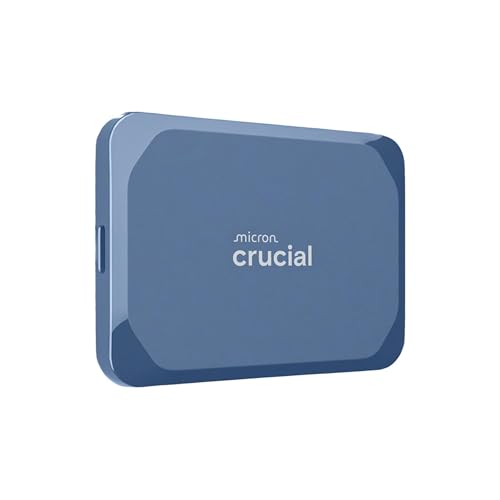
The Crucial X9 Pro 2TB at around A$229 is the other obvious 2TB rugged option in this bracket. Slower than the SanDisk Pro (1050MB/s, not 2000MB/s) but cheaper and the same IP55 rating.
The good: Genuine 2000MB/s if your laptop supports it, aluminium chassis, drop-rated.
The trade-off: A$80 more than the T7 Shield for speed many laptops cannot use. Some buyer reports of drive failures in the SanDisk Extreme family - keep cloud backups regardless.
Best NAS Units for EOFY 2026
Synology BeeStation 4TB - The Easy Start (A$399)
 Synology BeeStation 4TBCheck Price
 The BeeStation is Synology's attempt at building a NAS for people who don't want to learn the word NAS. It arrives with a 4TB drive already inside it, the operating system is pre-configured, and the setup is about ten minutes from box to first backup. You plug it into your router, scan a QR code with your phone, and the BeeMobile app handles photo and video backup from there. It also pulls files in from Google Drive, OneDrive and Dropbox if you want to consolidate cloud accounts you've been paying for separately.
The catch is that it's a single drive. There is no redundancy - if that one drive fails, your data is gone unless you've enabled the cloud-backed BeeProtect service. For personal photo and document backup, that's a reasonable trade for the simplicity. For business-critical files, look at a two-bay unit like the DS224+ below.
The good: Easiest NAS setup we've seen, subscription-free personal cloud, app-driven photo backup is actually pleasant to use, very quiet.
The trade-off: Single drive, fixed 4TB capacity (no drive expansion), runs on Synology's BeeOS rather than the full DSM ecosystem so you can't run Docker or third-party apps. The BeeStation Plus 8TB at around A$569 doubles the capacity if 4TB is too tight.
Synology DS224+ - The Sole Trader Default (A$549 diskless)
 Synology DS224+Check Price
 The DS224+ is the NAS we point most sole traders, freelancers and small studios toward. Two drive bays - so you can run RAID 1 mirroring and have your data survive a single drive failure. Quad-core Intel Celeron J4125 CPU, 2GB DDR4 RAM upgradeable to 6GB, two Gigabit ethernet ports, three USB 3.2 ports. It runs Synology DSM, which is genuinely the easiest NAS operating system on the market and supports the full ecosystem - Synology Photos, Drive (a self-hosted Dropbox replacement), Surveillance Station, Docker for tinkerers.
The sticker is A$549 diskless. You'll need two NAS-rated drives, which is the next section. Total landed cost with two 4TB drives is around A$800 to A$900. If you'd rather buy a bundle, Amazon AU lists the DS224+ with 2x 2TB Seagate IronWolf drives as a single SKU.
The good: RAID 1 redundancy, Synology DSM is the best NAS OS, expandable to 6GB RAM, three-year warranty.
The trade-off: 1GbE only (no 2.5GbE), 2GB RAM standard is tight for heavy users, you're locked into the Synology software ecosystem (which is great until it isn't).
Synology DS423+ - The Four-Bay Step-Up (A$899 diskless)
 Synology DS423+Check Price
 The DS423+ takes the DS224+ formula and gives it four bays instead of two. Same J4125 quad-core CPU, same DSM software, same expansion options, but now you can run RAID 5 - which is one-drive redundancy across four disks rather than mirroring across two. The practical effect: 16TB of usable storage from four 6TB drives with one-drive failure tolerance, versus 6TB of usable storage from two 6TB drives in RAID 1.
This is the NAS we'd point a small office, a two-photographer studio, or a freelancer who's been quietly running a media business on the side to. The price gap to the DS224+ (about A$350) is worth it the moment you start filling four bays, because rebuilding storage on a NAS is annoying enough that buying the bigger box first is usually the cheaper path.
The good: Four-bay flexibility, RAID 5 efficiency, same DSM ecosystem, two USB 3.2 ports.
The trade-off: 1GbE only (the newer DS425+ finally adds 2.5GbE if that matters to you), the J4125 CPU is starting to show its age, no 10GbE upgrade path.
UGREEN NASync DXP2800 - The Spec-Sheet Outsider (A$649 diskless)
 UGREEN NASync DXP2800Check Price
 UGREEN, better known for chargers and cables, has started shipping NAS units that look ridiculous on paper compared to the Synology equivalents. The DXP2800 is a 2-bay diskless NAS with an Intel N100 quad-core, 8GB DDR5 RAM (versus Synology's 2GB DDR4), two M.2 NVMe slots for SSD caching, 2.5GbE networking, and a 4K HDMI output. The hardware is roughly twice the DS224+'s on every axis for about A$100 more.
The wrinkle is the software. UGREEN OS is built on Debian and is still relatively young - Docker works, the apps run, but the polish, the third-party app catalogue, and the long-haul track record are all behind Synology DSM. For tinkerers who want the spec sheet and don't mind that the OS will keep changing, it's a strong buy. For someone who wants the NAS to disappear and just work for the next five years, the DS224+ is still the lower-risk pick.
The good: Hardware spec sheet that embarrasses every other 2-bay NAS at this price, 2.5GbE, M.2 NVMe support, HDMI output for direct media playback.
The trade-off: Newer OS with less mature ecosystem, longer-term support unproven, fans can be louder than Synology equivalents.
NAS Drives - You Need Two (or Four)
 WD Red Plus 4TB (WD40EFPX)Check Price
 The diskless NAS units above all need drives added. Do not put generic external-drive shucks or desktop drives into a NAS - they aren't rated for 24/7 operation and will fail faster than NAS-rated drives. The two we recommend on Amazon AU:
- WD Red Plus 4TB (WD40EFPX) at around A$179. 5400 RPM, 256MB cache, CMR (not SMR), rated for 180TB-per-year workload, 1 million hours MTBF. The standard recommendation for a 2-bay or 4-bay NAS where you don't need the absolute fastest spinning rust.
- Seagate IronWolf 4TB (ST4000VN006) at around A$169. The Seagate equivalent. Slightly faster on sequential workloads than the WD Red Plus, and Seagate's Rescue Data Recovery Service is bundled (three years of one free attempt to recover data if the drive fails).
Two 4TB drives in a DS224+ gives you 4TB of usable storage in RAID 1 (one drive failure tolerance). Four 4TB drives in a DS423+ gives you 12TB usable in RAID 5. For larger setups, the same drive families come in 6TB, 8TB and 12TB capacities.
The Cost Comparison
Let's lay it out plainly. Here's what an EOFY-2026 storage spend looks like across three setups.
| Setup | What it costs | What you get |
|---|---|---|
| Portable SSD only | ~A$249 (Samsung T7 Shield 2TB) | 2TB of fast portable storage on one drive. No redundancy. No multi-device sharing. |
| BeeStation 4TB | ~A$399 (single SKU, drive included) | 4TB of personal cloud, app-managed, single drive (no redundancy without paid BeeProtect). |
| DS224+ + 2x 4TB WD Red Plus | ~A$549 + A$358 = ~A$907 | 4TB usable storage in RAID 1 (single drive failure tolerance), full DSM ecosystem, multi-device sharing. |
| DS423+ + 4x 4TB WD Red Plus | ~A$899 + A$716 = ~A$1615 | 12TB usable storage in RAID 5, four-bay expandable, full DSM ecosystem. |
The portable SSD is by far the cheapest entry. The full NAS setup is the most expensive but also the most capable, and the gear lasts longer - a Synology bought in 2026 will still be doing its job in 2031 with one or two drive replacements along the way.
What You Can Claim and How
For sole traders and small businesses with turnover under A$10 million, the instant asset write-off threshold sits at A$20,000 per asset for the 2025-26 financial year. Every option in this guide - portable SSD, BeeStation, DS224+ with drives, DS423+ with drives - is well under that cap individually, so eligible buyers can write each asset off in full in the year of purchase rather than depreciating it over several years.
For salaried employees claiming work-related expenses, items costing A$300 or less and used wholly for work can typically be deducted in full in the year you buy them. Anything above A$300 - which in this guide is most of the NAS options once drives are included - has to be depreciated over its effective life. Buy before 30 June 2026 to put the deduction in the 2025-26 financial year.
Two catches to keep in mind. First, work-use percentage matters - if the NAS is 70% work backup and 30% family photos, you claim 70% of the cost. Second, keep the Amazon AU receipts; they're acceptable as substantiation but you need to be able to produce them.
A note on tax: This article is general information only and is not tax advice. top7.au is not a registered tax agent. Whether you can claim a deduction depends on your circumstances - your work-use percentage, your business structure, and current ATO rules. Talk to a registered tax agent or check ato.gov.au before claiming any deduction based on information you read here.
Our EOFY Pick
If you're a sole trader, freelancer, photographer, or anyone running a small business out of a home office, the Synology DS224+ paired with two WD Red Plus 4TB drives is the EOFY storage buy we'd make ourselves. About A$900 total, sits comfortably inside the instant asset write-off threshold, gives you 4TB of redundant storage, runs the best NAS software in the category, and will still be the thing backing up your work in 2031.
If A$900 is too much, or you just need fast scratch storage to plug into a laptop, the Samsung T7 Shield 2TB at A$249 is the easy answer. It's the drive we'd buy first and a NAS later.
If you've never set up a NAS before and the DS224+ sounds intimidating, the Synology BeeStation 4TB at A$399 is the no-headache middle ground. Buy before 30 June 2026 to claim against this financial year if you're eligible.
More EOFY and Storage Reading
For the standalone SSD picks in more depth, see our EOFY portable SSD guide and our best portable SSD Australia 2026 roundup. For the broader EOFY landscape, the EOFY tech sale timing guide covers when to actually pull the trigger, and the instant asset write-off guide walks through the bigger purchases. For the full Amazon AU storage catalogue, browse the storage category page. For broader home-office bundles that combine a NAS with monitor, keyboard and webcam, see the EOFY home office bundle guide.
Top Picks - Check Latest Prices


See Our Top 7 Storage for Australia
Hand-picked and ranked by our editors — with honest pros, cons, and Aussie pricing.
More Storage Reading
Best SSD for PS5 Australia 2026: M.2 NVMe Upgrades That Actually Fit
The best SSD for PS5 in Australia for 2026: licensed, fastest and best-value M.2 NVMe drives compared, with Amazon AU pricing and install tips.
Best microSD Card for Nintendo Switch 2 in Australia (2026)
The best microSD Express cards for Nintendo Switch 2 in Australia 2026. Verified Amazon AU prices, capacity guide and why regular microSD cards won't work.
Best Portable SSD Australia 2026: Tested & Ranked
The best portable SSDs in Australia for 2026 - ranked by speed, durability and value. Prices in AUD, available from Amazon AU, JB Hi-Fi and more.
Weekly AU tech deals, in your inbox
We check prices on every product we cover daily. Once a week we send the biggest genuine price drops we spot - the ones worth your attention.
- One email a week, max
- No spam, ever
- Unsubscribe in one click