26 May 2026 · Laptops · top7.au editorial team
EOFY Laptop vs Desktop for Tax 2026 Australia - Which Depreciates Better?
EOFY 2026 laptop vs desktop for tax in Australia. Effective life, work-use, and the instant asset write-off compared, with Amazon AU picks for each.
EOFY Laptop vs Desktop for Tax 2026 Australia - Which Depreciates Better?
Every June, the same question lands in the inbox of every accountant in the country. Sole trader, freelancer, small business owner staring at the calendar with three weeks until 30 June. Do I buy the laptop or the desktop before EOFY? Which one writes off better against this year's tax? It's a sensible question, and the honest answer is the bit nobody wants to hear at the cafe over a flat white. It depends. But it depends in ways that are actually pretty straightforward once you lay them out, and the EOFY 2026 sale window is a decent moment to think it through rather than panic-buy a refurb desktop the night of 29 June. For the broader EOFY tech shopping calendar, see our EOFY tech sales 2026 guide, or jump into the full laptops category.
This post is a comparison, not a tax ruling. It's general information. top7.au is not a registered tax agent. Whether you can claim a deduction at all, and how much of the cost is claimable, depends on your circumstances, your work-use percentage, and the current ATO rules. Talk to a registered tax agent before you make a buying decision based on a tax outcome - the cost of a 20-minute call usually pays for itself. With that said, here's how laptops and desktops differ when the receipt hits the books, plus the Amazon AU picks for each side if you decide to buy.
Quick Picks - EOFY Laptop and Desktop Comparison
| Product | Best For | Price (AUD) |
|---|---|---|
| Apple MacBook Air M5 13-inch | Best portable Mac for sole traders | ~A$1,799 |
| ASUS ZenBook 14 OLED (Ryzen AI 7 350) | Best Windows laptop for business use | ~A$2,099 |
| Lenovo IdeaPad Slim 5 16-inch | Best budget Windows laptop | ~A$1,099 |
| Apple Mac mini M4 | Best fixed-desk Mac | ~A$999 |
| Beelink SER8 Mini PC | Best mid-range Windows desktop | ~A$899 |
| GEEKOM A9 Max Mini PC | Best premium Windows desktop | ~A$1,599 |
The Short Answer on Depreciation
Here's the headline. For most sole traders and small businesses in Australia, neither a laptop nor a desktop "depreciates better" than the other in any meaningful tax sense, because both fall under the same instant asset write-off (IAWO) rules and the same set of effective-life conventions. What actually changes the outcome is the buyer, not the box.
The instant asset write-off currently sits at A$20,000 per asset for the 2025-26 financial year for eligible small businesses with aggregated turnover under A$10 million. Every product on this list sits well under that ceiling. If you qualify for the write-off, the work-use portion of the laptop or the desktop may be claimable in a single year rather than depreciated across two or three years. That's the bit most people want, and the rule applies to both equally.
If you don't qualify - because your turnover is too high, or because you're an employee claiming a work-related deduction rather than a business - you'll typically depreciate the work-use portion over the device's effective life. The ATO's standard effective life for general-purpose computers (which includes both laptops and desktops in the tax office's published tables) is two years. For more specialised desktops used for heavy creative or engineering workloads, the effective life can stretch slightly, but for the average sole-trader purchase, the depreciation timeline is broadly the same on each side of the fence.
So what actually matters? Work-use percentage, suitability for the job, and total spend.
Where Laptops Actually Win for Tax
Laptops tend to land a higher work-use percentage in real-world claims for one reason. They go with you. The laptop sitting in the boot of the ute that you drag into the kitchen to send three quotes after dinner is much harder to use for anything else when you're on a job site for nine hours of the day. A sole trader running a building business, a consulting freelancer, a sales rep, a real estate agent - their laptop spends most of its switched-on hours in front of work software because that's where the work happens.
Desktops, by contrast, sit at the home office. The home office desktop is also the home gaming PC, the kids' Minecraft machine on the weekend, the family's video call station for nan's 80th, and the household's Netflix backup when the TV's playing up. Honest work-use percentages on a shared home desktop often land lower than on a portable that lives in the work bag.
That said, if you have a desktop that's genuinely set up as a single-purpose work machine - separate user account, separate room, separate router rules, locked off from the rest of the household - the work-use percentage can be just as defensible as a laptop's. The ATO doesn't care whether the box has a battery. It cares whether the use is genuinely work-related, and whether you've been honest in apportioning it.
Where Desktops Actually Win for Tax
Desktops typically deliver more performance per dollar than laptops. For a sole trader whose work is computationally demanding - video editing, CAD work, 3D rendering, large-dataset analytics, software development that touches Docker and virtual machines - the desktop side of the equation usually means you spend less on the actual hardware that does the job. Less spend per asset means you stay further inside the instant asset write-off ceiling, leaving room to add a monitor, a UPS, or an external SSD inside the same financial year and still come in under A$20,000 per asset.
The other win for desktops is depreciation neatness. A desktop is more likely to stay in service for longer, and more likely to be incrementally upgraded with parts (more RAM, larger SSD, a fresh GPU) that have their own depreciation lives. For a business operator who wants a tidy capital-expense pattern over four or five years, the desktop side is often cleaner. The laptop side is messier - laptops get dropped, lost, stolen, traded in, and replaced more often than desktops do.
The Effective Life Question (Honestly)
This is the bit the title of the post hints at, so let's lay it out plainly. The phrase "which depreciates better" makes it sound like one device gives you a bigger tax benefit per dollar. In Australia, for general-purpose computers used by sole traders and small businesses, the ATO's standard effective life applied to both laptops and desktops is two years for most cases. Some categories of higher-spec workstation desktops can attract a longer effective life - up to four years - which actually slows the depreciation rather than speeds it up.
For sole traders and small businesses eligible for the instant asset write-off, the effective-life table is largely moot. You're claiming the work-use portion of the cost in a single year, not stretching it across two or four. For employees, the table matters more, but again the difference between laptop and desktop depreciation is small in practice for the kinds of devices on this list.
The real lever, again, is the work-use percentage. A 70 percent work-use laptop bought for A$2,000 produces a larger first-year deduction than an 80 percent work-use desktop bought for A$1,200, even though the desktop's work-use share is higher. The maths is boring but it's where the actual outcome sits.
What You Can Claim and How
The instant asset write-off for 2025-26 sits at A$20,000 per asset for eligible small businesses with aggregated turnover under A$10 million. Every laptop and desktop on this list falls comfortably under that ceiling, so if you qualify, the work-use portion of the cost may be claimable in a single year rather than depreciated.
For salaried employees claiming a work-related computer deduction without a business behind it, the rules are different. Items costing A$300 or less can often be claimed in full in the year of purchase. Above A$300, you depreciate the work-use portion over the ATO's effective life (typically two years for general-purpose computers). The instant asset write-off does not apply to employee claims - it's a small-business mechanism.
Either way, three things matter for any defensible claim. First, keep the Amazon AU invoice - the email is sufficient documentation, save it the day it lands. Second, log your work-use percentage honestly, ideally with a four-week diary showing how the device is actually used. Third, talk to a registered tax agent before claiming - a 20-minute conversation usually catches the apportionment mistakes that the ATO's data matching is most likely to flag.
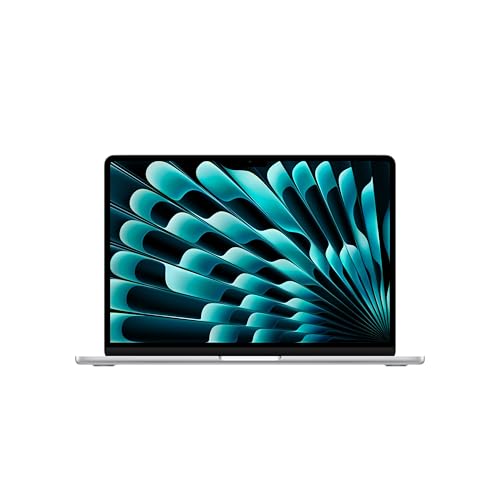
Apple MacBook Air M5 13-inch - Best Portable Mac for Sole Traders
 Apple MacBook Air M5 13-inchCheck Price
 Around A$1,799 on Amazon AU for the 13-inch M5 with 10-core CPU, 8-core GPU, 16GB unified memory, and 512GB storage. The M5 chip is Apple's most efficient laptop silicon to date, and the new N1 connectivity chip brings Wi-Fi 7 and Bluetooth 6 into the lineup. For a sole trader running a typical mix of email, Numbers or Excel, browser-based business tools, light Photoshop or Lightroom, and a constant tower of Chrome tabs, the M5 Air is as much laptop as most buyers will ever need.
Apple rates the M5 Air for up to 18 hours of battery on light workloads, which means it'll get a sole trader through a full day on the road with a couple of meetings, a stretch of cafe work, and a site visit. Two Thunderbolt 4 ports, MagSafe charging, and a headphone jack. The Liquid Retina display is sharp enough for design review work, and silently is genuine - there's no fan in the Air.
The good: Excellent battery, silent operation, fast charging via MagSafe or USB-C, M5 chip handles every business workload comfortably, supports Apple Intelligence on a paired iPhone or iPad. Sits well under the A$20,000 instant asset write-off ceiling if you qualify.
The trade-off: Base configuration ships with 512GB and 16GB - not upgradeable later, so think hard before settling for less. Sticker price is meaningfully higher than the comparable Windows laptops on this list.
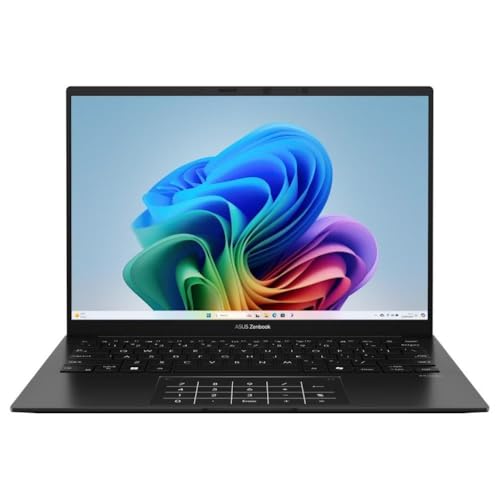
ASUS ZenBook 14 OLED (Ryzen AI 7 350) - Best Windows Laptop for Business Use
 ASUS ZenBook 14 OLED (Ryzen AI 7 350)Check Price
 Around A$2,099 on Amazon AU for the 14-inch 3K OLED with the AMD Ryzen AI 7 350 processor, 32GB RAM, and 1TB SSD. The Ryzen AI 7 350 is one of AMD's newer Strix Point laptop chips with a dedicated NPU, which means it qualifies as a Copilot+ PC and runs the AI-accelerated features of Windows 11 on-device rather than leaning on the cloud. For sole traders working with sensitive client data who can't or won't pipe everything through a cloud AI, that's a meaningful difference.
The 3K (2880 x 1800) OLED display at 120Hz is the kind of screen that makes daily business work feel less like work. Sharp text for hours of document review, accurate colour for any design review, and deep blacks that actually look black rather than dark grey. Military-grade durability rating, WiFi 6E, slim and light enough to live in a laptop bag without negotiation.
For a Windows-side sole trader who wants the laptop to be the centrepiece of the work setup rather than a compromise, this is the pick. The 32GB of RAM gives genuine headroom for keeping Outlook, Teams, the browser tower, Photoshop, and a virtual machine open at the same time without the swap dance.
The good: 3K OLED display is genuinely excellent, Copilot+ certified, 32GB RAM and 1TB SSD as standard, military-grade durability, WiFi 6E, slim form factor.
The trade-off: Approaching A$2,000 once you've added a sleeve and an extra power brick. Battery life is good but not Apple-Air-good - expect 10 to 12 hours on a mixed business workload.
Lenovo IdeaPad Slim 5 16-inch - Best Budget Windows Laptop
 Lenovo IdeaPad Slim 5 16-inchCheck Price
 Around A$1,099 on Amazon AU for the 16-inch IdeaPad Slim 5 with AMD Ryzen 7 8845HS, 16GB LPDDR5 RAM, 512GB SSD, and Windows 11 Home. This is the laptop for the sole trader who doesn't want to spend two grand to send invoices and run a Xero browser tab. The Ryzen 7 8845HS is an 8-core chip with a competent integrated Radeon GPU - more than enough for the standard business workload, with enough left over to handle the occasional Photoshop edit or a Premiere Pro quick cut.
The 16-inch WUXGA IPS display is bigger and less premium than the ZenBook's OLED, but for invoice work and spreadsheet review, the extra screen real estate matters more than the colour gamut. Backlit keyboard, fingerprint reader, Wi-Fi 6, and a chassis that won't draw stares in either direction at the airport lounge. This is honest, sturdy, well-priced business kit.
The good: Strong AMD chip, 16-inch display gives more workspace than the typical 14-inch business laptop, 16GB RAM and 512GB SSD at the price point, backlit keyboard, fingerprint reader, well under the A$20,000 IAWO ceiling if you qualify.
The trade-off: WUXGA IPS panel is fine but won't impress next to the ZenBook's OLED. 16-inch chassis is heavier than the 14-inch alternatives - expect to feel it in the laptop bag on a long day.
Apple Mac mini M4 - Best Fixed-Desk Mac
 Apple Mac mini M4Check Price
 Around A$999 on Amazon AU for the M4 with 10-core CPU, 10-core GPU, 16GB unified memory, and 256GB storage. The Mac mini is the cheapest way into a current-generation Apple Silicon machine, and for a sole trader who already has a monitor, keyboard, and mouse, the M4 mini is the most cost-efficient desktop Mac going. The 5-inch by 5-inch footprint disappears behind a monitor on a small desk.
For business use, the M4 chip handles everything the MacBook Air M5 can, with more thermal headroom for sustained workloads (video render, code compile, large spreadsheet recalc). Two Thunderbolt 4 ports, HDMI, Gigabit Ethernet on the back, plus front-facing USB-C ports and a headphone jack. Apple Intelligence is built in. If you're choosing between a MacBook Air at A$1,799 and a Mac mini at A$999 plus a monitor, the mini is often the cheaper total spend, sometimes by a wide margin if you already own the screen.
The good: Cheapest current-generation Mac, tiny footprint, full Apple Silicon performance, quiet under load, sits well under the A$20,000 IAWO ceiling, easy to pair with the existing home-office monitor.
The trade-off: 256GB base storage fills quickly with creative work or local backups. No keyboard, mouse, or display in the box - factor those into the EOFY budget if you don't have them. Not portable.
Apple Mac mini M4 Pro - For Heavier Mac Workloads
Apple Mac mini M4 ProCheck Price Around A$2,099 on Amazon AU for the M4 Pro with 12-core CPU, 16-core GPU, 24GB unified memory, and 512GB storage. The step-up choice for a sole trader running a Mac-side video editing, motion graphics, software development, or 3D pipeline that's outgrown the M4. The Pro chip's wider memory bandwidth makes a real difference in apps like Final Cut Pro, Logic Pro, Xcode builds, and Blender, where the base M4 starts to feel its limits on serious projects.
Same form factor as the base mini. Three Thunderbolt 5 ports instead of Thunderbolt 4, which matters if you're connecting external GPU enclosures, fast SSD arrays, or multiple 4K displays for a colour-graded edit suite.
The good: Workstation-grade performance in the same 5-inch case, Thunderbolt 5, more memory bandwidth than the base M4, falls under the A$20,000 IAWO ceiling for sole traders and small businesses that qualify.
The trade-off: Twice the spend of the base M4 - only worth it if your work genuinely uses the extra horsepower. Otherwise the base mini does the same job for less.
Beelink SER8 Mini PC - Best Mid-Range Windows Desktop
 Beelink SER8 Mini PCCheck Price
 Around A$899 on Amazon AU for the SER8 with AMD Ryzen 7 8845HS, 32GB DDR5 RAM, and 1TB PCIe 4.0 SSD. For a Windows sole trader who wants a serious desktop without the size or noise of a tower, this is the sweet spot. The Ryzen 7 8845HS is the same chip Lenovo uses in the IdeaPad Slim 5 above - 8 cores, 16 threads, up to 5.1GHz - but in the SER8 it's got proper desktop cooling, so it can hold higher sustained clocks for longer.
32GB of DDR5 and a 1TB Gen4 SSD is a generous starting configuration for the price. USB4 for fast external storage and Thunderbolt-class device support, HDMI and DisplayPort 1.4 for two 4K monitors, 2.5G LAN for fast network transfers, WiFi 6, Bluetooth 5.2. Two M.2 slots and two RAM slots make later upgrades genuinely possible, which is the part most pre-built desktops get wrong.
The good: Strong performance per dollar, 32GB RAM and 1TB SSD as standard at well under A$1,000, USB4, dual-display ready, near-silent under typical business load, upgradeable. Comfortably inside the A$20,000 IAWO ceiling for eligible small businesses.
The trade-off: Beelink's warranty network in Australia is smaller than Apple's or Lenovo's - check the seller's return and warranty terms on Amazon AU before clicking buy. Includes a power brick (no internal PSU) which lives outside the case.
MINISFORUM UM890 Pro - For Heavier Windows Workloads
 Minisforum UM890 ProA$1,479.99Check Price
 Around A$1,099 on Amazon AU for the UM890 Pro with AMD Ryzen 9 8945HS, 32GB DDR5 5600MHz RAM, and 1TB PCIe 4.0 SSD. The step up from the Beelink SER8. Same idea, same kind of tiny chassis, but with the bigger Ryzen 9 chip and a quieter, more refined cooling design. For a sole trader who's doing real work in heavier tools - DaVinci Resolve edits, Lightroom batch exports, large CAD or 3D models - this is the desktop that keeps up.
HDMI 2.1 and DP 1.4 plus two USB4 ports support quad-display output, which is the bit a sole trader running an accounting practice, a real estate office, or a multi-monitor research setup actually uses. OCuLink connector for external GPU enclosures is unusual at this price - it future-proofs the box if you ever decide to bolt on a discrete GPU for gaming or AI workloads later.
The good: Ryzen 9 performance, quad-display support, USB4 and OCuLink expandability, two M.2 slots, two RAM slots, sits under the A$20,000 IAWO ceiling. Quieter than most mini PCs at this performance level.
The trade-off: Pricier than the Beelink SER8 for marginal performance gains in average business workloads - the Ryzen 9 only earns its keep if you're actually using the extra threads. Like the Beelink, warranty support in Australia is more limited than mainstream brands.
GEEKOM A9 Max - Best Premium Windows Desktop
 GEEKOM A9 MaxCheck Price
 Around A$1,599 on Amazon AU for the A9 Max with AMD Ryzen AI 9 HX 370, 32GB DDR5 RAM, and 1TB NVMe SSD. The premium pick on the desktop side. The Ryzen AI 9 HX 370 is a 12-core Strix Point chip with a dedicated NPU rated at 80 TOPS, which makes the A9 Max one of the few mini PCs that actually qualifies as a Copilot+ PC. For a sole trader who wants on-device AI features - private summarisation, on-device transcription, local image generation - this is the box.
WiFi 7, Bluetooth 5.4, HDMI 2.1, USB4, DP 1.4, dual 2.5G LAN, and 8K quad-display support. The Radeon 890M integrated graphics is genuinely competent for light gaming and 1080p creative work, and the dual NVMe slots take it past 4TB of total storage if you upgrade later. GEEKOM ships with a 3-year limited warranty - the strongest in the mini-PC category.
The good: Copilot+ certified, 80 TOPS NPU, WiFi 7, USB4, dual LAN, quad-display ready, 3-year warranty, sits inside the A$20,000 IAWO ceiling.
The trade-off: The most expensive mini PC on the Windows side of this list - the price gap to the Beelink SER8 is roughly A$700 for a chip generation jump that benefits AI workloads more than typical business workloads. Premium mini PC pricing on a chip that's still relatively new in the Australian market means stock fluctuates.
So Which Should You Buy for EOFY 2026?
If your work happens on the road, in cafes, at client sites, or anywhere that isn't a fixed desk, the laptop is the obvious answer. The MacBook Air M5 at A$1,799 is the sweet spot for Apple-side sole traders, the ASUS ZenBook 14 OLED at A$2,099 is the equivalent for Windows users, and the Lenovo IdeaPad Slim 5 at A$1,099 is the budget-conscious choice that still does honest business work.
If your work happens at a fixed desk and the laptop's portability is wasted on you, the desktop side of the equation is usually the better dollar-for-performance buy. The Apple Mac mini M4 at A$999 is the most cost-efficient way into Apple Silicon. On the Windows side, the Beelink SER8 at A$899 is the value pick, and the GEEKOM A9 Max at A$1,599 is the premium step-up for AI workloads and Copilot+ certification.
On the depreciation question itself, the honest answer is that the choice should be driven by how you work, not by tax math. The IAWO covers both sides equally, the effective-life difference between laptops and desktops is small for general-purpose computers, and the work-use percentage you can defensibly claim depends more on how the device is used than on whether it has a battery. Buy the machine you'll actually use for work, and let the tax outcome follow the use rather than the other way around.
If you're inside the IAWO ceiling and you'd qualify for the small-business write-off, buying before 30 June 2026 may let you claim the work-use portion against the 2025-26 financial year rather than waiting another twelve months. If you're an employee claiming a work-related deduction without a business, the same June 30 deadline applies, but the depreciation will spread across two years rather than landing in one.
Our EOFY Pick
For sole traders who genuinely need portability, the Apple MacBook Air M5 at A$1,799 is our pick if you're on the Apple side, and the ASUS ZenBook 14 OLED at A$2,099 if you're on the Windows side. For a fixed-desk operator, the Apple Mac mini M4 at A$999 is the cheapest sensible entry into a current-generation Mac, and the Beelink SER8 at A$899 is the best-value Windows mini PC. Buy before 30 June 2026 if you want the tax outcome to apply against this financial year (if you qualify).
A Note on Tax
This article is general information only and is not tax advice. top7.au is not a registered tax agent. Whether you can claim a deduction depends on your circumstances - your work-use percentage, your business structure, the current rules from the ATO, and (especially relevant for this post) the difference between small-business claims and employee deductions. Both the instant asset write-off and the standard depreciation rules have eligibility requirements that aren't covered in detail here. Talk to a registered tax agent or check ato.gov.au before claiming any deduction based on what you read here.
More EOFY Reading
For more in the EOFY series, see our best laptops EOFY 2026 guide, the best mini PC for tax-deductible business setups, and our best monitor for tax claim Australia 2026. The EOFY tech sales 2026 calendar covers when each retailer's deals start, and the instant asset write-off tech guide covers the broader rules. Or browse the full laptops and desktops categories for the rest of the catalogue.
Top Picks - Check Latest Prices



See Our Top 7 Laptops for Australia
Hand-picked and ranked by our editors — with honest pros, cons, and Aussie pricing.
More Laptops Reading
Best Laptop for Video Editing Australia 2026: 7 Picks From $1,799 to $4,799
The best laptop for video editing in Australia 2026, from a $1,799 Asus V16 to the M5 MacBook Pro. Every pick price-checked and in stock on Amazon AU.
Best Gaming Laptop Australia 2026: 7 Picks Actually In Stock Right Now
The best gaming laptops you can buy in Australia in 2026, from a $1,340 starter to an RTX 5070 desktop replacement. Every pick verified in stock on Amazon AU with real AUD prices.
Best Instant Asset Write-Off Tech Under $20,000 Australia 2026 - 7 EOFY Business Picks
Best instant asset write-off tech under $20,000 Australia 2026. Seven Amazon AU business picks sole traders and SMEs can claim before 30 June.
Weekly AU tech deals, in your inbox
We check prices on every product we cover daily. Once a week we send the biggest genuine price drops we spot - the ones worth your attention.
- One email a week, max
- No spam, ever
- Unsubscribe in one click